Wren vs Apple Notes: AI ink on the page
Start with the page you already keep
If you take notes on an iPad, you probably already live in Apple Notes. You write with Apple Pencil, you search across notebooks, you file things into folders, and you use the AI features Apple ships in iPadOS. That workflow is real, and it is good.
So the honest question is not whether Apple Notes can handle handwriting. It can. The question is narrower: when you are looking at a page you wrote by hand, what does each app add to that specific page, and in what form?
This guide answers only that. It names one workflow, continuing a handwritten page, and explains what Apple documents, then what Wren does on top of it.
What Apple documents on a handwritten page
Apple is specific about its handwriting features, so we can quote them directly rather than guess.
In June 2025, Apple described its on-device handwriting work in the article Apple Intelligence makes WWDC25 even smarter, which covers the refinement and understanding of handwritten and typed input across the system. Apple's own Apple Notes user guide and the Apple Intelligence overview document the shipping features: handwriting with Apple Pencil, Smart Script refinement that tidies your existing handwriting, powerful search, organization into folders and tags, shared and collaborative notes, and AI summaries of typed text and recorded audio.
Read that list carefully, because it matters for the comparison. Apple refines the handwriting you already wrote, and it summarizes typed or recorded content into typed output. Those are strong features. Apple Notes is not missing handwriting, Apple Pencil, search, organization, collaboration, or AI.
The one thing Wren does differently
Wren's difference is not a longer feature list. It is the form of what the AI puts back on the page.
When you hand Apple Notes a messy equation, its handwriting intelligence cleans up the strokes you made. When you hand it a lecture recording or a typed paragraph, it gives you a typed summary. The AI operates on existing input and returns refined or typed text.
Wren reads the handwritten context already on your page and draws new information beside it, as ink. Write a quadratic by hand and Wren can add the graph next to it. Write three steps of a process and Wren can add the diagram that connects them. The addition is not a tidied version of your strokes and it is not a typed card in a separate pane. It is new AI ink placed on the same page, in handwriting-matched ink, where the work is.
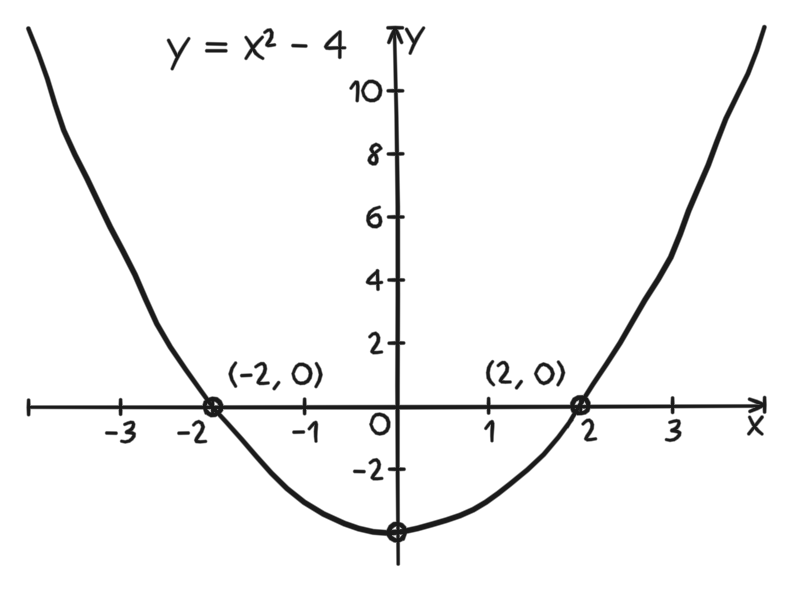
Figure 1. A verified PencilKit graph fixture. It shows the kind of graph Wren can add beside handwritten equation work, drawn as ink rather than returned as typed text.
Why "reviewable" is the important word
There is a second difference that is easy to miss: nothing Wren draws is permanent until you accept it.
The draft appears on the page where it belongs, and you read it in context. You check the labels. You check whether it answers the question you actually had when you wrote the note. If it does not help, you discard it and the page is exactly as you left it. If it does help, you keep it, and it becomes part of the note you study from later.
That review-before-keep step is deliberate. It keeps the page yours. Your handwriting still shows how you were thinking, and the AI addition is something you chose to leave there, not something that was inserted automatically.
When each one is the right tool
Use Apple Notes for what Apple built it to do well: refining your handwriting, summarizing a typed document or a recorded lecture into text, searching everything you have ever written, and collaborating on shared notes. For a lot of students, that is the whole job.
Reach for Wren at the specific moment a handwritten page needs a new visual or explanation added to it, in ink, that you review first. That is the narrow seam this comparison is about. It is not that Apple Notes cannot handle handwriting; it is that Wren's AI returns drawn context on the page instead of refined strokes or typed summaries.
A concrete first-page test
The fastest way to feel the difference is to run the same page through the workflow you already know, then through Wren:
- Write a short equation or a three-step process by hand.
- In your current app, use its AI the way you normally would, and notice what form the result takes.
- In Wren, ask for the one visual the page is missing: a graph for the equation, a diagram for the process.
- Review Wren's draft where it appears on the page.
- Keep it only if it makes your next review of that page easier.
If the typed summary is what you needed, your current workflow already covers it. If you wanted the graph drawn next to the equation so the page tells the whole story on its own, that is the gap Wren fills.
Common questions
Does Apple Notes lack AI or handwriting features?
No. Apple documents handwriting, Apple Pencil, Smart Script refinement, search, organization, collaboration, and AI summaries of typed and recorded content. This comparison is about one narrow workflow, not a scorecard.
Is Wren a replacement for Apple Notes?
Not necessarily. Wren is for iOS and iPadOS and works best on iPad with Apple Pencil. Many people will keep Apple Notes for refinement, search, and summaries, and use Wren for the moment a handwritten page needs new reviewable ink added to it.
What should I read next?
See how handwritten notes turn into structured insights with AI stickies for the on-page workflow in depth, then the Apple Notes comparison for students for how this fits a full study setup.