Wren vs Goodnotes: reviewable AI ink on the page
Start with what both apps already do well
If you are choosing between Wren and Goodnotes, start by being fair about what Goodnotes already covers. Goodnotes is a mature handwriting app with its own documented AI features and handwriting search. Its team describes an AI study assistant, quiz and flashcard generation, and other writing tools in its official AI help documentation, and it documents converting and searching handwritten notes in its handwriting recognition and search support article. None of that is in question here. If you want a clean place to write by hand, convert it to text, and search it later, Goodnotes does that job and does it well.
So this is not a "Goodnotes can't handle handwriting" article, because that would be false. The comparison worth making is much narrower, and it is about one specific moment: what happens when you ask AI for help in the middle of a handwritten page, and where that help ends up.
The narrow difference: where the AI result lands
In most AI note workflows, the generated result lives somewhere adjacent to your writing. You ask a question, you get a typed answer in a panel or a separate card, and then you decide whether to copy anything back into your notes. The AI output and your handwriting are two different materials sitting in two different places.
Wren is built around a different default. When you ask Wren to add a graph, a formula, or a short explanation, it draws that result as new ink on the same handwritten page, in a hand-matched style, in the space the page left for it. The addition reads as part of the note rather than as a reply to a chat message.
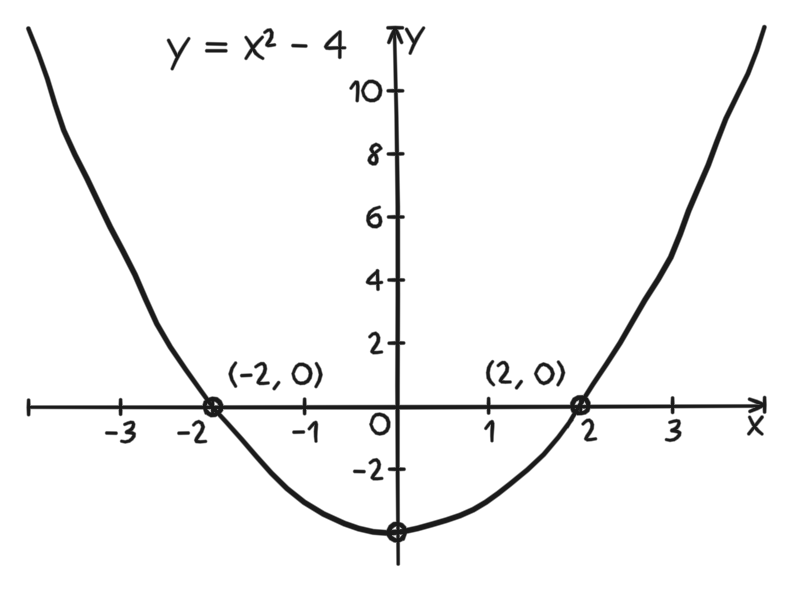
Figure 1. A verified PencilKit graph fixture. It shows a handwritten parabola with labeled roots, the kind of AI ink that can sit directly beside the equation you wrote by hand.
That is the whole claim, and it is deliberately small. Goodnotes gives you strong handwriting plus AI tools that produce study material. Wren adds reviewable AI ink that lands on the page next to your own writing.
Why "on the page" changes how you review
The reason placement matters is review, not novelty. When an AI answer sits in a side panel, reviewing it is a separate task: read the panel, judge it, then decide what to transfer. When the answer is drawn onto the page itself, you review it in context, against the exact equation or paragraph that prompted it.
With Wren, the draft appears where it will live. You can look at a generated graph directly beside the equation and ask a concrete question: do these labeled roots match the function I wrote? You are not comparing two surfaces. You are checking one page.
And because the addition is a draft, nothing is committed until you say so. Wren does not silently save the result. You read it on the page, then keep it or discard it. If the graph is wrong or the explanation does not help, you leave it out and the page stays clean. That keep-or-discard review step is the second half of the difference: the page is still your work, and the AI ink only stays if it earns its place.
A practical way to compare them yourself
You do not have to take either description on faith. Run the same page through both apps and watch where the result lands.
- Write a quadratic equation by hand, or a short process you half-remember.
- In Goodnotes, use its AI and search tools the way its documentation describes, and note where the generated material appears relative to your handwriting.
- In Wren, ask for the one missing visual, and note that the result is drawn as ink on the same page.
- In both, ask the practical question: how much work is it to review the result and keep only the useful part?
If your workflow is mostly "write by hand, convert, search, and occasionally generate study material," Goodnotes already serves that well. If your workflow is "write the part I understand, then add one reviewed visual in the same space," that is the specific case Wren is built for.
What to keep in mind
Pick the tool that matches how you actually study, not the longer feature list. Goodnotes has real handwriting, recognition, search, and AI features, and it will keep serving people who want a polished handwriting notebook with assistant tools attached. Wren's narrow advantage is the on-page, reviewable AI ink moment: the generated graph or explanation appears as ink beside your own, and you decide whether it stays.
Common questions
Is this saying Goodnotes has no AI or no search?
No. Goodnotes has documented AI features and handwriting search. The only difference discussed here is where AI output appears and how you review it before keeping it.
Does Wren replace handwriting with typed answers?
No. The addition is drawn as ink in a hand-matched style on the same page, so it reads as part of your note rather than as a separate typed reply.
What should I read next?
Compare the thinking workflow in Wren vs Goodnotes: which app helps you think, then see the broader positioning in why choose Wren over Goodnotes and Notability.