
AI FOR HANDWRITTEN NOTES ON IPAD
Pause your pen.
AI draws the next part.
Write notes like normal. When you stop, Wren reads the page and adds the graph, mind map, formula or diagram in ink. Keep it or discard it.
Made for iPad, Apple Pencil, and your way of thinking.
Still your thinking.
NEW · THE WREN PLUGIN FOR CHATGPT
Wren is now
in ChatGPT.
Ask ChatGPT for a graph, a flowchart or a worked solution. It lands in your Wren notebook as real handwriting you can edit, and syncs to your iPad.
Try asking
Sign in with your Wren account. US and Canada.
ChatGPT is a trademark of OpenAI.
@Wren graph y = x² − 4 and its tangent at x = 1
 Tangent Lines Synced to iPad
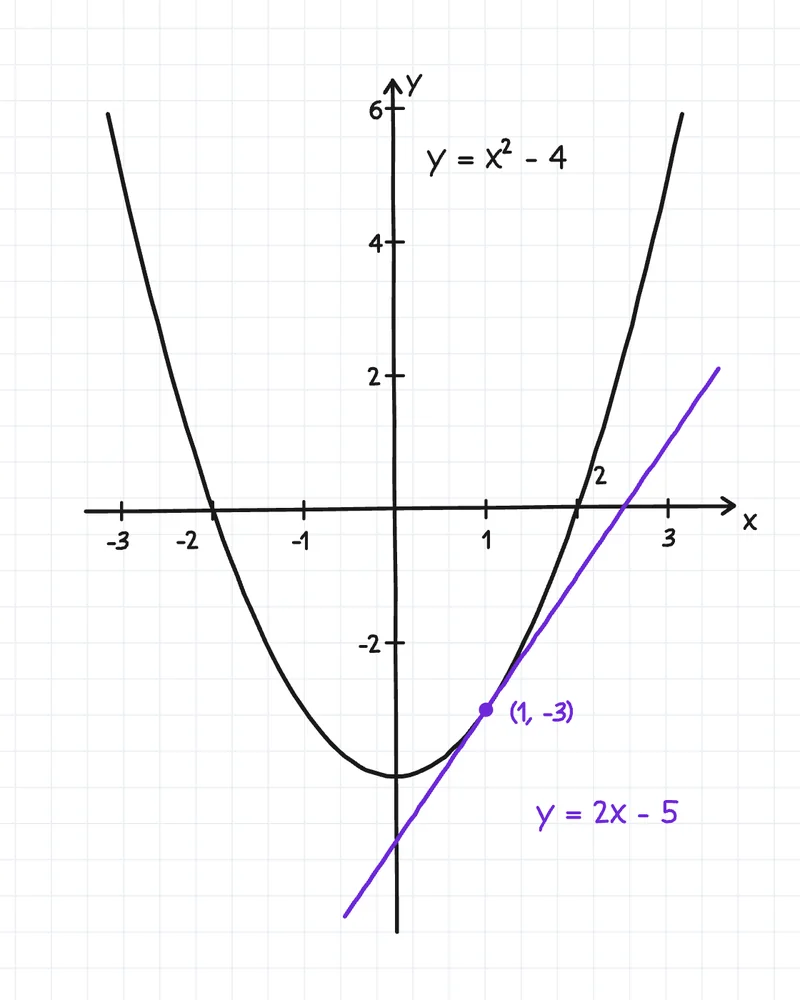
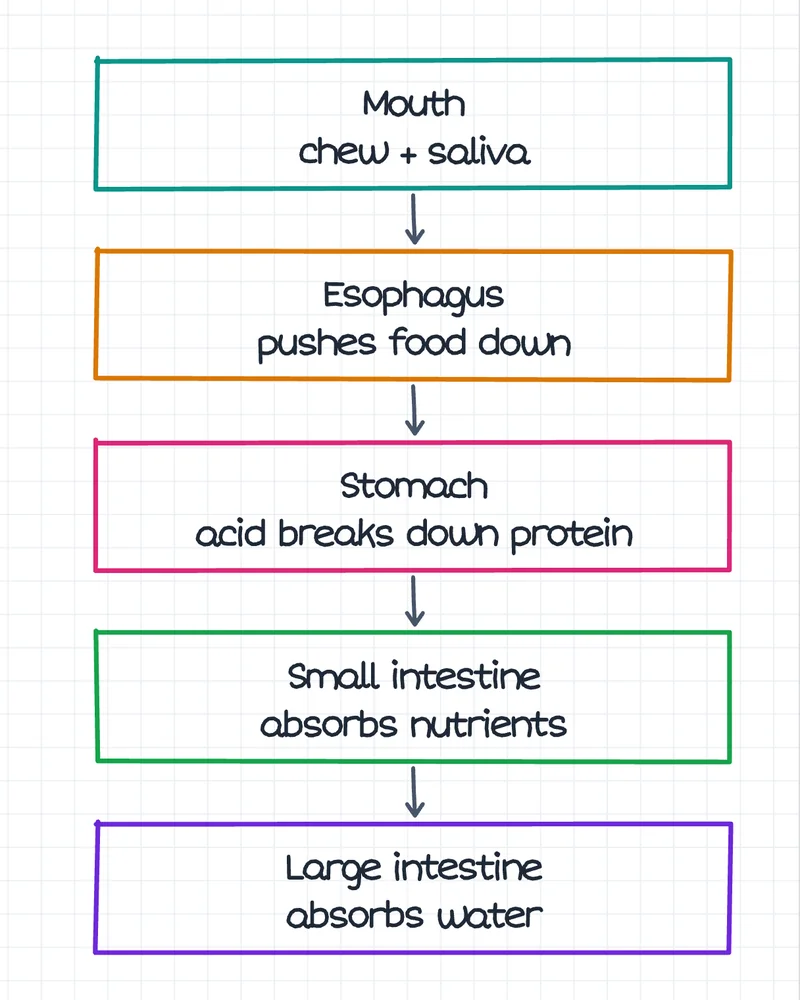
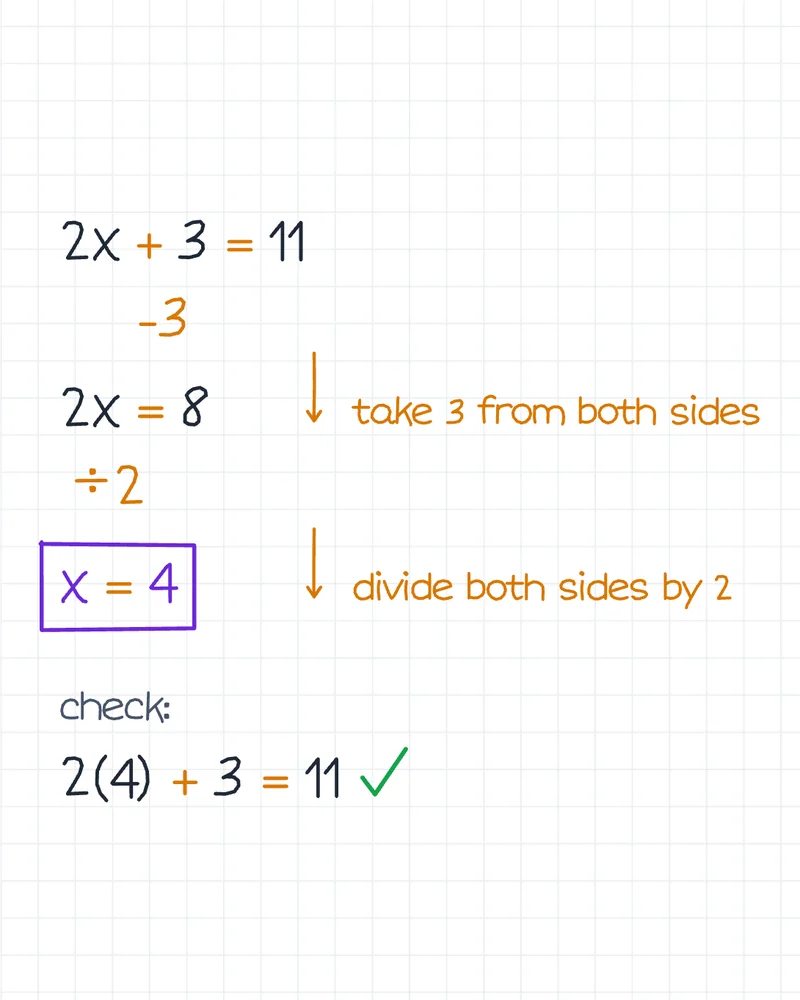
Real Wren ink from the iPad app.
01 / THE PRODUCT LOOP
Read the page. Develop the idea.
Visualize what clicks.
A focused loop for the moments when your notes have real context but the next explanation, connection, or picture has not appeared yet.
Some ideas make more sense as a picture.
Turn the connections in your notes into diagrams, mind maps, and visual explanations right alongside the thinking that led there.
Real screen recordings from Wren on iPad.
02 / IPAD-ONLY PERSONAL STYLE
Personal style.
Right on your iPad.
Your handwriting is personal. The shape of a letter. The way you space a sentence. The rhythm of a page.
Only in the iPad app, Wren can use a sample of your handwriting to generate new ink in your style, so additions belong alongside the notes you have already made. The website demo does not match a visitor’s personal handwriting.
Make room for your next ideathe beginning of
something good.
+ a little help to see
where it could go next
03 / A LITTLE HELP, RIGHT ON THE PAGE
Less switching.
More momentum.
- 01
Write the real starting point.
Take notes, sketch a thought, or bring a handwritten page into Wren on your iPad.
- 02
Let Wren read the page.
The context is already there: your notes, your questions, and the idea you’re working through.
- 03
Choose the clearest next shape.
Build out an explanation, connect ideas in a mind map, or add a diagram in ink.
NO SIGN-IN REQUIRED
Try demo handwriting.
Then take the real page further.
The web playground turns typed words into demo handwriting so you can explore the engine. It is not a personal-style preview or a live read of your notes; those are Wren for iPad capabilities.
BUILT FROM THE SAME KIND OF PAGES
Made by a brother and sister, both in college.
We are building Wren because our own lectures, sketches, and half-finished explanations deserve more than a blank next page. The goal is not to replace the way you think — it is to give your thinking more room to move.
GOOD QUESTIONS
A few things
you might wonder.
Does Wren write in my handwriting?
In the iPad app, Wren can use a sample of your handwriting to generate ink in your style. The web playground uses demo handwriting so you can try the engine without supplying a sample.
What can it add to my notes?
Wren can build on your ideas with explanations, summaries, diagrams, and mind maps. What it adds depends on the context of your page and what you ask it to do.
Is the web playground the full app?
The playground creates a handwritten note from text. Wren on iPad brings together your handwritten pages, personalized ink, and AI help in your note-taking workspace.
Where can I use Wren?
Wren is available on the App Store for iPad and iPhone. The handwriting experience is built around iPad and Apple Pencil.
KEEP THE PEN. OPEN THE POSSIBILITIES.
Your next idea
starts here.
Get Wren on the App Store Built by students. For pages worth coming back to.