Best Apps for Apple Pencil (2027): 12 Student Picks
An Apple Pencil turns an iPad into a notebook, a sketchbook, a PDF desk and a flashcard deck, but only if you have the right app for each job. Most "best Apple Pencil apps" lists are written for artists. This one is for students: what to install for notes, drawing and diagrams, reading and marking up PDFs, math, flashcards and planning.
We make Wren, so we say that up front: it is listed first for one specific job, AI that answers in ink on your page. Every other app is described from its maker's own pages and App Store listing, checked in November 2026. For a deeper comparison of note apps only, read our guide to the best note-taking app for iPad.
The best apps for Apple Pencil at a glance
| App | Best for | Works on | Price model |
|---|---|---|---|
| Wren | Notes where AI answers in ink | iPad, iPhone; web app in any browser | Free to start |
| Goodnotes | Handwritten notebooks and PDFs | iPad, iPhone, Mac, Windows, Android, web | Free (3 files); paid plans |
| Notability | Lectures you also record | iPad, iPhone, Mac, Android, web | Free (5 notes); paid plans |
| Apple Notes | Free notes and Math Notes | iPad, iPhone, Mac | Free, built in |
| Procreate | Drawing and illustration | iPad | One-time purchase |
| Adobe Fresco | Free drawing and painting | iPad, iPhone | Free; optional Photoshop bundle |
| Concepts | Sketches and diagrams on an infinite canvas | iPad, iPhone, Android, Windows, Chromebook | Free; subscription or one-time |
| LiquidText | Reading and connecting PDFs | iPad, iPhone, Mac | Free; paid upgrades |
| PDF Expert | Marking up, filling and signing PDFs | iPad, iPhone, Mac | Free; Premium subscription |
| MyScript Notes | Handwriting and math to typed text | iPad, iPhone, Android | Free with limits; upgrade |
| AnkiMobile | Flashcards with spaced repetition | iPhone, iPad; syncs with Anki | One-time purchase |
| Zinnia | A digital planner and journal | iPad | Free; in-app purchases |
Platforms and price models from each maker's site and App Store listing, checked November 2026. Prices change often, so follow the links in each section before you pay.
How we picked
Every app here works with Apple Pencil, so "supports the Pencil" is not a reason to list anything. We picked by the job a student needs done, and for each app we checked four things:
- The job. Notes, drawing, PDFs, math, flashcards or planning. One great app per job beats five that overlap.
- What the Pencil adds. Writing that feels like paper, pressure for drawing, or handwriting turned into text you can search and edit.
- Where your work goes next. The other devices it syncs to, and whether a laptop can open it.
- How you pay. Free, free with limits, subscription or one-time purchase, from the maker's own pages.
Best Apple Pencil apps for taking notes
1. Wren: AI that answers in ink on your page
Wren is a note-taking app built around one moment: you write or sketch on the page with Apple Pencil, pause, and Wren's AI answers in ink on that same page. Write "graph y = x² - 4" and the parabola appears beside your notes. Write the first line of an equation and the next step of the solve appears below it. Ask for a diagram, a formula, a mind map or a table and it is drawn where it belongs, not in a chat window.
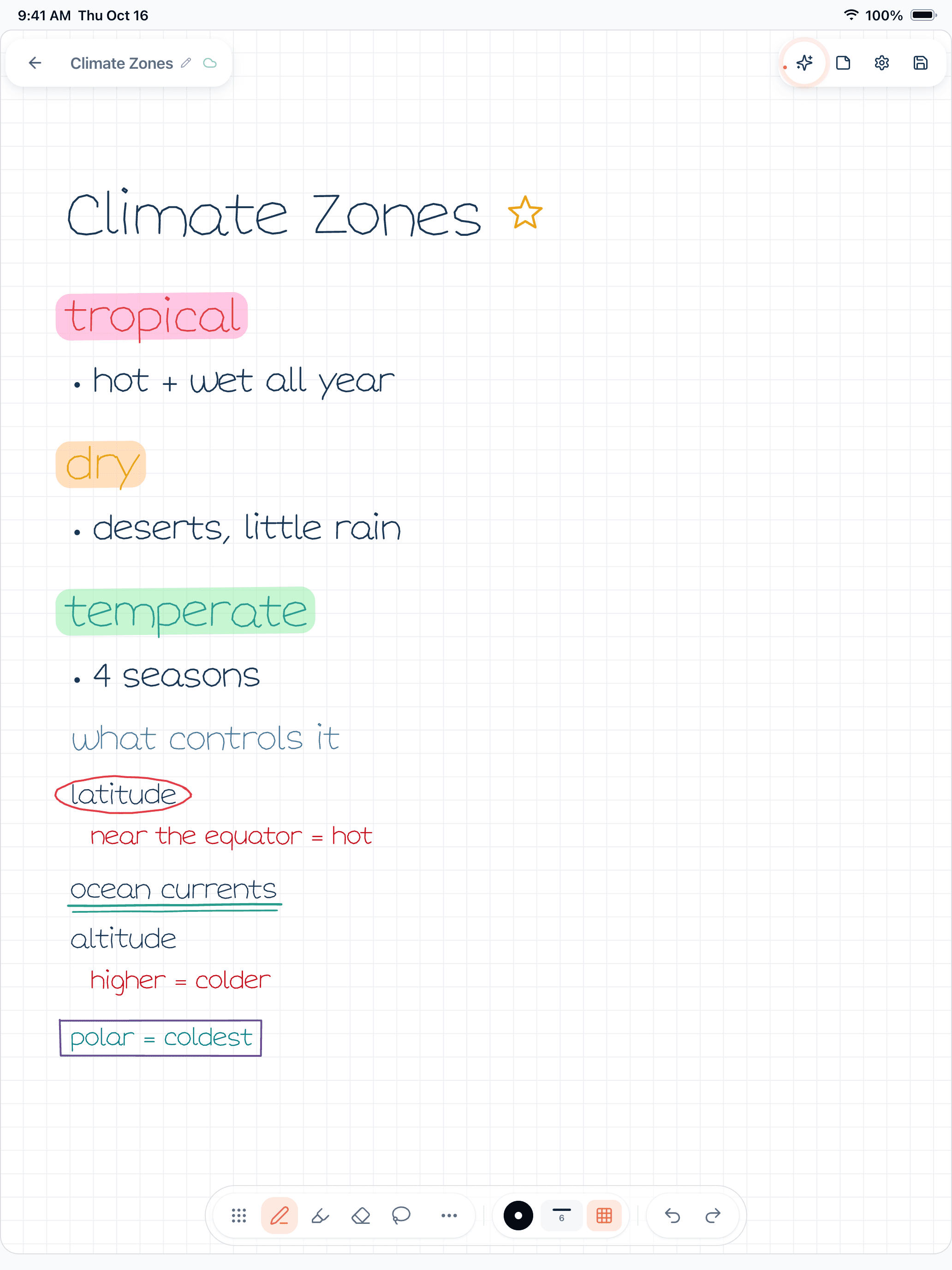
Figure 1. A Wren 1.5.4 page on iPad: handwritten Climate Zones notes marked up with Apple Pencil, with highlighter, a circle, an underline, a box and a star.
Every AI addition arrives as a draft you keep or discard, so the page stays yours. You can also ask Wren a question about the page you have open.
- Works on: iPad and iPhone, plus the Wren web app in any current browser, with the same account and notes. There is no Windows or Android app.
- Price model: free to start (pricing).
- Best for: math, science and any subject where the next step is a graph, a diagram or a worked solution.
2. Goodnotes: handwritten notebooks and PDFs
Goodnotes is a full digital notebook: paper-style notebooks and folders, PDF markup for slides and readings, and handwriting search. Its free plan includes Math Assist plus a few AI questions and quizzes a month, with more AI on paid plans (pricing).
- Works on: iPad, iPhone and Mac, plus Windows, Android and the web.
- Price model: free plan with up to 3 files, then paid plans.
3. Notability: lectures you also record
Notability links an audio recording to what you write, so you can tap a line and hear the moment you wrote it. Paid plans add AI summaries, transcription, flashcards and quizzes (pricing).
- Works on: iPad, iPhone, Mac, an Android app and a web app.
- Price model: free Starter plan with 5 notes, then paid plans.
4. Apple Notes: free, built in, with Math Notes
Apple Notes is already on your iPad. Write with Apple Pencil, scan documents and sync to your iPhone and Mac through iCloud. With iPadOS 18, Apple added Math Notes, which solves an expression you write with an equals sign, and Smart Script, which tidies handwriting as you write (Apple).
- Works on: iPad, iPhone and Mac, and in a browser on iCloud.com.
- Price model: free.
Want all nine note apps side by side, with Noteshelf, OneNote, CollaNote and Freenotes too? See the best note-taking app for iPad.
Best Apple Pencil apps for drawing and diagrams
5. Procreate: drawing and illustration
Procreate is a drawing and painting app made for iPad and Apple Pencil, with pressure sensitivity and Apple Pencil Pro features (App Store). For students it is overkill for notes but great for art classes, design projects and detailed scientific drawings.
- Works on: iPad. Procreate Pocket is a separate app for iPhone.
- Price model: one paid download, with no subscription listed.
6. Adobe Fresco: free drawing and painting
Adobe Fresco is free, with pixel brushes, vector brushes that stay sharp at any size, and live brushes that blend like real watercolor and oil. It works with Apple Pencil Pro features (App Store).
- Works on: iPad and iPhone.
- Price model: free; in-app purchases add Photoshop on iPad.
7. Concepts: sketches and diagrams on an infinite canvas
Concepts is a vector sketching app with an infinite canvas, grids, snapping and measuring, which makes it a good fit for diagrams, mind maps, engineering sketches and design work you will rearrange later (pricing).
- Works on: iPad and iPhone, Android, Windows and Chromebooks.
- Price model: a free Basics version, then a subscription or a one-time Essentials purchase for one platform.
Best Apple Pencil apps for reading and annotating PDFs
8. LiquidText: reading that connects ideas
LiquidText is made for close reading. Pull excerpts from a PDF, Word file or web page into a side workspace, write notes beside them, draw links between ideas and compare distant pages side by side (App Store). It suits research papers, case readings and essays built from sources.
- Works on: iPad, iPhone and Mac.
- Price model: free to download; paid upgrades unlock more tools.
9. PDF Expert: mark up, fill and sign
PDF Expert by Readdle covers the everyday PDF jobs: highlight and write on readings, fill in forms and sign them, with searchable handwritten notes and Apple Pencil Pro squeeze for annotation tools. PDF Copilot summarizes a document and answers questions about it (App Store).
- Works on: iPad, iPhone and Mac.
- Price model: free to download; a Premium subscription covers iPad, iPhone and Mac.
Best Apple Pencil apps for math
Math is where the Pencil earns its keep, because equations are faster to write than to type. Three ways to get help with handwritten math:
- Apple Notes Math Notes solves an expression you write with an equals sign, for free (see above).
- Wren answers in ink on the page: write the problem, pause, and the next step of the solve, a graph or a formula appears beside your work as a draft you keep or discard.
- MyScript Notes turns your handwritten math into typed text and LaTeX.
10. MyScript Notes: handwriting and math to typed text
MyScript Notes (formerly Nebo) converts handwriting into typed text in 66 languages and handwritten math into LaTeX, so a page of pen notes becomes something you can paste into a document (MyScript). A paid AI beta can summarize, explain, quiz and chat.
- Works on: iPad, iPhone and Android, plus supported Chromebooks.
- Price model: a free version with notebooks of up to 5 pages, without cloud sync or AI, then an upgrade (FAQ).
Best Apple Pencil app for flashcards
11. AnkiMobile: spaced repetition
AnkiMobile is the iPhone and iPad app for Anki, the open-source flashcard system that shows each card just before you would forget it. Its listing mentions Apple Pencil support for adding hand-drawn images to cards, handy for diagrams, chemical structures and characters in a new language (App Store).
- Works on: iPhone and iPad, with free sync to Anki on Mac, Windows, Linux and the web.
- Price model: one-time purchase, with sync included.
Best Apple Pencil app for planning
12. Zinnia: a digital planner and journal
Zinnia by Pixite is a planner and journal app for iPad with templates, design elements and pens tuned for Apple Pencil, including a calligraphy pen for Apple Pencil Pro (App Store). It suits students who like a paper planner but want it on the same device as their notes.
- Works on: iPad.
- Price model: free to download, with in-app purchases.
Apple Pencil tricks built into iPad
You get two Pencil features without installing anything:
- Scribble turns what you write with Apple Pencil into typed text in almost any text field, such as a search box or a message (Apple). Step by step, with Apple Notes, Goodnotes and Notability too: how to convert handwriting to text on iPad.
- Math Notes and Smart Script live in Apple Notes (see above).
Free apps for Apple Pencil
If you are starting with no budget: Apple Notes is free and built in, Adobe Fresco is free, and Concepts, LiquidText, PDF Expert and Zinnia all have free versions. Goodnotes (3 files), Notability (5 notes) and MyScript Notes (5-page notebooks) have free tiers with limits. Wren is free to start.
Make it yours in Wren
Try the Wren entry above without leaving this page: watch Wren's AI write a physics study page in ink and save it to your own notes, see a real pen pause on iPad, then ask ChatGPT or Claude to write the next page into your notebook. When you are ready to write with your own Apple Pencil, get Wren on the App Store, write a problem from tonight's homework and pause.
TRY IT ON A REAL PAGE
Watch Wren's AI write the page. Then make it yours.
Wren’s AI writes this page in real ink, stroke by stroke. Save it to your Wren notes and keep writing on it, on the web or on iPad.
Wren’s AI writes the page here.
Make it yours.
This is real ink, not a picture. Save it to your Wren notes and it becomes your page.
- Write your own notes next to it
- Erase or move any line, box or diagram
- Ask Wren's AI to explain or extend it
Free to start. One account for Wren on the web and on iPad. More pages to try
PAUSE YOUR PEN
Write. Pause. Wren's AI answers on your page.
No chat window to copy from. Wren reads what is already on the page and adds the next part in ink, right where you are working.
- WriteOn iPad, write with Apple Pencil. On the web, type or sketch on a whiteboard page.
- PauseStop for a moment. Wren reads what is on the page.
- AI answers in inkWren's AI adds the graph, formula, diagram or next step on the same page, in ink you can edit.
Rather ask a question? On iPad, open Study Buddy: it reads the page and can add its answer in ink. On the web, Ask Wren answers questions about the open page.
ASK CHATGPT OR CLAUDE
Ask your AI. It writes in Wren.
Connect Wren to ChatGPT or Claude once. Then ask in the chat, and Wren writes the page into your notebook in ink, ready to edit on the web or on iPad.
Paste this into ChatGPT or Claude
Create a Wren note called Derivatives review with one page: the power rule, one worked example, and a graph of y = x² with its tangent line at x = 1
- Connect WrenAdd the Wren plugin in ChatGPT, or add Wren as a custom connector in Claude. Sign in to Wren with your email or Google.
- Paste the promptYour AI finds the note by its title or subject, or starts a new one, and Wren writes the page.
- Keep writingOpen the note in Wren. The page is real ink: write next to it, erase or move any part.
Your AI sees note titles, subjects and page lists, not the writing on your pages. It adds pages and can redo pages Wren wrote; it never changes what you wrote. The ChatGPT plugin is available in the US and Canada.
Which Apple Pencil app should you get?
- Get Wren if you want AI to add the graph, the formula or the next step in ink on your notes.
- Get Goodnotes or Notability if you want a handwritten notebook for every class.
- Get Procreate, Fresco or Concepts if you draw, design or diagram.
- Get LiquidText or PDF Expert if your course runs on PDFs.
- Get MyScript Notes if handwritten notes need to become typed text.
- Get AnkiMobile for flashcards and Zinnia for planning.
Most students end up with two or three: one notes app, one PDF app and a flashcard app. Start with the job you do most this week, and add the others when you need them.
Frequently asked questions
What are the best apps for Apple Pencil?
It depends on the job. For notes where AI answers in ink on the page, Wren. For handwritten notebooks and PDFs, Goodnotes or Notability. For drawing, Procreate, Adobe Fresco or Concepts. For reading and marking up PDFs, LiquidText or PDF Expert. For math, Apple Notes and MyScript Notes. For flashcards, AnkiMobile. For a planner, Zinnia.
What are the best free apps for Apple Pencil?
Apple Notes is free and built in, Adobe Fresco is free to download, and Concepts, LiquidText, PDF Expert and Zinnia have free versions with paid upgrades. Goodnotes, Notability and MyScript Notes have free tiers with limits. Wren is free to start.
What is the best Apple Pencil app for taking notes?
For a notebook-style library, Goodnotes; for lectures you also record, Notability; for something free and built in, Apple Notes. If you want AI that answers on the page as ink you can keep or discard, Wren. Our iPad guide compares nine note apps in depth.
Which Apple Pencil app is best for math?
Apple Notes' Math Notes solves an expression you write with an equals sign. MyScript Notes turns handwritten math into LaTeX. In Wren, write the first line of a problem, pause, and the next step of the solve, a graph or a formula appears in ink on your page.
Do I need an Apple Pencil to use these apps?
No, most of them also work with your finger, but handwriting and drawing feel much better with a pen. Check the App Store listing for the Apple Pencil models an app supports.
Is there a Wren app for Windows or Android?
No. Wren is an app for iPad and iPhone. On a Windows laptop, a Chromebook or an Android tablet, Wren runs in the browser as the Wren web app, with the same account and notes.