Best Note-Taking App for iPad (2027): 9 Apps Compared
There is no single best note-taking app for every iPad owner, but there is a best notes app for the job you do most. If you mostly write by hand and want help on the page, the answer is different from someone who records lectures, annotates slide decks, or needs the same notes on a Windows laptop.
We compared nine iPad note apps on the things students actually notice: how writing with Apple Pencil feels, how notes stay organized, what the AI does and where its answer lands, which devices the notes follow you to, and how you pay. We make Wren, so we say that up front: it is listed first for one specific job, and every other app is described from its maker's own pages, checked in November 2026.
Our picks at a glance
- Wren: best for AI that answers in ink on your handwritten page.
- Goodnotes: best all-round digital notebook, with apps beyond Apple devices.
- Notability: best for lectures you also record.
- Apple Notes: best free app, already on your iPad.
- Microsoft OneNote: best free option if your school runs on Microsoft 365.
- Noteshelf: best if you would rather pay once than subscribe.
- MyScript Notes (formerly Nebo): best for turning handwriting into clean, editable text.
- CollaNote: best for writing with classmates in real time.
- Freenotes: best for a free start with templates and stickers.
How we picked
Every app here is a capable handwriting note-taking app with Apple Pencil support, so "it has handwriting" is not a reason to rank anything. We looked at six things instead:
- Writing feel. Pens, highlighters, eraser and lasso that keep up with a fast lecture, and paper that works the way you think: pages, or an open board.
- Organization. Notebooks and folders, importing a PDF or slide deck to write on, and searching your handwriting later.
- AI, and where its answer lands. Summaries, quizzes, cleaned-up handwriting and solved equations are different jobs. We noted what each app's AI does and whether the result appears on your page or beside it.
- Devices beyond the iPad. Most students also study on a laptop, and that laptop is often Windows or a Chromebook.
- Price model. Free, free tier with limits, subscription or one-time purchase. Prices change often, so we describe the model and link the maker's page. For every plan and limit, see our Goodnotes price and Notability price guides.
- Facts from the maker. We used each app's official site, help center and App Store listing. If we could not confirm a feature, we left it out.
iPad note-taking apps compared
| App | Best for | Works on | Price model | Standout |
|---|---|---|---|---|
| Wren | AI that answers in ink | iPad, iPhone; web app in any browser | Free to start; one plan covers iPad and web | Write, pause, and AI adds a graph, formula, diagram or next step in ink on your page |
| Goodnotes | All-round digital notebook | iPad, iPhone, Mac, Windows, Android, web | Free (3 files); yearly plans; one-time option on Apple | Notebook library, PDF markup, Goodnotes AI, live collaboration |
| Notability | Lectures you record | iPad, iPhone, Mac, Android, web | Free (5 notes); yearly plans | Recordings linked to what you wrote; Notability Learn study tools |
| Apple Notes | Free and built in | iPad, iPhone, Mac; iCloud.com in a browser | Free | Math Notes solves what you write, in your handwriting |
| Microsoft OneNote | Microsoft 365 schools | iPad, iPhone, Mac, Windows, Android, web | Free; Copilot needs an eligible Microsoft 365 license | Free on every device; ink, typing and audio in one notebook |
| Noteshelf | Paying once | iPad, iPhone, Mac, Android, Windows | Free (3 notebooks); one-time or subscription upgrade | Handwriting to text, audio recording, Noteshelf AI |
| MyScript Notes (Nebo) | Handwriting to typed text | iPad, iPhone, Android; Windows as Nebo | Free trial, then a limited free version or an upgrade | Converts handwriting, math and diagrams into editable text and shapes |
| CollaNote | Writing with classmates | iPad, iPhone, Mac (Apple devices only) | Free; one-time premium upgrade | Real-time collaboration on the same note |
| Freenotes | Free start with templates | iPad, iPhone | Free with ads and a note limit; paid plans | Templates, stickers, PDF markup, AI summaries |
Platforms and price models from each maker's site and App Store listing, checked November 2026. Prices change often; follow the links in each section for current prices.
The 9 best note-taking apps for iPad
1. Wren: best for AI that answers in ink
Wren is a note-taking app built around one moment: you write or sketch on the page with Apple Pencil, pause, and Wren's AI answers in ink on that same page. Write "graph y = x² - 4" under your notes and the parabola appears beside them. Write the first line of an equation and the next step of the solve appears in the space below. Ask for a diagram, a formula, a mind map or a table and it is drawn where it belongs, not in a chat window.
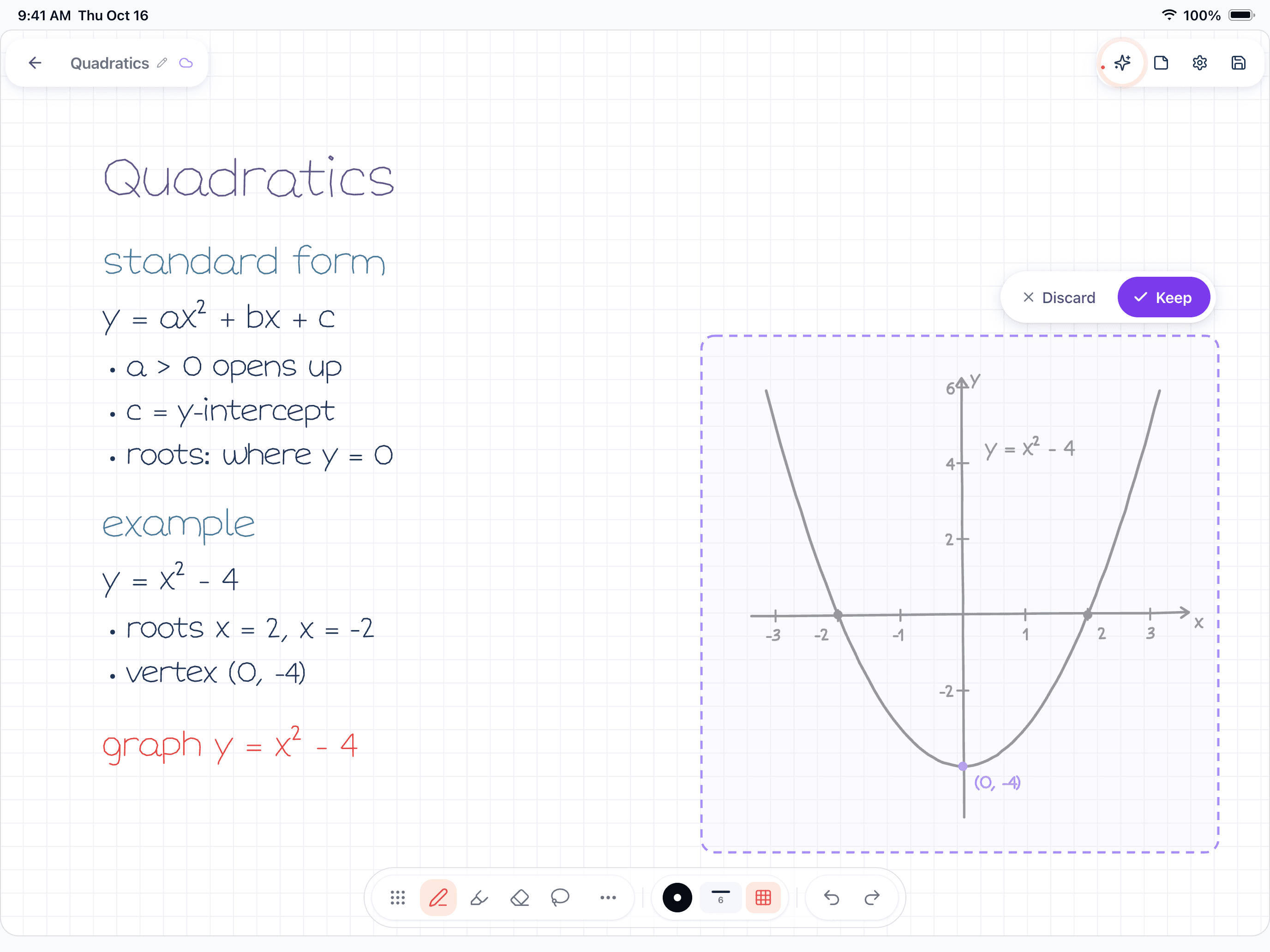
Figure 1. A real Wren 1.5.4 page on iPad. The student wrote "graph y = x² - 4" and paused; Wren drafted the graph in ink, with Keep and Discard.
Every addition arrives as a draft. You read it next to the work that prompted it, then keep it or discard it, so the page stays yours. In the iPad app, that ink can follow a style based on a sample of your handwriting, which keeps a page readable as one note instead of two materials stitched together. You can also ask Wren a question about the open page.
- Works on: iPad and iPhone, plus the Wren web app in any current browser (Windows, Chromebook, Mac, Android), with the same account and notes.
- Price model: free to start; a paid plan covers iPad and the web.
- Best for: math, science and any subject where the next step is a graph, a diagram or a worked solution.
- Good to know: Wren has no Windows or Android app; on those devices you use the web app, where you type or sketch on a whiteboard page and AI answers in ink. The handwriting-style ink is part of the iPad app. If your main job is annotating long PDFs or recording lectures, the apps below document those workflows in more depth.
See it step by step in how Wren adds AI ink to handwritten notes.
2. Goodnotes: best all-round digital notebook
Goodnotes is a full digital notebook app: notebooks and folders that feel like paper, strong PDF markup for lecture slides and readings, handwriting you can convert and search, and live collaboration on a shared notebook. Goodnotes AI adds questions and quizzes about your notes and AI for Math, which works on a handwritten problem you select.
- Works on: iPad, iPhone, Mac, plus its own Windows and Android apps (including Chromebooks) and Goodnotes for Web.
- Price model: free plan with up to 3 files; Essential and Pro yearly plans, an AI Pass add-on, and a one-time Special Edition on Apple devices (pricing).
- Best for: students who want one tidy notebook library for every class, on almost any device.
- Good to know: keeping one library in sync across Apple and non-Apple devices needs Goodnotes Cloud, which comes with Pro.
3. Notability: best for lectures you record
Notability is built around the lecture. Record while you write, and the recording stays linked to your notes, so you can tap a line and hear what was said when you wrote it. Notability Learn turns notes, PDFs and recordings into summaries, quizzes and flashcards, and it can convert handwriting and math to typed text.
- Works on: iPad, iPhone and Mac, an Android app on Google Play, and the Notability Web App in a browser. A separate desktop app for Windows and Mac records meetings and pairs the transcript with typed notes.
- Price model: free Starter plan with 5 notes, then Lite, Plus and Pro yearly plans (pricing).
- Best for: lecture-heavy courses where you want to replay the explanation behind a line.
- Good to know: on Windows, handwriting happens in the web app; the desktop app is for typed notes and recordings.
Torn between the two? Our Goodnotes vs Notability comparison puts their plans, audio, AI and sync side by side. For their AI alone, see Goodnotes AI vs Notability AI.
4. Apple Notes: best free app, already on your iPad
Apple Notes costs nothing and is already installed. Write with Apple Pencil, scan documents, record audio, and keep everything in folders that sync to your iPhone and Mac. Its best trick for students is Math Notes: write an expression with an equals sign and Apple says it is "instantly solved in their own handwriting", with variables and one-tap graphs (Apple). Smart Script tidies your handwriting as you write.
- Works on: iPad, iPhone and Mac, and in a browser through Notes on iCloud.com. No Android app.
- Price model: free.
- Best for: students who live on Apple devices and want something simple that just works.
- Good to know: it is a general notes app; if you want a notebook-style library with paper templates, Goodnotes and Noteshelf are built for that.
5. Microsoft OneNote: best free option for Microsoft 365 schools
OneNote is free on every major platform, and many schools already hand out Microsoft 365 accounts. Its notebooks, sections and pages mix handwriting, typing, images and audio recordings on an open page, and class notebooks are common in Microsoft schools. Copilot in OneNote is available with an eligible Microsoft 365 license (Microsoft).
- Works on: iPad, iPhone, Mac, Windows, Android and the web (App Store).
- Price model: free; extras and Copilot depend on your Microsoft 365 plan.
- Best for: students who switch between an iPad and a Windows laptop, or whose school runs on Microsoft 365.
- Good to know: notes live on open pages in notebooks and sections, which suits mixed typed and handwritten notes; for a paper-notebook feel, Goodnotes and Noteshelf are closer.
Choosing between OneNote and a handwriting notebook? See Goodnotes vs OneNote and Notability vs OneNote.
6. Noteshelf: best if you would rather pay once
Noteshelf is a handwriting notebook with templates, audio recording while you write, handwriting-to-text conversion in many languages and an AI assistant, Noteshelf AI. Its draw for many students is the price model: on Apple devices you can unlock premium with a one-time purchase instead of a subscription.
- Works on: iPad, iPhone and Mac, plus Android and Windows versions (Noteshelf).
- Price model: free with 3 notebooks; premium as a one-time purchase or a subscription (App Store).
- Best for: students who want a full notebook app without another yearly bill.
- Good to know: check how sync works before mixing Apple and non-Apple devices.
7. MyScript Notes (formerly Nebo): best for handwriting into clean text
On iPad and Android, Nebo is now called MyScript Notes; on Windows it keeps the Nebo name. It is built for people who write by hand but hand in typed work: it converts handwriting into editable text, solves simple calculations and exports math as LaTeX, and turns hand-drawn diagrams into shapes that stay editable in PowerPoint. AI tools summarize, explain and quiz you on a note (MyScript).
- Works on: iPad, iPhone and Android, and Windows as Nebo.
- Price model: free trial, then a limited free version or an upgrade through the App Store or Google Play.
- Best for: students who want handwritten notes to end up as clean typed documents.
- Good to know: on Windows the app keeps the Nebo name and comes from the Microsoft Store. For every app that converts handwriting, including the free ones, see the best handwriting to text apps.
8. CollaNote: best for writing with classmates
CollaNote is a handwriting and PDF app built around real-time collaboration: several people can write on the same note at once, which suits study groups and group projects. It also records audio alongside your notes.
- Works on: iPad, iPhone and Mac (Apple devices only) (App Store).
- Price model: free to download, with a one-time premium upgrade.
- Best for: study groups on Apple devices.
- Good to know: check the App Store listing for which features need premium.
9. Freenotes: best for a free start with templates
Freenotes is a free-to-download notebook with templates, stickers, PDF markup, handwriting beautification and AI summaries.
- Works on: iPad and iPhone (App Store).
- Price model: free with ads and a limit on notes; subscription plans, a lifetime option and a Remove Ads purchase.
- Best for: students who want to try digital handwriting at no cost.
- Good to know: the free version has a note limit, so plan for an upgrade or a move if you fill it.
Which iPad note app should you pick?
Start from your hardest class, not from the longest feature list.
| If you are... | Start with | Why |
|---|---|---|
| Taking math, physics or engineering | Wren | Write the problem, pause, and AI adds the graph or the next step of the solve in ink beside your work. Apple Notes' Math Notes is a free option for quick calculations and graphs. |
| Taking biology or chemistry | Wren, plus Goodnotes or Notability for slides | Wren draws diagrams, flowcharts, mind maps and tables on your page; the others are strong for writing on lecture slides. |
| Reading-heavy: history, English, law | Goodnotes or Notability | Mature PDF markup for readings, and notebooks that hold a whole semester. |
| Sitting through long lectures | Notability | Recordings stay linked to what you wrote, so you can replay the explanation behind a line. |
| Handing in typed work from handwritten notes | MyScript Notes | Handwriting, math and diagrams convert into editable text and shapes. |
| On a tight budget | Apple Notes or OneNote | Both are free. Wren, Goodnotes, Notability, Noteshelf, CollaNote and Freenotes are free to start. |
| Using a Windows laptop or Chromebook too | OneNote, Goodnotes or Wren | OneNote and Goodnotes have their own apps; Wren runs in the browser as the Wren web app with the same notes. |
| Studying in a group | CollaNote or OneNote | Several people can work in the same note or notebook. |
If you study across two devices, our guide to the best note-taking apps for students goes device by device: iPad, Windows, Chromebook, Mac and Android.
What to test before you commit
Most of these apps have a free tier or a free start, so test with a real class rather than a blank page:
- Write one full page at lecture speed. Check that the pen keeps up and your palm never leaves marks.
- Import the slides from one lecture and write on them.
- Search for a word you wrote by hand a few pages back.
- Ask the AI for something you actually need, such as a graph of tonight's homework function, and look at where the answer lands and how much work it takes to keep only the useful part.
- Open the same note on your laptop. If you use Windows or a Chromebook, this step rules apps in or out fast.
- Export the notebook as a PDF, so you know your notes are never stuck.
Make it yours in Wren
Try what the Wren entry above describes without leaving this page: watch Wren's AI write a study page in ink and save it to your own notes, see a real pen pause on iPad, then ask ChatGPT or Claude to write the next page into your notebook.
TRY IT ON A REAL PAGE
Watch Wren's AI write the page. Then make it yours.
Wren’s AI writes this page in real ink, stroke by stroke. Save it to your Wren notes and keep writing on it, on the web or on iPad.
Wren’s AI writes the page here.
Make it yours.
This is real ink, not a picture. Save it to your Wren notes and it becomes your page.
- Write your own notes next to it
- Erase or move any line, box or diagram
- Ask Wren's AI to explain or extend it
Free to start. One account for Wren on the web and on iPad. More pages to try
PAUSE YOUR PEN
Write. Pause. Wren's AI answers on your page.
No chat window to copy from. Wren reads what is already on the page and adds the next part in ink, right where you are working.
- WriteOn iPad, write with Apple Pencil. On the web, type or sketch on a whiteboard page.
- PauseStop for a moment. Wren reads what is on the page.
- AI answers in inkWren's AI adds the graph, formula, diagram or next step on the same page, in ink you can edit.
Rather ask a question? On iPad, open Study Buddy: it reads the page and can add its answer in ink. On the web, Ask Wren answers questions about the open page.
ASK CHATGPT OR CLAUDE
Ask your AI. It writes in Wren.
Connect Wren to ChatGPT or Claude once. Then ask in the chat, and Wren writes the page into your notebook in ink, ready to edit on the web or on iPad.
Paste this into ChatGPT or Claude
Add a page with the quadratic formula and one worked example to my Algebra note in Wren
- Connect WrenAdd the Wren plugin in ChatGPT, or add Wren as a custom connector in Claude. Sign in to Wren with your email or Google.
- Paste the promptYour AI finds the note by its title or subject, or starts a new one, and Wren writes the page.
- Keep writingOpen the note in Wren. The page is real ink: write next to it, erase or move any part.
Your AI sees note titles, subjects and page lists, not the writing on your pages. It adds pages and can redo pages Wren wrote; it never changes what you wrote. The ChatGPT plugin is available in the US and Canada.
Keep reading
- Best note-taking apps of 2027: twelve picks beyond the iPad, for Windows, Mac, Android and typed notes.
- How to take notes on iPad: set up Apple Pencil, paper and folders once you've picked an app.
- Wren vs Goodnotes and Wren vs Notability: one task, compared in detail.
- Wren vs Apple Notes: what each adds to a handwritten page.
- Wren on Windows, Chromebook and Android: use Wren on the laptop next to your iPad.
- Goodnotes alternatives and Notability alternatives: apps to try instead, with free, Windows and Android picks.
Frequently asked questions
What is the best note-taking app for iPad in 2027?
It depends on the job. Wren is the pick if you want AI that answers in ink on your handwritten page. Goodnotes is a strong all-round digital notebook with apps beyond Apple devices, Notability suits lectures you also record, and Apple Notes and OneNote are free.
What is the best free note-taking app for iPad?
Apple Notes is free and already on your iPad. Microsoft OneNote is free on iPad, Windows, Mac, Android and the web. CollaNote and Freenotes are free to download. Goodnotes, Notability and Wren have free tiers or are free to start, with paid plans for more.
Is Goodnotes or Notability better for students?
Goodnotes suits students who want a notebook-style library and apps on Windows and Android as well as Apple devices. Notability suits students who record lectures and want the audio tied to their notes. Both have free tiers, so test both with one real lecture.
Which iPad note-taking app has AI that writes on the page?
Wren does: you write or sketch, pause, and the AI answer is drawn as ink on the same page, such as a graph, a formula, a diagram or the next step of a solve, and you keep or discard it. Apple Notes' Math Notes also shows the result of an expression you write in your handwriting. Goodnotes and Notability document AI study tools such as questions, quizzes and summaries about your notes.
Is there a Wren app for Windows or Android?
No. Wren is an app for iPad and iPhone. On a Windows laptop, a Chromebook or Android, Wren runs in the browser as the Wren web app, with the same account and notes as the iPad app.