Goodnotes Web App: What It Does and Doesn't (2027)
Goodnotes is best known as an iPad notebook, but it also runs in a browser. Goodnotes for Web lives at web.goodnotes.com, uses the same Goodnotes account as its Windows and Android apps, and needs nothing installed. That makes it handy on a school Chromebook, a library computer or a laptop that isn't yours.
We checked every fact below against Goodnotes' and Ginger Labs' own pages and help centers on November 15, 2026, and linked each source. One disclosure: we make Wren, a different note app with its own web app. Goodnotes and Notability come first; Wren gets its own section near the end.
Is there a Goodnotes web app?
Yes. Goodnotes for Web is the browser version of Goodnotes, out of beta since August 2023 alongside the Android and Windows apps (Goodnotes blog). Open web.goodnotes.com and sign in with Microsoft, Apple or Google (get started guide).
On the web, your notebooks are stored in Goodnotes Cloud. They sync with Goodnotes on Android and Windows when you sign in with the same Goodnotes account (general FAQs). Syncing with an iPad is a separate story, covered below.
What can you do in Goodnotes for Web?
The web app shares its toolbar with Goodnotes on Android and Windows. Per Goodnotes' getting-started guide, you can:
- Write and draw with the pen, highlighter, eraser, shapes, lasso and a laser pointer.
- Build pages with text, images and elements, in notebooks you create from templates (paper size, color, orientation and cover).
- Bring in documents: import a PDF and write on it, or export a notebook as a PDF.
- Share a notebook by turning on a share link.
Goodnotes' help center also lists handwriting-to-text conversion, search, offline support, multiple tabs, page reordering, planner hyperlinks and the Trash Bin as available on Android, Windows and Web (frequently requested features).
The web app has caught up in two big steps. Since January 2026, the "next-generation" Goodnotes, with Text Documents, Goodnotes AI and real-time collaboration, is on Android, Windows and Web (Goodnotes blog). In October 2026, Quick Diagramming arrived on Apple devices and the web (Goodnotes blog).
What Goodnotes for Web can't do yet
Goodnotes is open that the web app is not the iPad app in a browser. Its web page says Goodnotes for Web "does not offer the full range of features in Goodnotes 6 on iPad" (Goodnotes for Web). The help center names the gaps on Android, Windows and Web as of November 2026:
- No flashcards, and no Time Keeper or Study Sets.
- One font in the Text Tool.
- No export in Goodnotes format. PDF export works.
- No full library backup. Export important notebooks one at a time.
- Custom template sizes and themes are made on Apple devices only. Notebooks created from them still open on the web.
If you write by hand most of the day, the iPad app is where Goodnotes' handwriting tools are fullest. The web app is best for reading, typing and quick edits on a computer.
Which browsers work with Goodnotes for Web?
Goodnotes recommends Google Chrome 91 or later or Microsoft Edge 91 or later. It says Safari and Firefox "may work but may not provide the same performance or experience" (system requirements).
So on a Mac, Chrome or Edge is the safer choice for the web app, or use Goodnotes' Mac app from the App Store. Our guide to the best note taking apps for Mac covers both.
Does Goodnotes for Web sync with the iPad app?
Only with Goodnotes Pro. On an iPad, iPhone or Mac, Goodnotes syncs through iCloud, and iCloud does not reach Android, Windows or the web. To see your iPad library in a browser, you switch the Apple device to Goodnotes Cloud, which is included with Goodnotes Pro. It is not part of Goodnotes Essential or Special Edition (Goodnotes Cloud).
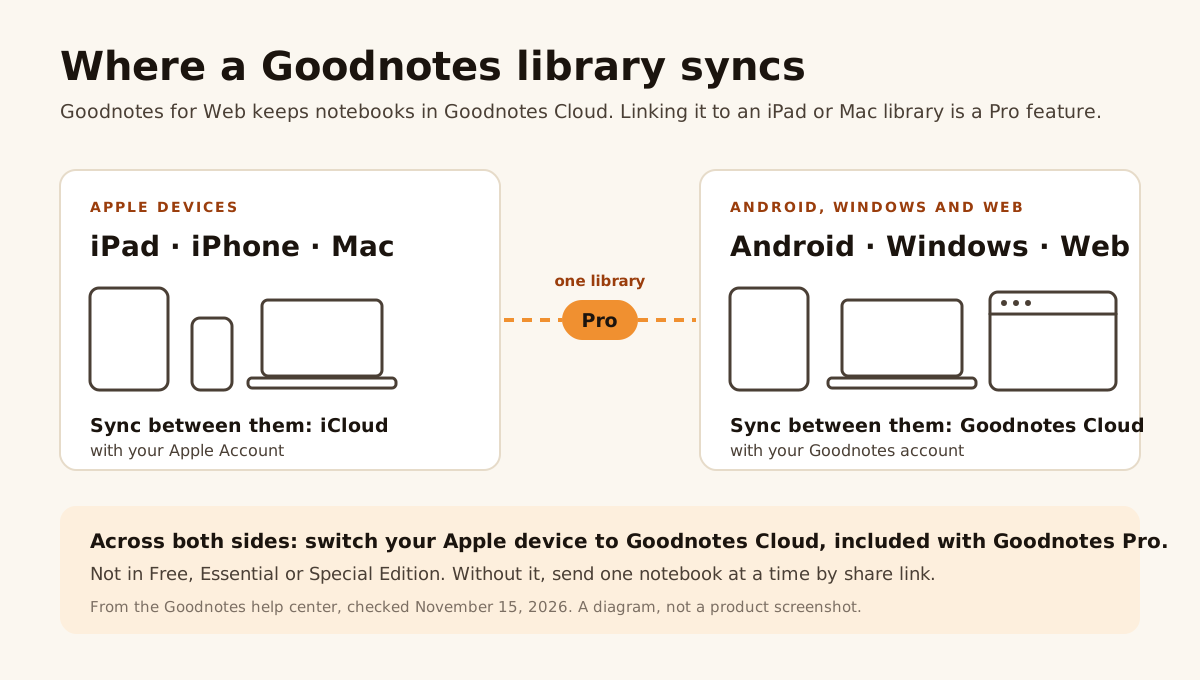
Figure 1. Diagram, not a product screenshot: where a Goodnotes library syncs, from Goodnotes' help center on November 15, 2026.
Without Pro, you can still send a single notebook from your iPad to the web with a share link (share between iOS and other platforms).
Is Goodnotes for Web free?
Yes, with limits. The free plan is not a trial, but the pricing page caps it at 3 files and 5 MB imports, and exports carry a watermark (Goodnotes pricing). Goodnotes Essential and Goodnotes Pro both cover the web along with Apple devices, Android and Windows; only Pro links the web to your iPad library. Every plan, price and limit is in our Goodnotes price 2026 guide.
Who Goodnotes for Web is for
It's a good fit if:
- You use Goodnotes on Windows or Android and want the same notebooks on any computer.
- You're on Goodnotes Pro and want your iPad library on a school or library computer.
- You mostly read, type and make light edits, rather than write whole pages by hand.
It's a weaker fit if you rely on flashcards, Study Sets or Goodnotes-format exports, or if your iPad notes sync through iCloud on Essential or Special Edition.
Notability Web, briefly
Notability has a web app too. Ginger Labs describes Notability Web as made for typed notes (lectures, meetings, outlines), with a Pen tool for drawing with your mouse, audio recording with live transcripts and Smart Notes, and Learn: summaries, quizzes, flashcards and chat with your notes. Paste a YouTube link and you get a transcript, summary and quiz (Notability blog, Notability Web).
Its Web App FAQ, updated August 25, 2026, says it works in all major browsers with Chrome suggested, works best on a desktop browser, and can be used free or with a Plus or Pro plan. A stylus is not supported when you open it on an iOS device (Web App FAQ). Notes from your iPad appear on the web if you use Notability Cloud, which Ginger Labs says is free for all users (Notability Cloud FAQ).
Goodnotes for Web vs Notability Web at a glance
| Goodnotes for Web | Notability Web | |
|---|---|---|
| Built for | Notebooks you write and draw in, from templates | Typed notes, recordings and study tools |
| Drawing | Pen, highlighter, shapes and lasso; handwriting to text | Pen tool with your mouse |
| AI | Goodnotes AI | Learn: summaries, quizzes, flashcards, chat |
| Browsers | Chrome or Edge 91+; Safari and Firefox may work | All major browsers; Chrome suggested |
| Your iPad notes on the web | With Goodnotes Pro (Goodnotes Cloud) | With Notability Cloud, free for all users |
| Free to use | Free plan: 3 files | Free, or with Plus or Pro |
For everything beyond the browser (platforms, audio, sync and price), read Goodnotes vs Notability, and for what each app's AI does, Goodnotes AI vs Notability AI.
Wren in the browser: AI that answers in ink
Goodnotes and Notability bring their notebooks to the browser. Wren's web app is built around a different moment: you write the problem, pause, and the AI answers on the page.
Open web.wrenapp.ai in any current browser and sign in. Start a whiteboard page (marked beta on the web), type the problem or sketch it with a mouse, a touchscreen or a stylus, and pause. Wren's AI adds the graph, formula, diagram or next step in ink on the same page. It arrives as a draft: keep it, or discard it and the page stays as you left it. Stuck on a step? Ask Wren a question about the page you have open.
- Same notes as the iPad app. Sign in with the same account on both and your notes sync both ways. On iPad you write with Apple Pencil; ink in a style matched to how you write is an iPad feature, not a web one.
- Free to start. An optional Pro plan gives you more AI answers each day, and one plan covers iPad and the web (pricing).
- Fair warning: Wren is a study notebook built around AI on the page, not a paper-style planner with a template marketplace. If that's what you want, Goodnotes is built for it.
On a laptop or a tablet? See Wren on Windows, a Mac, a Chromebook or Android. Still choosing between full note apps? The best note-taking apps of 2027 compares twelve across every device.
Make it yours in Wren
Watch Wren write a study page in ink, then save it to your own notes in the web app. Or have ChatGPT or Claude add a page straight to your notebook through the Wren connector.
TRY IT ON A REAL PAGE
Watch Wren's AI write the page. Then make it yours.
Wren’s AI writes this page in real ink, stroke by stroke. Save it to your Wren notes and keep writing on it, on the web or on iPad.
Wren’s AI writes the page here.
Make it yours.
This is real ink, not a picture. Save it to your Wren notes and it becomes your page.
- Write your own notes next to it
- Erase or move any line, box or diagram
- Ask Wren's AI to explain or extend it
Free to start. One account for Wren on the web and on iPad. More pages to try
ASK CHATGPT OR CLAUDE
Ask your AI. It writes in Wren.
Connect Wren to ChatGPT or Claude once. Then ask in the chat, and Wren writes the page into your notebook in ink, ready to edit on the web or on iPad.
Paste this into ChatGPT or Claude
Add a page to my Science note in Wren that explains the water cycle with a labelled diagram.
- Connect WrenAdd the Wren plugin in ChatGPT, or add Wren as a custom connector in Claude. Sign in to Wren with your email or Google.
- Paste the promptYour AI finds the note by its title or subject, or starts a new one, and Wren writes the page.
- Keep writingOpen the note in Wren. The page is real ink: write next to it, erase or move any part.
Your AI sees note titles, subjects and page lists, not the writing on your pages. It adds pages and can redo pages Wren wrote; it never changes what you wrote. The ChatGPT plugin is available in the US and Canada.
Sources
Checked on November 15, 2026.
Goodnotes
- Goodnotes for Web: what the web app offers, free tier, "does not offer the full range of features"
- Get started with Goodnotes for Android, Windows and Web: sign-in, toolbar, notebooks, PDF import, share links
- General FAQs for Android, Windows and Web: Goodnotes Cloud, Apple sync, backups, templates
- Frequently requested features for Android, Windows and Web: what's available and what isn't
- System requirements for Android, Windows, Chromebook and Web: supported browsers
- Sync your library with Goodnotes Cloud: Pro-only cross-platform sync, iCloud is Apple-only
- Share notebooks between iOS and other platforms: the share-link route
- Goodnotes pricing: free plan limits, plans by platform
- Features, fixes and updates, December 2025 (January 2026): next-generation Goodnotes on Android, Windows and Web
- What's new, July to September 2026 (October 2026): Quick Diagramming on the web
Notability
- Notability Web is here: what Notability Web does
- Notability Web: AI summaries, quizzes and flashcards from typed notes
- Web App FAQ (August 25, 2026): browsers, plans, stylus on iOS
- Notability Cloud FAQ (September 15, 2026): platforms, free for all users
Frequently asked questions
Is there a Goodnotes web app?
Yes. Goodnotes for Web runs at web.goodnotes.com. Sign in with Microsoft, Apple or Google, and your notebooks are stored in Goodnotes Cloud, shared with Goodnotes on Android and Windows when you use the same account.
Is Goodnotes for Web free?
Yes, with limits. Goodnotes' free plan holds up to 3 files, imports up to 5 MB and watermarks exports. Paid plans remove the limits and cover the web along with Apple devices, Android and Windows.
Does Goodnotes Web sync with my iPad?
Only with Goodnotes Pro. On an iPad, iPhone or Mac, Goodnotes syncs through iCloud, which does not reach the web. To open your iPad library in a browser you switch the Apple device to Goodnotes Cloud, which is included with Pro and not with Essential or Special Edition. Without it, you can share one notebook at a time by link.
Which browsers does Goodnotes for Web support?
Goodnotes recommends Google Chrome 91 or later or Microsoft Edge 91 or later. It says Safari and Firefox may work but may not give the same performance or experience.
What can't Goodnotes for Web do?
Goodnotes says the web version doesn't have every iPad feature. As of November 2026 its help center lists no flashcards, Time Keeper or Study Sets, one font in the Text Tool, no export in Goodnotes format and no full library backup on Android, Windows and Web.
Does Notability have a web app?
Yes. Notability Web works in all major browsers, with Chrome suggested, and works best on a desktop browser. It is built for typed notes, with a Pen tool for drawing with a mouse, audio recording with live transcripts, and Learn for summaries, quizzes, flashcards and chat. You can use it free or with a Plus or Pro plan.
Is there a web note app where AI answers in ink?
Wren does this. Open web.wrenapp.ai in any current browser, type or sketch a problem on a whiteboard page and pause: Wren's AI adds a graph, a formula, a diagram or the next step in ink on the page, which you keep or discard. The same notes open in the Wren app for iPad.