Goodnotes AI vs Notability AI: features and limits
Goodnotes and Notability both sell AI now, and both put "AI" in their App Store names. Under the label they do different jobs. Goodnotes AI is an assistant that works inside your documents: it answers questions about your notes, drafts and edits, and helps with handwritten math. Notability's AI, mostly under the name Learn, is a study kit: it turns notes, PDFs and recordings into summaries, quizzes and flashcards.
We checked every fact below against Goodnotes' and Ginger Labs' own pages in November 2026 and linked the source next to it. Plans and AI limits change often, so check them before you pay.
One disclosure: we make Wren, a note app whose AI answers in ink on the page. We kept Wren out of the head-to-head and gave it its own section near the end.
The short answer
Goodnotes AI fits you if you want help while you work:
- You do math by hand and get stuck. Lasso the problem and Goodnotes AI for Math shows how it read your writing, then Solves it step by step or Teaches you with guided questions.
- You want AI to draft, summarize or clean up inside your notebooks, whiteboards and text documents.
- You want to try AI without paying: Math AI and handwriting spellcheck are on the free plan, with 5 questions and 5 quizzes a month (pricing).
Notability's AI fits you if you study from what you already captured:
- You record lectures and want the transcript, summary and quiz to come from that recording.
- You revise with flashcards, quizzes and fill-in-the-blank exercises made from your own notes and PDFs (Notability Learn).
- You're happy to pay for it: Learn is for Plus and Pro subscribers.
If you want the AI to answer on your page, in ink, as part of the note, that is a third approach. More on it below.
Goodnotes AI vs Notability AI at a glance (November 2026)
| Goodnotes AI | Notability AI (Learn and more) | |
|---|---|---|
| What it is | An assistant inside notebooks, whiteboards and text documents | Study tools built from your notes, PDFs and recordings |
| Questions about your notes | Yes: 5 a month on the free plan, more on paid plans | Chat with your notes on Pro |
| Summaries | Of long notes and supported recordings | Of notes, PDFs and recordings; real-time Smart Notes on Pro |
| Quizzes and flashcards | Quiz generator: 5 a month on the free plan, more on paid plans | Quizzes, flashcards and fill-in-the-blank; limited on Plus, unlimited on Pro |
| Handwritten math | Lasso a problem: Solve (step by step) or Teach Me (guided), every plan | Convert handwritten math to typed math and LaTeX (iOS and Android) |
| Recordings | Meeting AI records, transcribes and summarizes on Pro | Transcripts after recording on Plus, live transcription on Pro |
| Writing help | Drafts, templates, diagrams, line-by-line feedback; handwriting spellcheck on every plan | Action items from notes and recordings; YouTube link to note with transcript and summary |
| Where results go | Previewed, then added to your document, in a color that marks AI contributions | Inside Learn; a quiz cannot currently be exported or added to a note |
| Plan needed | Some AI free; Essential $11.99/yr; Pro $35.99/yr adds Meeting AI and Create Mode; AI Pass add-on $9.99/mo | Plus $19.99/yr (limited AI); Pro $99.99/yr (unlimited) |
Every row is sourced in the list at the end of this article.
What Goodnotes AI does today
Goodnotes relaunched its AI in September 2025 as Goodnotes AI, "a true collaborator within your notes" and the successor to Ask Goodnotes. The Goodnotes AI page lists what it covers now:
- Search and questions. Search across typed text, handwriting, PDFs, images and diagrams, and ask questions about what's in your notes.
- Summaries. Turn long notes or supported recordings into summaries and key takeaways.
- Handwriting to text. Convert handwriting into editable text with built-in spellcheck.
- Math. Handwrite an equation and let AI check the calculation. The math tools show a confirmation card with how they read your problem before computing, then offer Solve (each step explained, with alternative methods) or Teach Me (the concept first, then guided questions at your pace).
- Quizzes and structured outputs generated from your notes.
- Visuals and templates. Turn ideas into diagrams, frameworks and reusable templates, or get a first draft and line-by-line feedback on your writing.
- Meetings. On Pro, AI for Meetings records, transcribes and summarizes, with a live summary.
Goodnotes designed the assistant to stay visible and under your control. Its design notes describe three layouts (floating, sidebar and window), a preview of AI content before it's added to your notebook or whiteboard, and a dedicated color for AI contributions so you can tell them apart from your own writing.
The limits. On the pricing page, the free plan includes handwriting spellcheck and Math AI, and caps questions and quizzes at 5 a month each. Essential ($11.99 a year) comes with "limited AI capabilities", Pro ($35.99 a year) adds Meeting AI and Create Mode, and the AI Pass ($9.99 a month on top of Essential or Pro) is sold as "Unlock full AI experience". Goodnotes says its AI also runs on its Android, Windows and web apps.
What Notability's AI does today
Notability's AI centers on Learn, which "automatically creates summaries, quizzes, flashcards, and fill-in-the-blanks from your notes, PDFs, or recordings". Around it:
- Live transcription. Record a lecture or meeting and watch the transcript appear.
- Smart Notes. A summary of your notes that updates as you write.
- Chat with your note. Ask questions and get answers about one note.
- Action items generated from the content of your notes.
- YouTube link to note. Paste a video link and get a note with transcript and summary (pricing).
- Handwriting and math conversion to typed text on Plus, with handwritten math to LaTeX on iOS and Android (compare plans).
The limits. Learn "is only available to Notability Plus and Pro subscribers". Plus ($19.99 a year) has a set amount of AI usage shared across Learn features that renews over time; Pro ($99.99 a year) is unlimited and adds live transcription, real-time Smart Notes and chat with your notes (subscription FAQ). The Learn help page also lists some practical limits: a quiz needs at least 250 words of content and no more than about 20,000, comes from one note at a time, and cannot currently be exported or added to a note. Learn is not available on managed (MDM) devices, so a school-managed iPad may not have it, and Learn content does not sync between devices. Ginger Labs says it does not use your data to train AI systems or large language models.
Do you need a paid plan for the AI?
- Goodnotes: not to start. The free plan's 5 questions and 5 quizzes a month, Math AI and handwriting spellcheck are enough to judge it. Heavy use means Essential or Pro, and the AI Pass if you hit the limits.
- Notability: yes. The free Starter plan covers notes and audio recording, but Learn starts at Plus. If you'll quiz yourself every week, compare Plus' monthly allowance with Pro's unlimited use.
At US list prices in November 2026, the cheapest way into each app's AI is Goodnotes Free, then Goodnotes Essential at $11.99 a year, then Notability Plus at $19.99 a year. The most AI each sells: Goodnotes Pro with the AI Pass ($35.99 a year plus $9.99 a month) or Notability Pro ($99.99 a year). Every plan and limit: Goodnotes price 2026 and Notability price 2026.
Where the AI's answer ends up
This is the difference that decides how each one feels in use.
In Goodnotes, you open the assistant beside your work, ask, preview the result and add it to your document, marked in the AI color. The answer is a reply you place.
In Notability, Learn makes study material from a note: a summary to read, a quiz to take, flashcards to flip. It lives in Learn, next to the note, not in it.
Both are useful. Neither is the same as the AI writing its answer into the page you're working on, as part of the note.
A different approach: AI that answers in ink on the page
That third approach is what Wren is built around. You don't open an assistant or switch to a study view. You write or sketch the problem on the page and pause. Wren's AI reads the page and answers in ink right where you were working: a graph, a formula, a diagram or a step-by-step solution. The answer arrives as a draft. Keep it, or discard it and the page stays exactly as you left it.
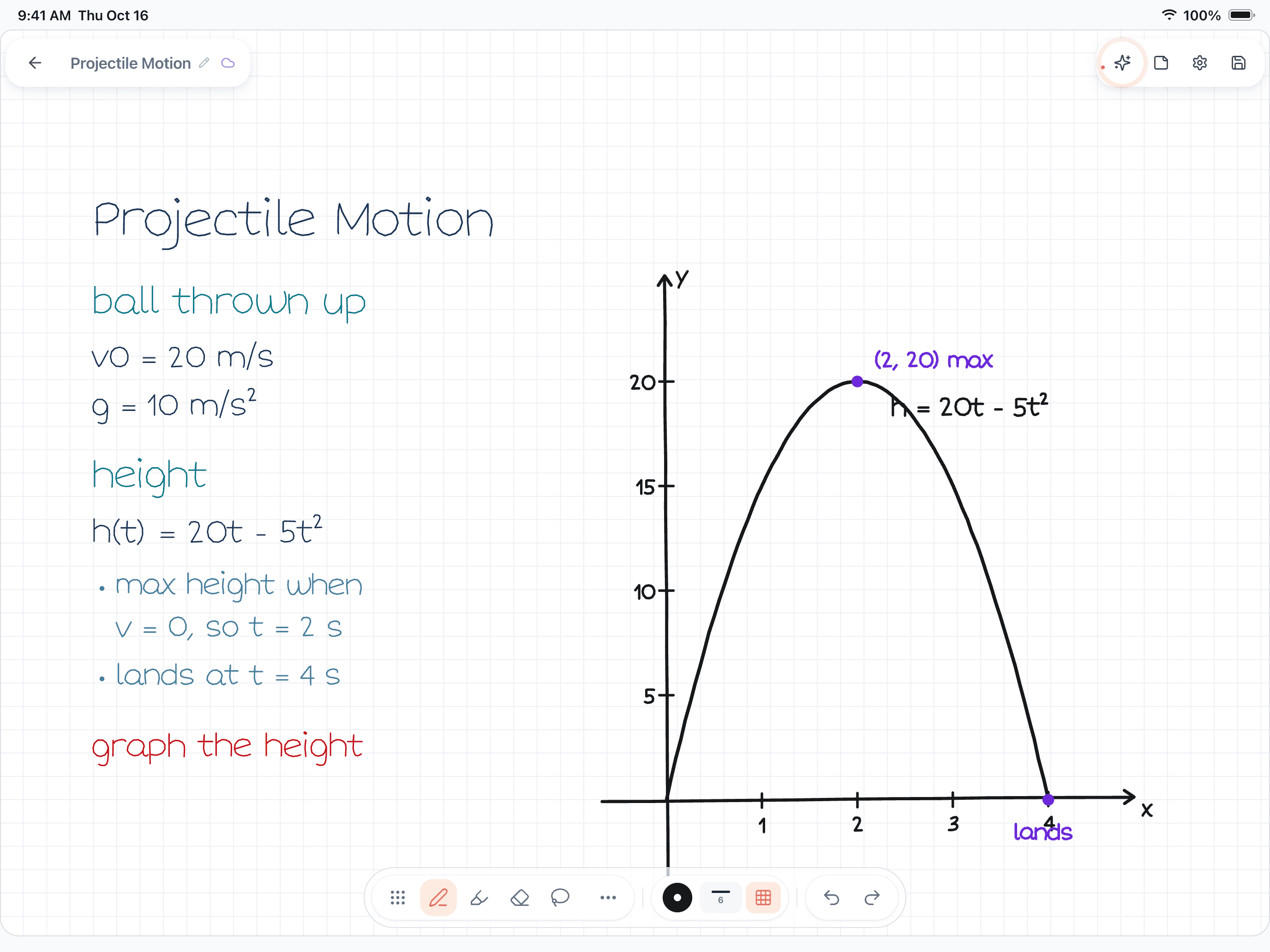
Figure 1. A Wren 1.5.4 page on iPad. The student wrote projectile-motion notes ending in "graph the height" and paused; Wren's AI drew the height graph in ink beside the notes, with the maximum at (2, 20) and the landing point labeled.
How that works where you study:
- On iPad and iPhone. Write with Apple Pencil on iPad and the AI ink is drawn in a style matched to your handwriting, so the graph or the worked step reads as part of your note.
- In the Wren web app, in any current browser. Open web.wrenapp.ai on a Windows laptop, a Chromebook, an Android tablet or a Mac. Type or sketch on a whiteboard page, pause, and the AI answers in ink; or ask Wren a question about the open page. On the web the ink is not drawn in your own handwriting; that part is the iPad app. Same account and notes as the iPad app, and one Pro plan covers both.
Wren is free to start on the web and on iPad, and an optional Pro plan gives you more AI answers each day. If what you want is flashcards from a recorded lecture, Notability is built for that; if you want a math tutor beside your notebook, Goodnotes AI for Math is worth trying. If you want to write "graph the height" and see the graph appear on your page, open Wren on the web, write the problem and pause.
Which AI fits how you study
| If you want to… | Lean toward | Why |
|---|---|---|
| Get unstuck on a handwritten math problem | Goodnotes AI | Lasso the problem, then Solve or Teach Me; on every plan. |
| Turn a recorded lecture into a summary and a quiz | Notability (Plus or Pro) | Learn works from recordings as well as notes and PDFs. |
| Revise with flashcards from your notes | Notability (Plus or Pro) | Learn makes flashcards and fill-in-the-blank exercises. |
| Try AI without paying | Goodnotes AI | Free plan: Math AI, spellcheck, 5 questions and 5 quizzes a month. |
| Draft, summarize and edit inside documents | Goodnotes AI | The assistant previews and adds content to your notebook, whiteboard or text document. |
| See the graph, formula or next step drawn on your page | Wren | Write or sketch, pause, and the AI answers in ink on the same page. |
For the rest of the decision (platforms, audio, sync and price beyond AI), read Goodnotes vs Notability. If you're weighing either against Microsoft's free notebook, see Goodnotes vs OneNote and Notability vs OneNote. Already using one of them? See how Wren's AI ink compares in Wren vs Goodnotes and Wren vs Notability, or start on a laptop with Wren on Windows, Chromebook and Android. For the wider field, see the best note-taking apps for iPad.
Make it yours in Wren
See the difference for yourself: watch Wren's AI write a worked physics page in ink, ask about a page with Study Buddy on iPad or Ask Wren on the web, and have ChatGPT or Claude write a page straight into your notebook.
TRY IT ON A REAL PAGE
Watch Wren's AI write the page. Then make it yours.
Wren’s AI writes this page in real ink, stroke by stroke. Save it to your Wren notes and keep writing on it, on the web or on iPad.
Wren’s AI writes the page here.
Make it yours.
This is real ink, not a picture. Save it to your Wren notes and it becomes your page.
- Write your own notes next to it
- Erase or move any line, box or diagram
- Ask Wren's AI to explain or extend it
Free to start. One account for Wren on the web and on iPad. More pages to try
PAUSE YOUR PEN
Ask about your page. Wren's AI answers in ink.
No chat window to copy from. Wren reads what is already on the page and adds the next part in ink, right where you are working.
- WriteOn iPad, write with Apple Pencil. On the web, type or sketch on a whiteboard page.
- PauseStop for a moment. Wren reads what is on the page.
- AI answers in inkWren's AI adds the graph, formula, diagram or next step on the same page, in ink you can edit.
Rather ask a question? On iPad, open Study Buddy: it reads the page and can add its answer in ink. On the web, Ask Wren answers questions about the open page.
ASK CHATGPT OR CLAUDE
Ask your AI. It writes in Wren.
Connect Wren to ChatGPT or Claude once. Then ask in the chat, and Wren writes the page into your notebook in ink, ready to edit on the web or on iPad.
Paste this into ChatGPT or Claude
Add a page to my Physics note in Wren that works through a ball thrown up at 20 m/s step by step, with a graph of its height
- Connect WrenAdd the Wren plugin in ChatGPT, or add Wren as a custom connector in Claude. Sign in to Wren with your email or Google.
- Paste the promptYour AI finds the note by its title or subject, or starts a new one, and Wren writes the page.
- Keep writingOpen the note in Wren. The page is real ink: write next to it, erase or move any part.
Your AI sees note titles, subjects and page lists, not the writing on your pages. It adds pages and can redo pages Wren wrote; it never changes what you wrote. The ChatGPT plugin is available in the US and Canada.
Sources
Checked on November 15, 2026. Prices are US list prices before tax.
Goodnotes
- Goodnotes pricing: AI features by plan, free plan limits, AI Pass
- Goodnotes AI: what the AI covers
- Meet the new generation of Goodnotes (September 2025): Goodnotes AI, AI for Math, AI for Meetings, AI Pass
- Math AI that actually builds understanding: Solve, Teach Me, confirmation card
- Shaping Goodnotes AI to the way you work: layouts, preview before insert, AI color
- New features, October to December 2025: Goodnotes AI on Android, Windows and web
Notability (Ginger Labs)
- Notability Learn: features, plans, quiz limits, managed devices, data use
- Notability pricing and compare plans
- Notability subscription FAQ: what Plus and Pro include
- Syncing notes across devices with Notability Cloud: Learn content does not sync
Frequently asked questions
Is Goodnotes AI free?
Partly. As of November 2026, Goodnotes' free plan includes handwriting spellcheck and Math AI, plus up to 5 AI questions and 5 AI quizzes a month. Essential ($11.99 a year) and Pro ($35.99 a year) include more AI, Meeting AI and Create Mode are Pro features, and an AI Pass add-on ($9.99 a month) unlocks the full AI experience.
Is Notability's AI free?
No. Notability's help center says Learn, its AI study tool, is available to Plus and Pro subscribers. Plus ($19.99 a year) has a set amount of AI usage that renews over time; Pro ($99.99 a year) is unlimited and adds live transcription, real-time Smart Notes and chat with your notes. US list prices, November 2026.
Which is better for math, Goodnotes AI or Notability AI?
Goodnotes, if you want help solving. Lasso a handwritten problem, confirm how Goodnotes read it, then choose Solve for a step-by-step answer or Teach Me for guided questions. Notability converts handwritten math to typed math and LaTeX on iOS and Android, but its AI study tools focus on summaries, quizzes and flashcards.
Which one makes quizzes and flashcards?
Notability Learn makes summaries, quizzes, flashcards and fill-in-the-blank exercises from your notes, PDFs and recordings. Goodnotes AI makes quizzes from your notes, 5 a month on the free plan and more on paid plans.
Does the AI write on my notes?
Goodnotes AI can add content to a notebook or whiteboard after you preview it, and color-codes what it added. Notability's quizzes stay in Learn: its help center says a quiz cannot currently be exported or added to a note. Wren is built the other way round: its AI answers in ink on the page you are writing on.
Is there a note app where AI answers in ink on the page?
Wren does this. Write or sketch a problem, pause, and Wren's AI adds a graph, a formula, a diagram or the next step in ink on the same page, which you keep or discard. Wren runs on iPad and iPhone, and in any current browser as the Wren web app.