Best Note-Taking Apps of 2027: 12 Picks Compared
There is no single best note-taking app for everyone, but there is a best one for the way you take notes. Someone who writes equations with a stylus needs a different app from someone who types meeting notes on a Windows laptop, and both need something different from a student building a wiki of linked notes.
So we sorted the field by how you take notes and the devices you use, then picked twelve apps that each do one job best. We make Wren, and we say so wherever it comes up: it is listed for one specific job, AI that answers in ink on your page. Every other app is described from its maker's own pages, checked in November 2026, with the sources linked.
Our picks at a glance
- Wren: best for AI that answers in ink on your page.
- Goodnotes: best handwriting notebook on almost every device.
- Notability: best for lectures you record while you write.
- Microsoft OneNote: best free app on every device, and best for Windows.
- Apple Notes: best free app on iPhone, iPad and Mac.
- Notion: best for typed notes, docs and databases.
- Obsidian: best for linked notes kept as files you own.
- Evernote: best for saving web pages, files and notes in one searchable place.
- Google Keep: best for quick notes and lists on Android and Chromebook.
- Samsung Notes: best for a Galaxy phone or tablet with an S Pen.
- MyScript Notes (formerly Nebo): best for turning handwriting into typed text.
- Noteshelf: best if you would rather pay once than subscribe.
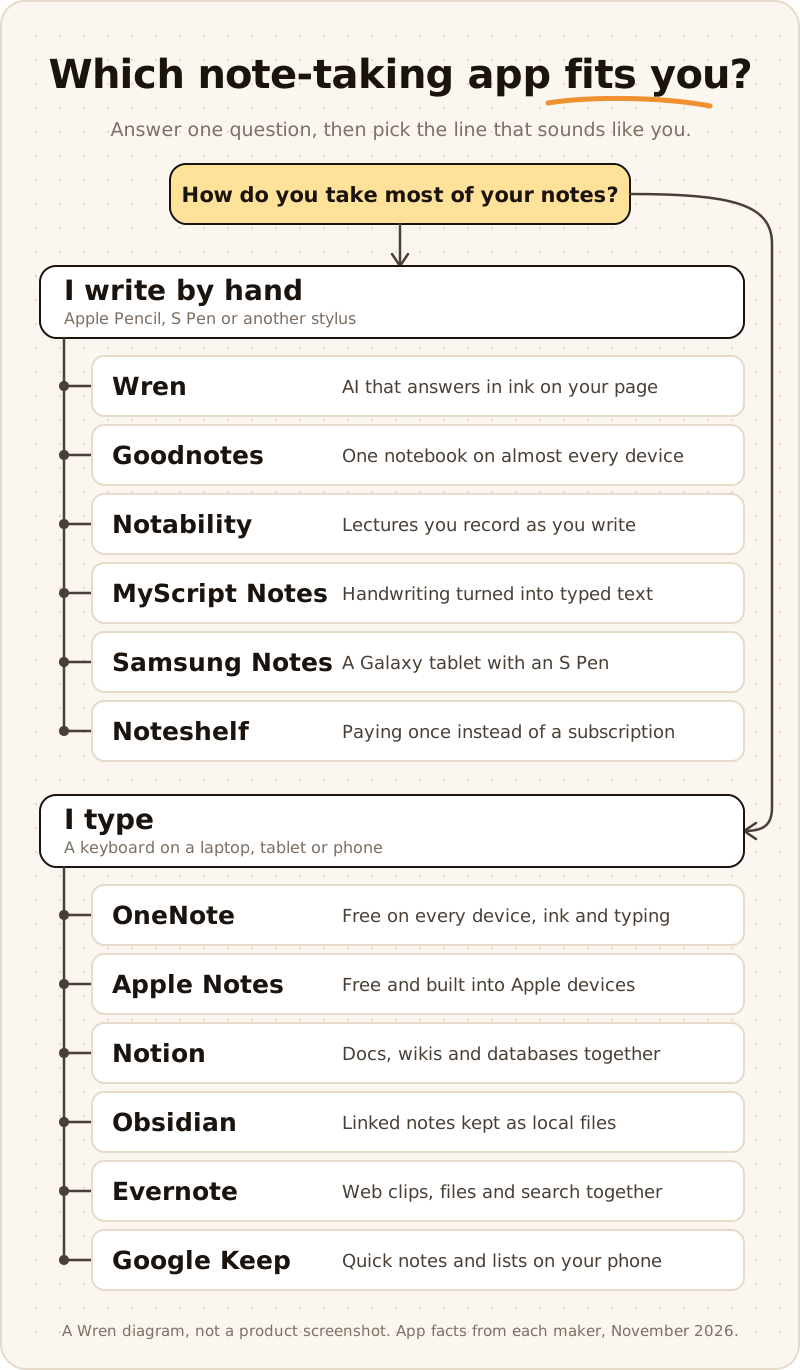
Figure 1. Which note-taking app fits you: start with whether you write by hand or type, then pick the line that sounds like you. A Wren diagram, not a product screenshot.
What changed for 2027
Last year's lists are out of date in a few important ways. These are the changes that move the picks, each from the maker's own announcement or help center:
- Notability left the Apple-only club. Notability became widely available on Google Play in August 2026 (9to5Google); it needs Android 12L or later, works with a stylus including the S Pen, and syncs through Notability Cloud (Ginger Labs). Ginger Labs also announced a desktop app for Windows and Mac on August 25, 2026 (Business Wire). It records the audio on your computer, turns it into a transcript and combines it with the notes you type (Ginger Labs). On Windows, handwriting still happens in the Notability web app.
- Goodnotes rebuilt its plans and added AI. On September 23, 2025, Goodnotes relaunched with Essential and Pro plans, an optional AI Pass add-on, infinite Whiteboards and typed Text Documents (Goodnotes). Goodnotes runs on iPad, iPhone, Mac, Windows, Android and the web; the free plan holds up to 3 files, and keeping one library in sync between Apple and non-Apple devices needs Pro (pricing).
- OneNote for Windows 10 is retired. Microsoft ended support on October 14, 2025, and the old app is read-only. To keep creating and syncing notes, Microsoft points to the OneNote app on Windows (Microsoft).
- Apple Notes does math in your writing. Math Notes, which arrived with iPadOS 18, solves an expression when you write an equal sign (Apple), and Apple's guide now covers 2D and 3D graphs (Apple). Our Math Notes on iPad guide shows how to use it and where it stops.
- AI moved into the note app. Goodnotes, Notability, OneNote (Copilot), Notion and Evernote all ship AI features now, so "has AI" no longer separates them. What still differs is what the AI makes and where the answer lands: a summary in a side panel, a quiz, or new ink on your own page.
How we picked
Every app on this list takes notes well, so "it takes notes" is not a reason to rank anything. We judged each app on six things instead:
- How you take notes. Handwriting with a stylus, typing on a keyboard, or both on the same page. The best handwriting app and the best typing app are rarely the same app.
- Devices. Where the app runs, and whether one library follows you from phone to tablet to laptop, including Windows and Chromebooks.
- Organization and search. Notebooks, folders, tags or links, and whether you can find a note again, including handwritten words.
- AI, and where its answer lands. Summaries, quizzes, typed text from handwriting, solved equations and new ink on the page are different jobs.
- Price model. Free, a free tier with limits, a subscription or a one-time purchase. Prices change often and differ by region, so we describe the model and link the maker's page instead of quoting numbers.
- Facts from the maker. We used each app's own site, help center and App Store or Google Play listing, checked in November 2026. If we could not confirm a feature, we left it out.
The best note-taking apps compared
| App | Best for | Notes by | Works on | Free option |
|---|---|---|---|---|
| Wren | AI that answers in ink | Handwriting, sketching and typing | iPad, iPhone; web app in any browser | Free to start |
| Goodnotes | Handwriting notebook everywhere | Handwriting, plus typed documents | iPad, iPhone, Mac, Windows, Android, web | Up to 3 files |
| Notability | Recorded lectures | Handwriting and audio | iPad, iPhone, Mac, Android, web; Windows and Mac desktop app | Starter: 5 notes |
| Microsoft OneNote | Free on every device | Typing and handwriting | Windows, Mac, iPad, iPhone, Android, web | Free |
| Apple Notes | Free on Apple devices | Typing and handwriting | iPhone, iPad, Mac; iCloud.com in a browser | Free |
| Notion | Docs and databases | Typing | Windows, Mac, iOS, Android, web | Free plan for individuals |
| Obsidian | Linked notes as files | Typing (Markdown) | Windows, Mac, Linux, iOS, Android | Free without limits |
| Evernote | Saving everything in one place | Typing, web clips and files | Windows, Mac, iOS, Android, web | 50 notes, 1 notebook |
| Google Keep | Quick notes and lists | Typing, lists, drawing notes | Android, iPhone, iPad, any browser | Free |
| Samsung Notes | Galaxy and S Pen | Handwriting and typing | Galaxy phones and tablets | Comes with Galaxy devices |
| MyScript Notes (Nebo) | Handwriting into text | Handwriting, converted | iPad, iPhone, Android, supported Chromebooks; Nebo on Windows | Limited free version |
| Noteshelf | Paying once | Handwriting and audio | iPad, iPhone, Mac, Android, Windows | Up to 3 notebooks |
Platforms and free options from each maker's site, help center and store listing, checked November 2026. Prices change often; follow the links in each section for current plans.
The 12 best note-taking apps of 2027
1. Wren: best for AI that answers in ink
Wren is a note-taking app built around one moment: you write, type or sketch on the page, pause, and Wren's AI answers in ink on that same page. Write "graph y = x² - 4" under your notes and the parabola appears beside them. Write the first line of an equation and the next step appears below it. Ask for a diagram, a formula or a table, and it is drawn where it belongs, not in a chat window.
Every addition arrives as a draft you keep or discard, so the page stays yours. In the iPad app, the ink can follow a style based on a sample of your handwriting. You can also ask about the open page: Study Buddy on iPad, Ask Wren on the web. And if you use ChatGPT or Claude, the Wren connector can create a note or add a page to one; it never reads or edits your own writing.
- Works on: iPad and iPhone, plus the Wren web app in any current browser on Windows, Mac, Chromebook or Android, with the same account and notes. There is no Windows, Mac or Android app to install.
- Price model: free to start; one optional Pro plan covers iPad and the web (pricing).
- Best for: math, science and any subject where the next step is a graph, a diagram or a worked solution.
- Good to know: Wren does not turn handwriting into typed text, and on the web you type or sketch on a whiteboard page (marked beta) rather than write with Apple Pencil. If your main job is marking up long PDFs, recording lectures or building a typed wiki, the apps below are built for that.
See it step by step in how Wren adds AI ink to handwritten notes, or on an endless canvas on the Wren AI whiteboard.
2. Goodnotes: best handwriting notebook on almost every device
Goodnotes is a full digital notebook: notebooks and folders that feel like paper, PDF markup for slides and readings, handwriting search, Whiteboards for open-ended thinking and Text Documents for typing. Goodnotes AI answers questions about your notes, builds quizzes and includes Math Assist for handwritten problems, with more AI on paid plans and the AI Pass add-on.
- Works on: iPad, iPhone and Mac, plus its own Windows and Android apps (including Chromebooks) and Goodnotes for Web.
- Price model: free plan with up to 3 files; Essential and Pro yearly plans, an AI Pass add-on, and a one-time Special Edition on Apple devices (pricing). Every limit is in our Goodnotes price guide.
- Best for: students and professionals who want one tidy handwritten library on every device they own.
- Good to know: one library synced between an iPad and a Windows or Android device needs Goodnotes Cloud, which only comes with Pro. What the browser version can and can't do: Goodnotes for Web, explained.
Looking at other options? See Goodnotes alternatives and Wren vs Goodnotes.
3. Notability: best for lectures you record
Notability is built around the lecture. Record while you write, and the recording stays linked to your notes, so you can tap a line and hear what was said when you wrote it. Paid plans add summaries, transcription, flashcards and quizzes, and Pro adds Smart Notes and chat with your notes (subscription FAQ).
- Works on: iPad, iPhone and Mac, an Android app on Google Play and the Notability Web App. A desktop app for Windows and Mac records meetings or classes and pairs the transcript with typed notes.
- Price model: free Starter plan with 5 notes, then Lite, Plus and Pro plans (pricing). See every step in our Notability price guide.
- Best for: lecture-heavy courses where you want to replay the explanation behind a line.
- Good to know: Ginger Labs lists a few features as not yet on Android, such as Comments and Text-Only Mode.
Torn between the two big handwriting apps? Goodnotes vs Notability puts plans, audio, AI and sync side by side, and Goodnotes AI vs Notability AI compares just the AI. Or browse Notability alternatives.
4. Microsoft OneNote: best free app on every device
OneNote is free with a Microsoft account on every major platform, and many schools and workplaces already use Microsoft 365. Notebooks, sections and pages hold typing, pen ink, images and audio recordings on an open page. Copilot in OneNote comes with an eligible Microsoft 365 plan (Microsoft), and Math Assistant solves handwritten or typed equations with steps (Microsoft).
- Works on: Windows, Mac, iPad, iPhone, Android and the web (App Store).
- Price model: free, with 5 GB of OneDrive storage on a free Microsoft account; Copilot and extra storage depend on your Microsoft 365 plan.
- Best for: anyone who switches between a Windows laptop and a tablet or phone, and Microsoft 365 schools and offices.
- Good to know: if you used OneNote for Windows 10, move to the OneNote app on Windows; the old app is read-only.
Comparing it with a handwriting notebook? See Goodnotes vs OneNote, Notability vs OneNote and OneNote alternatives.
5. Apple Notes: best free app on iPhone, iPad and Mac
Apple Notes costs nothing and is already installed. Type or write with Apple Pencil, scan documents, keep checklists and folders, and everything syncs through iCloud to your iPhone, iPad and Mac. Math Notes solves the math you write and graphs equations. In a browser, your notes are on iCloud.com, including on a Windows PC (Apple).
- Works on: iPhone, iPad and Mac, and iCloud.com in a browser. No Android app.
- Price model: free; iCloud includes 5 GB of free storage.
- Best for: anyone who lives on Apple devices and wants simple notes that just work.
- Good to know: it is a general notes app; for a paper-notebook library with templates and PDF markup, Goodnotes and Noteshelf are built for that. See Wren vs Apple Notes for what each adds to a handwritten page.
6. Notion: best for typed notes, docs and databases
Notion turns notes into linked pages, docs and databases: class notes that link to a reading list, a project tracker, a personal wiki. It is built for typing, and Notion AI is built in, with the full AI features on the Business plan and up and a trial on Free and Plus (pricing).
- Works on: Windows, Mac, iOS, Android and the web (system requirements).
- Price model: free plan for individuals; paid plans per member.
- Best for: people who want notes, tasks and reference material in one structured workspace.
- Good to know: Notion is not a handwriting app; pair it with a handwriting app if you think on paper.
7. Obsidian: best for linked notes you keep as files
Obsidian stores notes as plain-text Markdown files on your own device and links them together, so ideas connect across notes and you can open the files in any other app. Community plugins add almost anything, including AI.
- Works on: Windows, Mac, Linux, iOS and Android (download).
- Price model: free without limits; Sync and Publish are paid add-ons (pricing).
- Best for: writers, researchers and students building a long-term knowledge base.
- Good to know: syncing between devices needs Obsidian Sync or your own setup, such as a cloud folder.
8. Evernote: best for saving everything in one place
Evernote is built for capture and search: typed notes, web clips and files in notebooks, with an AI Assistant, semantic search and AI meeting notes on its plans (AI features).
- Works on: Windows, Mac, iOS, Android and the web (download).
- Price model: the free plan is limited to 50 notes, 1 notebook and 1 device; paid plans lift the limits (plans).
- Best for: people who save a lot from the web and need to find it again.
- Good to know: the free plan's limits are tight, so plan on paying if Evernote becomes your main app.
9. Google Keep: best for quick notes and lists
Google Keep is the sticky note of note apps: fast typed notes, checklists, reminders and drawing notes, synced to your Google account. On Android, Gemini can draft a list or a note title with Google AI Pro or Ultra or on a Pixel phone (Google).
- Works on: Android, iPhone and iPad, and keep.google.com in any browser, including Chrome on a Chromebook.
- Price model: free with a Google account.
- Best for: shopping lists, quick ideas and reminders on your phone.
- Good to know: it is built for short notes, not long class notes or notebooks.
10. Samsung Notes: best for Galaxy and the S Pen
Samsung Notes comes with Galaxy phones and tablets. Write with the S Pen, convert handwriting to text, mark up PDFs and sync through Samsung Cloud to your other Galaxy devices (Samsung). Galaxy AI Note Assist can summarize, format and translate notes on supported devices (Samsung).
- Works on: Samsung Galaxy phones and tablets; the Windows app is made for Galaxy Book laptops (Samsung).
- Price model: comes with Galaxy devices.
- Best for: Galaxy Tab and S Pen owners.
- Good to know: on a non-Samsung Android tablet, Goodnotes, Notability, Noteshelf and MyScript Notes are the handwriting apps to try. Our Android note-taking apps guide covers ten.
11. MyScript Notes (formerly Nebo): best for handwriting into typed text
MyScript Notes is for people who write by hand but hand in typed work. It converts handwriting into editable text in 66 languages, turns handwritten math into LaTeX, and keeps hand-drawn diagrams editable (MyScript). On Windows, it keeps the Nebo name.
- Works on: iPad, iPhone, Android and supported Chromebooks (compatible devices); Nebo for Windows is a separate app.
- Price model: a free version with notebooks of up to 5 pages, without cloud sync or AI; paid upgrades add more (FAQ).
- Best for: students and professionals who want handwritten notes to end up as clean documents.
- Other converters: Apple Notes, Goodnotes, Notability, OneNote on Windows and photo scanners compared in the best handwriting to text apps; on iPad, step by step: how to convert handwriting to text on iPad.
- Good to know: check the device list before you buy a tablet for it.
12. Noteshelf: best if you would rather pay once
Noteshelf is a handwriting notebook with templates, audio recording while you write, handwriting recognition and Noteshelf AI, which summarizes, explains and drafts notes (Noteshelf). On Apple devices you can unlock premium with a one-time purchase instead of a subscription.
- Works on: iPad, iPhone and Mac, plus Android and Windows versions.
- Price model: free with up to 3 notebooks; premium as a one-time purchase or a subscription (App Store).
- Best for: people who want a full handwriting app without another yearly bill.
- Good to know: check how sync works before you mix Apple and non-Apple devices.
The best note-taking app for your device and needs
Best free note-taking app
Microsoft OneNote is the strongest free app: free on every major platform, with typing, ink and audio on the same page. On Apple devices, Apple Notes is free and already installed; Google Keep is free for quick notes and lists; and Obsidian is free without limits for typed, linked notes. Goodnotes (3 files), Notability (5 notes), Notion, Evernote (50 notes) and Wren are free to start, with limits.
Best note-taking app for Windows
OneNote, because it is free and made by Microsoft. For handwritten notebooks on a Windows touchscreen, Goodnotes has its own Windows app; Notability's Windows desktop app is for typed notes with recordings, and its handwriting lives in the web app. Wren has no Windows app: it runs in Edge, Chrome or Firefox, where you type or sketch on a whiteboard page and AI answers in ink. Our note-taking app for Windows page covers what runs on a PC.
Best note-taking app for Mac
Apple Notes if you want free and simple, synced with your iPhone and iPad. Goodnotes and Notability both have Mac apps if you also write on an iPad, OneNote is free on Mac, and Notion and Obsidian suit typed notes. On a Mac, Wren runs in Safari or Chrome as the Wren web app, with the same notes as the iPad app. Our guide to the best note-taking apps for Mac compares eight of them.
Best note-taking app for Android and Chromebook
On a Galaxy tablet with an S Pen, Samsung Notes. On any Android tablet or Chromebook, Goodnotes and Notability now have Android apps, OneNote and Google Keep are free, and Wren runs in Chrome. See our guides to the best note-taking apps for Android and Chromebook.
Best for typed notes and a knowledge base
Notion if you want docs, databases and tasks in one workspace; Obsidian if you want linked notes stored as files you own; Evernote if you mostly save web pages and files and search them later; Apple Notes or Google Keep if you want fast and simple. OneNote sits in between, with typed and handwritten notes on open pages.
Best for lecture recordings
Notability, whose recordings stay linked to what you wrote. OneNote can record audio into a page (Microsoft), Goodnotes and Noteshelf record audio too, and Notability's desktop app records the audio on your computer and pairs a transcript with your typed notes.
Best for math
Wren if you want the next step, the graph or the worked solution written in ink beside your own work. Apple's Math Notes is a free way to solve and graph what you write on iPad and iPhone, and OneNote's Math Assistant shows steps with Microsoft 365. MyScript Notes turns handwritten math into LaTeX. For a method that works in any app, see how to take math notes. For science homework, our physics problem solver and chemistry problem solver pages show Wren working those problems in ink.
Best AI note-taking app
Decide what you want the AI to make. For new ink on your page, such as a graph, a formula, a diagram or the next step, Wren answers in ink and you keep or discard it. For summaries, quizzes and flashcards from your notes or recordings, Notability's study tools are built for that, and Goodnotes AI answers questions and builds quizzes about your notes. Copilot in OneNote, Notion AI and Evernote's AI Assistant work inside typed notes on their own plans. Our Goodnotes AI vs Notability AI guide compares two of them in detail.
Students
If you are choosing for school, our best note-taking apps for students guide goes device by device and subject by subject, our best note-taking app for iPad guide reviews nine iPad apps, best apps for Apple Pencil covers drawing, PDFs and flashcards too, and best study apps adds flashcard, focus, planner, math and AI tutor apps by job. Picked an iPad app? How to take notes on iPad sets it up for a semester.
What to test before you commit
Almost every app here is free to start, so test with real work rather than a blank page:
- Take one real set of notes at full speed: a lecture, a meeting or a chapter.
- Open the same note on your other device, especially a Windows laptop, a Chromebook or a phone. This step rules apps in or out fast.
- Search for a word you wrote or typed a few pages back.
- Ask the AI for something you actually need and look at where the answer lands and how much work it takes to keep only the useful part.
- Export a notebook as a PDF or a file, so you know your notes are never stuck.
For ways to lay out the page itself, see note-taking methods, from Cornell notes to mind maps.
Make it yours in Wren
Try the Wren pick without leaving this page: watch Wren's AI write a study page in ink and save it to your own notes, see a real pen pause on iPad, then ask ChatGPT or Claude to add the next page to a note in Wren.
TRY IT ON A REAL PAGE
Watch Wren's AI write the page. Then make it yours.
Wren’s AI writes this page in real ink, stroke by stroke. Save it to your Wren notes and keep writing on it, on the web or on iPad.
Wren’s AI writes the page here.
Make it yours.
This is real ink, not a picture. Save it to your Wren notes and it becomes your page.
- Write your own notes next to it
- Erase or move any line, box or diagram
- Ask Wren's AI to explain or extend it
Free to start. One account for Wren on the web and on iPad. More pages to try
PAUSE YOUR PEN
Write. Pause. Wren's AI answers on your page.
No chat window to copy from. Wren reads what is already on the page and adds the next part in ink, right where you are working.
- WriteOn iPad, write with Apple Pencil. On the web, type or sketch on a whiteboard page.
- PauseStop for a moment. Wren reads what is on the page.
- AI answers in inkWren's AI adds the graph, formula, diagram or next step on the same page, in ink you can edit.
Rather ask a question? On iPad, open Study Buddy: it reads the page and can add its answer in ink. On the web, Ask Wren answers questions about the open page.
ASK CHATGPT OR CLAUDE
Ask your AI. It writes in Wren.
Connect Wren to ChatGPT or Claude once. Then ask in the chat, and Wren writes the page into your notebook in ink, ready to edit on the web or on iPad.
Paste this into ChatGPT or Claude
Add a timeline page on the causes of World War I to my History note in Wren.
- Connect WrenAdd the Wren plugin in ChatGPT, or add Wren as a custom connector in Claude. Sign in to Wren with your email or Google.
- Paste the promptYour AI finds the note by its title or subject, or starts a new one, and Wren writes the page.
- Keep writingOpen the note in Wren. The page is real ink: write next to it, erase or move any part.
Your AI sees note titles, subjects and page lists, not the writing on your pages. It adds pages and can redo pages Wren wrote; it never changes what you wrote. The ChatGPT plugin is available in the US and Canada.
Keep reading
- Compare note-taking apps: every best-of guide, comparison, alternatives page and price guide on one page.
- Best note-taking app for iPad and best note-taking apps for students.
- Goodnotes vs Notability, Goodnotes vs OneNote and Notability vs OneNote.
- Wren vs Goodnotes, Wren vs Notability and Wren vs Apple Notes.
- Goodnotes alternatives, Notability alternatives and OneNote alternatives.
- Goodnotes price, Notability price and Wren pricing.
- Wren on Windows, Mac, Chromebook and Android, and the Wren AI whiteboard.
Frequently asked questions
What is the best note-taking app in 2027?
It depends on how you take notes. If you write by hand, Goodnotes is a strong all-round notebook on almost every device, Notability suits lectures you record, and Wren is the pick for AI that answers in ink on your page. If you type, Microsoft OneNote is free on every device, Apple Notes is built into Apple devices, Notion suits docs and databases, and Obsidian suits linked notes kept as local files.
What is the best free note-taking app?
Microsoft OneNote is free on Windows, Mac, iPad, iPhone, Android and the web, with handwriting and typing on the same page. Apple Notes is free on iPhone, iPad and Mac, Google Keep is free with a Google account, and Obsidian is free without limits. Goodnotes, Notability, Notion, Evernote and Wren have free plans or are free to start, with limits.
What is the best note-taking app for Windows?
Microsoft OneNote is the natural pick: it is free and made by Microsoft. Goodnotes has its own Windows app for handwritten notebooks, Notability has a Windows desktop app for typed notes with recordings, and Obsidian, Notion and Evernote run on Windows too. Wren has no Windows app; it runs in Edge, Chrome or Firefox as the Wren web app.
What is the best AI note-taking app?
Pick by what you want the AI to make. For a graph, a formula, a diagram or the next step of a solve added to your own page, Wren's AI answers in ink on the page and you keep or discard it. For summaries, quizzes or flashcards from your notes or recordings, Notability's study tools are built for that, Goodnotes AI answers questions and builds quizzes about your notes, and OneNote, Notion and Evernote offer AI assistants on their own plans.
Should I use a handwriting app or a typing app?
Write by hand if your classes are full of equations, diagrams and anything visual, or if you have an iPad or tablet with a stylus. Type if you write long text, build a wiki of linked notes, or mostly study on a laptop. Many people use one of each. OneNote takes both on the same page, and Wren takes handwriting on iPad and typing or sketching in the browser.
What happened to OneNote for Windows 10?
Microsoft ended support for OneNote for Windows 10 on October 14, 2025, and the app is now read-only. Microsoft points people to the OneNote app on Windows, which is free from the Microsoft Store and included with Microsoft 365.
Does Wren work on Windows, Mac or Android?
Yes, in the browser. Wren is an app for iPad and iPhone, and the Wren web app runs in any current browser on Windows, Mac, Chromebook or Android with the same account and notes. There is no Wren app for Windows, Mac or Android to install.