Notability Price 2026: Is It Free? Every Plan
Notability has a free plan, three yearly subscriptions (Lite, Plus and Pro) and a one-time purchase called Classic. The prices below come from the Notability pricing page and the Ginger Labs help center, checked on November 15, 2026. They are US prices; Notability's pricing page says prices "may vary", and it was running a 20% off sale on all plans when we checked, so confirm before you pay.
One disclosure: we make Wren, a different note app. The Notability sections stick to what Ginger Labs publishes, and Wren gets its own section at the end.
How much does Notability cost in 2026?
| Plan | US list price | Sale price shown Nov 15, 2026 | What you get |
|---|---|---|---|
| Starter | $0 | $0 | 5 free notes, all editing tools and content, PDFs and docs in your notes, 20,000+ templates, 7-day version history |
| Lite | $14.99 a year | $11.99 a year | Unlimited notes, third-party backups (iOS only), 7-day version history |
| Plus | $19.99 a year | $15.99 a year | Everything in Lite and Classic, plus limited AI quizzes and flashcards, audio transcription and YouTube link-to-note conversions, 30-day version history |
| Pro | $99.99 a year | $79.99 a year | Unlimited real-time transcription and AI summaries, quizzes, flashcards and YouTube conversions, chat with your notes, 90-day version history |
| Classic | $39.99 once on notability.com, $49.99 once on the App Store | Not shown | Unlimited notes, handwriting recognition, math conversion, collaboration, sync across iOS, Android and web, 7-day version history. No AI |
| Business | $60 per user a year | Not shown | Shared libraries, admin billing and controls, limited AI summaries and transcription. 30-day free trial |
| Business Pro | $180 per user a year | Not shown | Business plus unlimited real-time transcription and AI summaries, chat with your notes, audit log. 30-day free trial |
The pricing page shows the yearly prices by default, with the list price struck through next to the sale price. It also has Monthly and One-time toggles; we didn't verify the monthly prices, so check notability.com/pricing if you want to pay by the month. The Classic prices come from the Notability Classic help article.
Is Notability free?
Yes. In Notability's own words, it is "free to download, and free to use via our Starter plan." Starter is a plan, not a trial, and it includes:
- 5 notes. The pricing page lists "5 free notes", and the help center calls them starter notes.
- A monthly editing allowance. The subscription FAQ says free users get an editing allowance each month, which you can track in Settings. It doesn't publish the number.
- All editing tools and content, PDF and document import, 20,000+ templates and 7-day version history.
- The web app and the desktop app. The help center says the Web App works for free or with Plus or Pro, and the desktop app for Windows and Mac is available on every plan.
What Starter doesn't give you: unlimited notes (that starts with Lite or Classic) and Learn, Notability's AI study tools, which the help center says are only on Plus and Pro. Goodnotes AI vs Notability AI compares what Learn does with Goodnotes' AI.
Notability Classic: the one-time purchase
Classic is for people who don't want a subscription. The help center lists it at $39.99 on notability.com and $49.99 on the App Store, so buying on the web saves $10. It includes unlimited notes, handwriting recognition, math conversion, collaboration, sync across iOS, Android and web, and 7-day version history.
It does not include Learn or any AI features, and features built for the subscription plans aren't added later. If you bought Notability with the same Apple ID before it moved to subscriptions, the help center says you are a grandfathered Classic user and don't need to pay again. Refunds for a notability.com purchase must be requested within 14 days.
Lite vs Plus vs Pro: what each step adds
- Lite removes the 5-note cap. Pick it if you only need more notes.
- Plus adds AI: quizzes and flashcards from your notes, audio transcription and YouTube link-to-note conversions, each with a limit, plus 30-day version history. It costs $5 a year more than Lite at list price.
- Pro removes those AI limits and adds real-time transcription and summaries while you record, and chat with your notes. At $99.99 a year list price it is the most expensive individual plan.
Does Notability cost more on Android, the web or Windows?
The plans are the same everywhere; where you pay changes the checkout:
- iPad and iPhone subscriptions go through the App Store, web purchases through Stripe and Android through Google Play, per the subscription FAQ.
- Classic is $10 cheaper on notability.com than on the App Store.
- On a Windows PC you have two options: the Notability web app in any major browser, and the Notability desktop app for Windows and Mac. Ginger Labs describes the desktop app as recording your meetings, turning the audio into a transcript and combining it with the notes you type. You download it from notability.com, not the Microsoft Store, and Starter users can create 5 notes there too.
For more on note apps on a PC, see Wren on Windows, Chromebook and Android. If OneNote is your other option on Windows, see Notability vs OneNote.
Is there a Notability student discount?
We found no separate student price on the Notability pricing page on November 15, 2026; the 20% off sale applied to all plans. Schools are a different story: the help center says schools that manage devices get Notability for Organizations free, and Notability for Education is similar to the Plus subscription. If your school doesn't provide it, the plans above are what you pay.
Free and lower-cost options
Pick by what you actually need:
- Five notes is enough: stay on Starter.
- Unlimited notes, no AI: Lite at $14.99 a year list price, or Classic once for $39.99 on notability.com.
- AI quizzes and flashcards from your notes: Plus, the cheapest Notability plan with Learn.
- AI that answers on the page: try Wren, which is free to start.
Wren works differently from Notability's AI. You write or sketch a problem, pause, and Wren's AI adds the graph, the formula, the diagram or the worked steps in ink on that same page. The AI ink arrives as a draft, and you keep it or discard it.
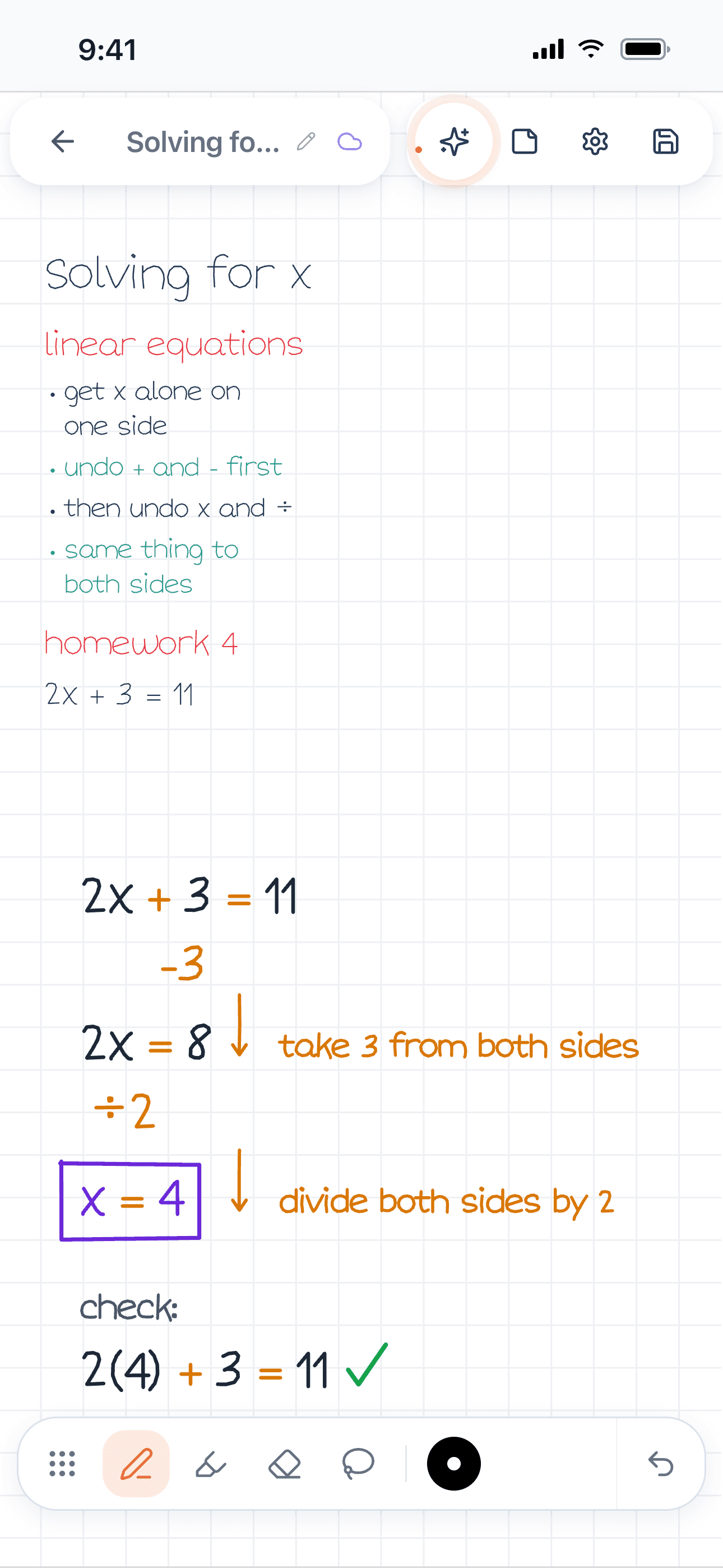
Figure 1. Wren on iPhone. The student's notes on solving for x end with homework problem 2x + 3 = 11; Wren's AI wrote the worked steps below in ink, boxed x = 4 and checked the answer.
Wren runs on iPad and iPhone, and in any current browser as the Wren web app, with the same account and notes everywhere. On a Windows laptop or a Chromebook you type or sketch on a whiteboard page and the AI ink lands there too. There is no Wren app to install on Windows or Android. One Pro plan covers iPad and the web; see Wren's plans and pricing.
To compare the two big handwriting apps side by side, read Goodnotes vs Notability (2027). For Goodnotes' plans, see Goodnotes price 2026. Looking beyond Notability? See our list of Notability alternatives, or the best note-taking apps for iPad.
Make it yours in Wren
Before you pay for any plan, watch Wren's AI write a study page in ink below, then save it to your notes and keep writing on it.
TRY IT ON A REAL PAGE
Watch Wren's AI write the page. Then make it yours.
Wren’s AI writes this page in real ink, stroke by stroke. Save it to your Wren notes and keep writing on it, on the web or on iPad.
Wren’s AI writes the page here.
Make it yours.
This is real ink, not a picture. Save it to your Wren notes and it becomes your page.
- Write your own notes next to it
- Erase or move any line, box or diagram
- Ask Wren's AI to explain or extend it
Free to start. One account for Wren on the web and on iPad. More pages to try
Sources
Checked on November 15, 2026. Prices are US prices and change often.
- Notability pricing page: Starter, Lite, Plus, Pro, Business and Business Pro prices, the 20% off sale, what each plan includes.
- Notability Classic (Ginger Labs help center): one-time prices, what Classic includes and excludes, refunds.
- Notability Subscription FAQ: Starter notes, the monthly editing allowance, where each platform bills, schools.
- Web App FAQ and Notability for Windows and Mac: the web app's free tier and the desktop app.
- Notability for Education.
Frequently asked questions
Is Notability free?
Yes, on the Starter plan. Notability is free to download and use with 5 notes and a monthly editing allowance. Unlimited notes start with Lite at $14.99 a year (US list price; $11.99 during the 20% off sale shown on November 15, 2026).
How much is Notability Plus?
$19.99 a year at US list price, shown at $15.99 a year during the sale on notability.com/pricing on November 15, 2026. Plus adds limited AI quizzes and flashcards, audio transcription and YouTube link-to-note conversions to everything in Lite and Classic.
Can I buy Notability once instead of subscribing?
Yes. Notability Classic is a one-time purchase: $39.99 on notability.com or $49.99 on the App Store, per Notability's help center. It includes unlimited notes, handwriting recognition, math conversion and sync, but no Learn or other AI features.
Is the Notability web app free?
Yes. Notability's help center says you can use the Web App for free, or with a Plus or Pro subscription. It works in all major browsers and works best on a desktop browser.
Is Wren free?
Wren is free to start on the web and on iPad. Write or sketch a problem, pause, and Wren's AI answers in ink on the page. An optional Pro plan gives you more AI answers each day and covers iPad and the web.