Notability vs OneNote: which is better for students?
Notability and OneNote solve different problems. Notability grew up on the iPad as the app you open in a lecture: write, record the audio, and replay what was said when you wrote each line. It now adds AI study tools and runs on Android and the web. OneNote is Microsoft's free digital notebook: open pages for typing, ink and files, on almost every device, and part of the Microsoft 365 account many schools give students.
We checked every fact below against Ginger Labs' and Microsoft's own pages in November 2026 and linked the source next to it. Prices are US list prices and change often, so check them before you pay.
One disclosure: we make Wren, a third note app. We kept Wren out of the head-to-head and gave it its own section near the end.
The short answer
Pick Notability if:
- You record lectures on an iPad and want the audio tied to your notes. Notability links recordings to what you write: tap a word or sketch and it plays what was said at that moment. Recording is on the free Starter plan.
- You want AI study material made from your own notes. Notability Learn builds summaries, quizzes, flashcards and fill-in-the-blank exercises from notes, PDFs and recordings, on Plus and Pro.
- You mostly write by hand on an iPad and want handwriting and math converted to typed text, which Notability includes from Plus.
Pick OneNote if:
- You want a capable notebook for free. The OneNote app is free with a Microsoft account on Windows, Mac, iPad, iPhone, Android and the web.
- Your main computer is a Windows laptop. OneNote has a full native Windows app for typing and handwriting; Notability's Windows options are a web app and a desktop app for recorded, typed notes.
- Your school uses Microsoft 365. Microsoft says eligible students and educators get Office 365 Education free, including OneNote, and teachers can hand out work through OneNote Class Notebooks.
- You type as much as you write, and like filing notes as notebook, section and page.
Still choosing by device? The best note-taking apps for students guide starts from the laptop or tablet you have.
Notability vs OneNote at a glance (November 2026)
| Notability | OneNote | |
|---|---|---|
| Price (US) | Starter free (5 notes); Lite $14.99/yr; Plus $19.99/yr; Pro $99.99/yr (a 20% discount was showing when we checked) | Free app with a Microsoft account; Math Assistant and Transcribe need Microsoft 365; Copilot needs a Copilot license or eligible Microsoft 365 plan |
| Apple devices | iPad, iPhone and Mac | iPad, iPhone and Mac |
| Windows | Notability Web App in a browser; a desktop app records meetings and classes and combines the transcript with typed notes | OneNote for Windows |
| Android | Android app on Google Play (Android 12L or later) | Android app on Google Play |
| Web | Notability Web App (best on a desktop browser) | OneNote for the web |
| Lecture recording | Recordings linked to your notes, on every plan; transcripts on Plus, live transcription on Pro | OneNote for Windows records audio linked to your notes; Transcribe on Windows with Microsoft 365 (300 minutes of uploads a month) |
| Handwriting to typed text | Convert handwriting and math to typed text on Plus and Pro (iOS and Android) | Ink to Text on Windows; not in OneNote for iPad or the web |
| PDFs and slides | Import PDFs, docs and slides into a note and write on them | Insert a PDF as a printout: each page becomes an image you write over |
| Organization | Notes in folders, with several notes open side by side | Notebooks, sections and pages |
| AI | Notability Learn: summaries, quizzes, flashcards, fill-in-the-blank (limited on Plus, unlimited on Pro); chat with your notes on Pro | Copilot in OneNote: summaries, task lists, drafts and chat; Math Assistant for handwritten equations |
| Sync | Notability Cloud across iPad, iPhone, Mac, Android and web, on the free plan too | OneDrive, through your Microsoft account |
| School-managed iPads | Learn is not available on managed (MDM) devices | Office 365 Education free for eligible students and teachers; Class Notebooks |
Every row is sourced in the list at the end of this article.
Price: free notebook vs freemium study app
OneNote costs nothing to install and use with a free Microsoft account. Extras sit behind Microsoft plans: Math Assistant "is only available if you have a Microsoft 365 subscription", Transcribe needs one too, and Copilot has its own license rules.
Notability is free to start and sells four tiers. Per its pricing page and subscription FAQ, Starter is free with 5 notes, Notability Cloud sync, audio recording and all editing tools. Lite ($14.99 a year) unlocks unlimited notes. Plus ($19.99 a year) adds AI summaries, quizzes and flashcards with a shared monthly allowance, transcription after a recording ends, and handwriting and math conversion. Pro ($99.99 a year) makes the AI unlimited and adds live transcription, real-time Smart Notes and chat with your notes. A 20% discount was showing on all plans when we checked. Every plan, limit and the one-time Classic are in our Notability price guide.
Windows, Android and the web
This is the biggest practical difference for many students.
- OneNote has native apps for Windows, Mac, iPad, iPhone and Android, plus OneNote for the web. You can write and type on a Windows laptop with a pen in the same notebook you use on an iPad.
- Notability is native on iPad, iPhone and Mac, and has an Android app on Google Play for Android 12L or later. On a Windows laptop you have two options: the Notability Web App, which Ginger Labs says works in all major browsers and works best on a desktop browser, and the Notability desktop app for Windows and Mac, which records the audio from a meeting or online class, turns it into a transcript and combines it with the notes you type. Its help page describes typed notes, not handwriting.
If you handwrite on a Windows tablet or 2-in-1, OneNote is the native option of the two. If an iPad is your main note device and the laptop is for review, Notability Cloud keeps your notes in sync with the web app. For more apps that run on Windows, see our OneNote alternatives and Notability alternatives.
Recording lectures
Lecture recording is Notability's signature feature. Recordings are linked to your annotations: while a recording plays you can tap anything in the note to jump to that point, play back at up to 2x, and trim or split recordings. Recording works on the free plan; a transcript after the recording needs Plus, and live transcription needs Pro.
OneNote for Windows can record audio on a page and links what you write during the recording to that moment. With a Microsoft 365 subscription, Transcribe turns a recording into a transcript and replays your ink in sync; it is Windows-only and capped at 300 minutes of uploaded audio a month for Microsoft 365 subscribers.
Handwriting and converting it to text
Both apps take Apple Pencil ink on an iPad. The difference is what happens to the ink afterwards. Notability lists handwriting recognition, handwriting search and converting handwritten math to LaTeX, with recognition and math conversion on iOS and Android; converting handwriting and math to typed text is part of Plus.
OneNote converts ink to text on Windows with Ink to Text, which is "not available in OneNote for Web", and Microsoft says OneNote for iPad does not currently support converting handwriting to text. Math Assistant converts handwritten equations to typed math in OneNote for Windows, iPad and the web with Microsoft 365.
AI: Notability Learn vs Copilot in OneNote
Notability Learn is built for studying. It automatically creates summaries, quizzes, flashcards and fill-in-the-blanks from your notes, PDFs or recordings, and Pro adds chat with your note. Learn is for Plus and Pro subscribers; Plus has a set amount of usage and Pro is unlimited. Ginger Labs also says Learn is not available on managed (MDM) devices, which matters if your iPad belongs to your school.
Copilot in OneNote is built for work and writing. It summarizes sections or pages, turns notes into task lists, drafts and rewrites text, and answers questions in a chat. Microsoft's Copilot page says it needs a Microsoft Copilot (work) license in OneNote on Windows, Mac, iPad and the web, or an eligible Microsoft 365 subscription in OneNote for Windows only. On a school account, the license comes from your school, so ask what yours includes.
For a closer look at AI in handwriting apps, read Goodnotes AI vs Notability AI.
Pick by how you study
| If you… | Lean toward | Why |
|---|---|---|
| Record lectures on an iPad | Notability | Tap anything you wrote to hear that moment; recording is on the free plan. |
| Want to pay nothing | OneNote | The app is free with a Microsoft account; Notability's free plan holds 5 notes. |
| Write by hand on a Windows tablet or 2-in-1 | OneNote | Native Windows app with ink and Ink to Text. |
| Revise with quizzes and flashcards from your own notes | Notability (Plus or Pro) | Learn makes summaries, quizzes, flashcards and fill-in-the-blank exercises. |
| Get Microsoft 365 through your school | OneNote | Office 365 Education includes OneNote, and teachers can use Class Notebooks. |
| Take typed notes in online classes on a computer | Either | Notability's desktop app pairs a transcript with typed notes; OneNote for Windows records and transcribes with Microsoft 365. |
| Want AI to draw the graph, diagram or next step on your page | Wren | Write or sketch, pause, and Wren's AI answers in ink on the same page. More below. |
A third option if you want AI to answer in ink
Notability and OneNote both keep AI beside your notes: Learn in its own study view, Copilot in a chat pane. Wren starts from a different moment: you are in the middle of a page and want the answer on that page.
Write or sketch the problem and pause. Wren's AI reads the page and answers in ink right where you were working: a graph, a formula, a diagram, a table or the next step of a solution. The answer arrives as a draft. Keep it, or discard it and the page stays exactly as you left it.
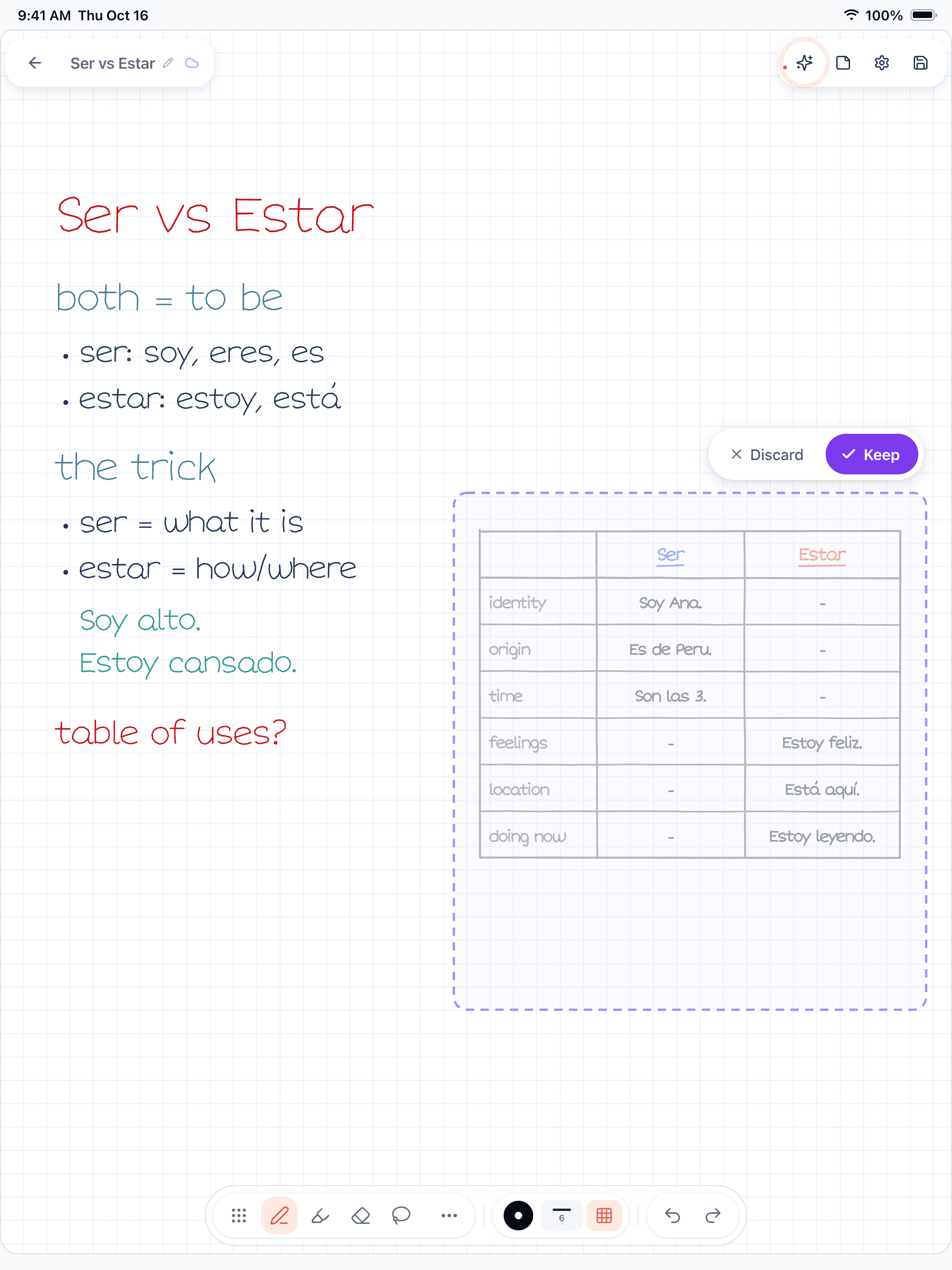
Figure 1. A Wren 1.5.4 page on iPad. The student wrote Spanish notes on ser and estar ending in "table of uses?" and paused; Wren's AI drafted a table of uses with example sentences in ink, with Discard and Keep.
Where Wren runs:
- iPad and iPhone apps. On iPad, write with Apple Pencil and the AI ink is drawn in a style matched to your handwriting, so it reads as part of your note.
- The Wren web app, in any current browser. Open web.wrenapp.ai on a Windows laptop, a Chromebook, an Android tablet or a Mac. Type or sketch on a whiteboard page with a mouse, touchscreen or stylus, pause, and the AI answers in ink. On the web the ink is not drawn in your own handwriting; that part is the iPad app. It is the same account and the same notes as the iPad app, and one Pro plan covers both.
Wren is not a lecture recorder or a class notebook. If recording lectures is the job, Notability does it well; if your class runs on OneNote, keep OneNote for that. If the moment you care about is "I'm stuck on this problem and want to see it worked out on my page," open Wren on the web, write the problem and pause.
On a Windows laptop or Chromebook, start with Wren on Windows, Chromebook and Android. Comparing more apps? Read Goodnotes vs OneNote and Goodnotes vs Notability. Already on Notability? See how Wren's AI ink compares in Wren vs Notability.
Make it yours in Wren
Watch Wren's AI draw the water cycle in ink, save the page to your own notes, then ask ChatGPT or Claude to add a page to your language notes.
TRY IT ON A REAL PAGE
Watch Wren's AI write the page. Then make it yours.
Wren’s AI writes this page in real ink, stroke by stroke. Save it to your Wren notes and keep writing on it, on the web or on iPad.
Wren’s AI writes the page here.
Make it yours.
This is real ink, not a picture. Save it to your Wren notes and it becomes your page.
- Write your own notes next to it
- Erase or move any line, box or diagram
- Ask Wren's AI to explain or extend it
Free to start. One account for Wren on the web and on iPad. More pages to try
ASK CHATGPT OR CLAUDE
Ask your AI. It writes in Wren.
Connect Wren to ChatGPT or Claude once. Then ask in the chat, and Wren writes the page into your notebook in ink, ready to edit on the web or on iPad.
Paste this into ChatGPT or Claude
Add a page to my Spanish note in Wren with a table of when to use ser and estar, with example sentences
- Connect WrenAdd the Wren plugin in ChatGPT, or add Wren as a custom connector in Claude. Sign in to Wren with your email or Google.
- Paste the promptYour AI finds the note by its title or subject, or starts a new one, and Wren writes the page.
- Keep writingOpen the note in Wren. The page is real ink: write next to it, erase or move any part.
Your AI sees note titles, subjects and page lists, not the writing on your pages. It adds pages and can redo pages Wren wrote; it never changes what you wrote. The ChatGPT plugin is available in the US and Canada.
Sources
Checked on November 15, 2026. Prices are US list prices before tax.
Notability (Ginger Labs)
- Notability pricing and compare plans: plans, AI by plan, platform notes
- Notability subscription FAQ: what each plan includes
- Recording and playing audio
- Notability Learn: features, plans, managed devices
- Syncing notes across devices with Notability Cloud
- Notability for Android FAQ (October 7, 2026)
- Notability for Windows and Mac (August 25, 2026)
- Notability Web App FAQ (August 25, 2026)
Microsoft OneNote
- Microsoft OneNote on the App Store (iPad and iPhone), on the Mac App Store and on Google Play: free apps
- OneNote for the web
- OneNote for education: Office 365 Education, Class Notebooks
- Take handwritten notes in OneNote and OneNote for iPad or iPhone: handwriting to text by platform
- Math Assistant in OneNote
- Insert PDF printouts into notes
- Record audio or video notes and Transcribe your recordings
- Welcome to Copilot in OneNote
Frequently asked questions
Is Notability or OneNote better for students?
Neither is better for every student. Notability suits students who record lectures on an iPad, want the audio tied to what they wrote, and want AI summaries, quizzes and flashcards. OneNote suits students who want a free notebook on Windows, Mac, iPad, Android and the web, type a lot, or get Microsoft 365 through their school.
Is Notability free like OneNote?
Partly. Notability's free Starter plan includes 5 notes, Notability Cloud sync, audio recording and all editing tools. Paid plans are Lite at $14.99 a year, Plus at $19.99 and Pro at $99.99 (US list prices, November 2026), and the AI study tools start at Plus. The OneNote app is free with a Microsoft account.
Can I use Notability on a Windows laptop?
Yes, two ways. The Notability Web App runs in all major browsers and works best on a desktop browser. The Notability desktop app for Windows and Mac records meeting or class audio, turns it into a transcript and combines it with the notes you type. OneNote has a full native Windows app for typing and handwriting.
Which is better for recording lectures?
Notability, if you write on an iPad. Its recordings are linked to your notes, so you can tap anything you wrote to jump to that moment, and recording is on the free plan. OneNote for Windows also links notes to an audio recording, and Transcribe turns recordings into text with a Microsoft 365 subscription.
Do Notability and OneNote have AI?
Yes. Notability Learn makes summaries, quizzes, flashcards and fill-in-the-blank exercises from your notes, PDFs and recordings, on Plus (limited) and Pro (unlimited). Copilot in OneNote summarizes notes, makes task lists, drafts text and answers questions, and needs a Copilot license or an eligible Microsoft 365 plan.
Is there a note app where AI answers in ink on the page?
Wren does this. Write or sketch a problem, pause, and Wren's AI adds a graph, a formula, a diagram or the next step in ink on the same page, which you keep or discard. Wren runs on iPad and iPhone, and in any current browser as the Wren web app, including on Windows and Chromebooks.