Goodnotes vs OneNote: which is better for students?
Goodnotes and OneNote come at note-taking from opposite ends. OneNote is Microsoft's free digital notebook: it runs almost everywhere, mixes typing, ink, audio and files on open pages, and comes with the Microsoft 365 account many schools hand out. Goodnotes is a handwriting-first app with a small free plan, built around writing on a tablet and marking up PDFs, and it now runs on Windows, Android and the web too.
We checked every fact below against Microsoft's and Goodnotes' own pages in November 2026 and linked the source next to it. Prices are US list prices and change often, so check them before you pay.
One disclosure: we make Wren, a third note app. We kept Wren out of the head-to-head and gave it its own section near the end.
The short answer
Pick OneNote if:
- You want a capable notebook for free on almost any device. The OneNote app is free with a Microsoft account on Windows, Mac, iPad, iPhone, Android and the web, and the App Store listing puts it plainly: "OneNote is free on iPhone and many other devices."
- Your school uses Microsoft 365. Microsoft says eligible students and educators get Office 365 Education free, including OneNote, with a valid school email, and teachers can hand out work through OneNote Class Notebooks.
- You type as much as you write, and like filing notes as notebook, section and page.
- You record lectures on a Windows laptop. OneNote for Windows links what you write to an audio recording, and Transcribe turns recordings into text with a Microsoft 365 subscription.
Pick Goodnotes if:
- You mostly write by hand on an iPad and want it to feel like paper. Goodnotes is built for the tablet: rest your hand, cross out to erase, convert to text.
- You annotate a lot of PDFs and lecture slides and want to hand back a marked-up PDF.
- You want your handwriting turned into text on an iPad. Goodnotes converts and searches handwriting on every plan; Microsoft says OneNote for iPad does not currently support converting handwriting to text.
- You want AI help with handwritten math. Lasso a problem and Goodnotes AI for Math will Solve it step by step or Teach Me with guided questions.
If both lists describe you, you can use both: OneNote for a shared class notebook, Goodnotes for your own handwritten notes. Still choosing by device? The best note-taking apps for students guide starts from the laptop or tablet you have.
Goodnotes vs OneNote at a glance (November 2026)
| Goodnotes | OneNote | |
|---|---|---|
| Price (US) | Free plan (3 files); Essential $11.99/yr; Pro $35.99/yr; AI Pass add-on $9.99/mo | Free app with a Microsoft account; Math Assistant and Transcribe need Microsoft 365; Copilot needs a Copilot license or eligible Microsoft 365 plan |
| Apple devices | iPad, iPhone and Mac | iPad, iPhone and Mac |
| Windows | Windows app (Microsoft Store) | OneNote for Windows |
| Android and Chromebook | Android app for tablets and Chromebooks | Android app |
| Web | Goodnotes for Web | OneNote for the web |
| Handwriting to typed text | Convert handwriting to text, every plan | Ink to Text on Windows; not in OneNote for iPad or the web |
| PDFs and slides | Import, write and highlight on the pages, export the annotated PDF | Insert a PDF as a printout: each page becomes an image you write over |
| Audio | Records in notebooks (20 minutes on the free plan, unlimited on paid plans); transcription of recordings on iOS | OneNote for Windows records audio linked to your notes; Transcribe on Windows with Microsoft 365 (300 minutes of uploads a month) |
| Organization | Folders of notebooks, whiteboards and text documents | Notebooks, sections and pages |
| AI | Goodnotes AI: questions and quizzes about your notes (5 a month on the free plan), AI for Math, handwriting spellcheck; Meeting AI and Create Mode on Pro | Copilot in OneNote: summaries, task lists, drafts and chat; Math Assistant for handwritten equations |
| Sync | iCloud between Apple devices; Goodnotes Cloud across Apple, Windows, Android and web on Pro | OneDrive, through your Microsoft account |
| School accounts | Free education plan; classroom tools unlock when the school sets up an admin console | Office 365 Education free for eligible students and teachers; Class Notebooks |
Every row is sourced in the list at the end of this article.
Price: free notebook vs paid handwriting app
OneNote costs nothing to install and use with a free Microsoft account, and your notebooks live in OneDrive. Paid Microsoft plans add extras on top: Math Assistant "is only available if you have a Microsoft 365 subscription", Transcribe needs one too, and Copilot has its own license rules (see the AI section). If your school gives you Office 365 Education, check what your school's plan includes before you buy anything.
Goodnotes is free to try and paid to live in. On its pricing page the free plan holds 3 files and 20 minutes of audio recording, Essential is $11.99 a year with unlimited files, and Pro is $35.99 a year with cross-platform sync, real-time collaboration and more AI. The optional AI Pass adds $9.99 a month for the full AI experience. Every plan and limit is in our Goodnotes price guide.
Devices: iPad, Windows, Android, Chromebook and the web
Both apps now reach every major platform, but they don't behave the same everywhere.
- OneNote has apps for Windows, Mac, iPad, iPhone and Android, plus OneNote for the web. Several features are platform-specific: Ink to Text and Transcribe are documented for Windows, and Copilot with a home Microsoft 365 plan works in OneNote for Windows only.
- Goodnotes runs on iPad, iPhone and Mac, has a Windows app and an Android app for tablets and Chromebooks, and Goodnotes for Web. Goodnotes itself notes that the experience is not completely identical across platforms, and whole-library sync between Apple and non-Apple devices is a Pro feature.
If a Windows laptop or Chromebook is your main computer and an iPad is your second device, OneNote syncs the same notebooks to both for free. Goodnotes does it too, on Pro. For more apps that run on Windows and iPad, see our OneNote alternatives.
Handwriting on an iPad
This is where Goodnotes earns its price. It is built for writing on a tablet, converts handwriting to typed text on every plan, checks the spelling of your handwriting, and searches what you wrote. Its newest tool, Restyle, turns messy handwriting into a cleaner style without rewriting it, free on Apple devices.
OneNote handles ink well enough for class notes: you can write and sketch with Apple Pencil on any page. The limits show up after you write. On Windows you can select handwriting and choose Ink to Text; that option is "not available in OneNote for Web", and Microsoft says OneNote for iPad does not currently convert handwriting to text. For handwritten equations, Math Assistant converts ink to typed math in OneNote for Windows, iPad and the web, with a Microsoft 365 subscription.
PDFs, slides and readings
If your professor posts slides as PDFs, Goodnotes is the smoother tool. You import the file, write and highlight directly on its pages, and export the annotated version as a PDF when you're done.
OneNote takes a different route. You insert a PDF as a printout: each page becomes an image on a OneNote page, and you write and type around and over it. It works, and it keeps the slides next to your typed notes, but the result is a OneNote page rather than an annotated copy of the original PDF.
Organizing a semester of notes
OneNote files everything as notebook, section and page, like a binder with tabs. A page is open space for typing, ink, pictures, files and audio, which suits mixed notes and long reference notebooks.
Goodnotes organizes a library of folders and subfolders holding notebooks, whiteboards and text documents. Each notebook keeps its page structure and paper template, which suits one notebook per course and a PDF per reading.
Recording lectures
OneNote for Windows can record audio on a page, and anything you write during the recording is linked to that moment. With a Microsoft 365 subscription, Transcribe turns a recording into a transcript and replays the ink you wrote in sync; it is Windows-only, and Microsoft 365 subscribers can transcribe up to 300 minutes of uploaded audio a month.
Goodnotes records audio inside notebooks on every plan (20 minutes on the free plan, unlimited on paid plans) and lists transcription of recorded audio as an iOS feature. Its April to June 2026 update added control over how your handwriting plays back with a recording.
AI: Goodnotes AI vs Copilot in OneNote
Goodnotes AI lives inside your notes. It answers questions about them, makes quizzes, summarizes notes and supported recordings, and helps with handwritten math: lasso a problem, confirm how it read your writing, then pick Solve or Teach Me. On the pricing page handwriting spellcheck and Math AI are on every plan, questions and quizzes are capped at 5 a month on the free plan, and Meeting AI and Create Mode need Pro. Goodnotes also says its AI can turn ideas into diagrams and templates.
Copilot in OneNote summarizes sections or pages, turns notes into task lists, drafts and rewrites text, and answers questions in a chat. Microsoft's Copilot page says it is available with a Microsoft Copilot (work) license in OneNote on Windows, Mac, iPad and the web, and with an eligible Microsoft 365 subscription in OneNote for Windows only. On a school account, the license comes from your school, so ask what yours includes.
Pick by how you study
| If you… | Lean toward | Why |
|---|---|---|
| Want to pay nothing | OneNote | The app is free with a Microsoft account; Goodnotes' free plan holds 3 files. |
| Get Microsoft 365 through your school | OneNote | Office 365 Education includes OneNote, and teachers can use Class Notebooks. |
| Write most notes by hand on an iPad | Goodnotes | Built for the tablet, with handwriting-to-text and handwriting spellcheck on every plan. |
| Annotate slides and readings | Goodnotes | Write on the PDF itself and export the annotated copy. |
| Type and write in the same notes on a Windows laptop | OneNote | Native Windows app, open pages, Ink to Text on Windows. |
| Record lectures | Either | OneNote on Windows links ink to audio and transcribes with Microsoft 365; Goodnotes records in notebooks on every plan. |
| Want AI help with math homework | Goodnotes | AI for Math works from handwriting: Solve or Teach Me. |
| Want AI to draw the graph, diagram or next step on your page | Wren | Write or sketch, pause, and Wren's AI answers in ink on the same page. More below. |
A third option if you want AI to answer in ink
Goodnotes and OneNote are notebooks first, with AI in an assistant or a chat pane beside your notes. Wren starts from a different moment: you are halfway through a problem and want the answer on the page itself.
Write or sketch the problem and pause. Wren's AI reads the page and answers in ink right where you were working: a graph, a formula, a diagram, a comparison table or the next step of a solution. The answer arrives as a draft. Keep it, or discard it and the page stays exactly as you left it.
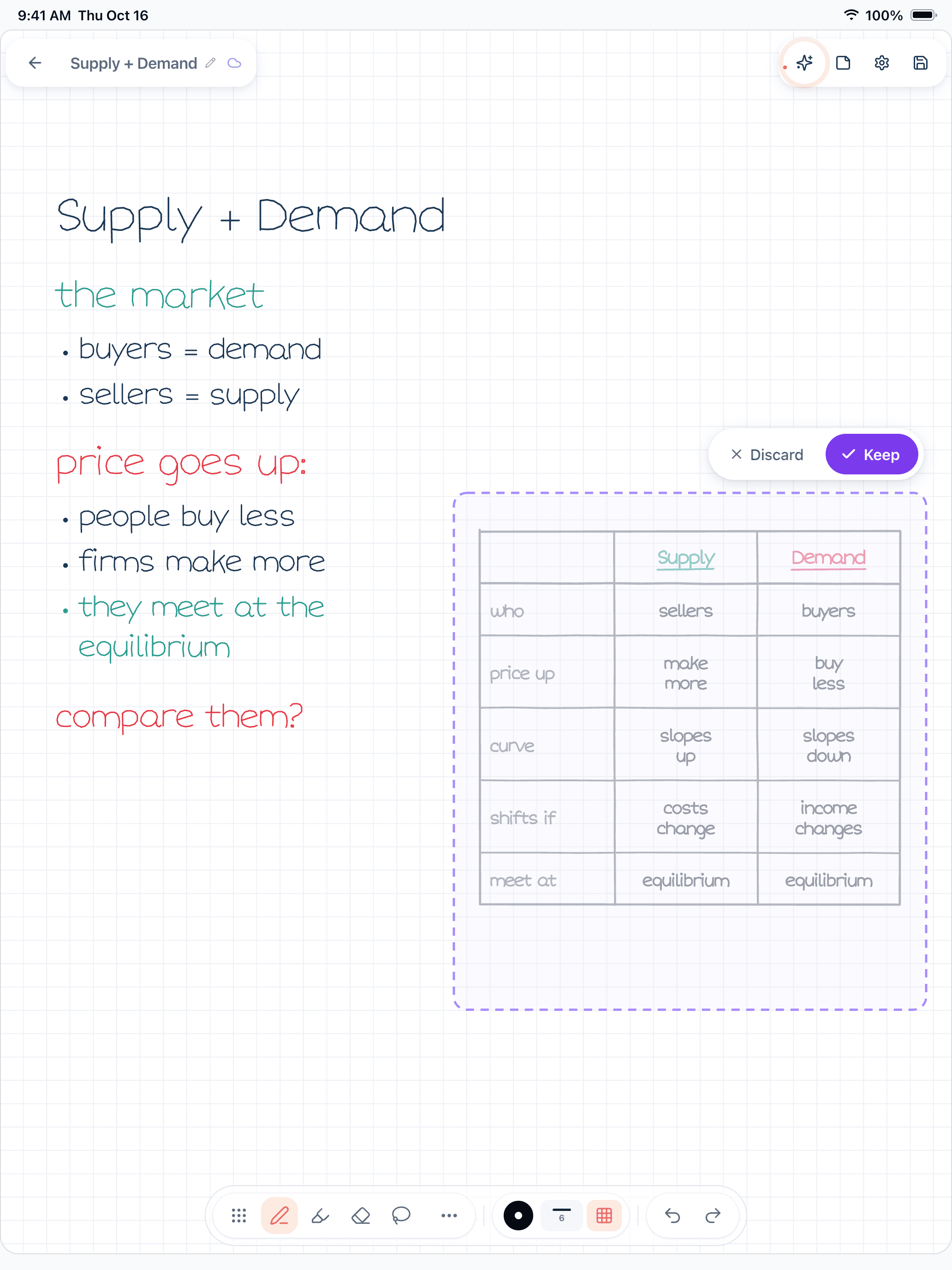
Figure 1. A Wren 1.5.4 page on iPad. The student wrote supply and demand notes ending in "compare them?" and paused; Wren's AI drafted a comparison table in ink beside the notes, with Discard and Keep.
Where Wren runs:
- iPad and iPhone apps. On iPad, write with Apple Pencil and the AI ink is drawn in a style matched to your handwriting, so it reads as part of your note.
- The Wren web app, in any current browser. Open web.wrenapp.ai on a Windows laptop, a Chromebook, an Android tablet or a Mac. Type or sketch on a whiteboard page with a mouse, touchscreen or stylus, pause, and the AI answers in ink. On the web the ink is not drawn in your own handwriting; that part is the iPad app. It is the same account and the same notes as the iPad app, and one Pro plan covers both.
Wren doesn't try to replace a class notebook. If your course runs on a OneNote Class Notebook, or you live in annotated PDFs, keep that tool for that job. If the moment you care about is "I'm stuck on this problem and want to see it worked out on my page," open Wren on the web, write the problem and pause.
On a Windows laptop or Chromebook, start with Wren on Windows, Chromebook and Android. Comparing more apps? Read Goodnotes vs Notability, Notability vs OneNote, and what each app's AI actually does in Goodnotes AI vs Notability AI. Already on Goodnotes? See how Wren's AI ink compares in Wren vs Goodnotes.
Make it yours in Wren
Watch Wren's AI write a history revision page in ink, save it to your own notes, then ask ChatGPT or Claude to add a page to a note you already have.
TRY IT ON A REAL PAGE
Watch Wren's AI write the page. Then make it yours.
Wren’s AI writes this page in real ink, stroke by stroke. Save it to your Wren notes and keep writing on it, on the web or on iPad.
Wren’s AI writes the page here.
Make it yours.
This is real ink, not a picture. Save it to your Wren notes and it becomes your page.
- Write your own notes next to it
- Erase or move any line, box or diagram
- Ask Wren's AI to explain or extend it
Free to start. One account for Wren on the web and on iPad. More pages to try
ASK CHATGPT OR CLAUDE
Ask your AI. It writes in Wren.
Connect Wren to ChatGPT or Claude once. Then ask in the chat, and Wren writes the page into your notebook in ink, ready to edit on the web or on iPad.
Paste this into ChatGPT or Claude
Add a page comparing supply and demand, with a table, to my Economics note in Wren
- Connect WrenAdd the Wren plugin in ChatGPT, or add Wren as a custom connector in Claude. Sign in to Wren with your email or Google.
- Paste the promptYour AI finds the note by its title or subject, or starts a new one, and Wren writes the page.
- Keep writingOpen the note in Wren. The page is real ink: write next to it, erase or move any part.
Your AI sees note titles, subjects and page lists, not the writing on your pages. It adds pages and can redo pages Wren wrote; it never changes what you wrote. The ChatGPT plugin is available in the US and Canada.
Sources
Checked on November 15, 2026. Prices are US list prices before tax.
Microsoft OneNote
- Microsoft OneNote on the App Store (iPad and iPhone), on the Mac App Store and on Google Play: free apps, Microsoft or school account sign-in
- OneNote for the web
- OneNote for education: Office 365 Education free for eligible students and educators, Class Notebooks
- Take handwritten notes in OneNote: Ink to Text, not in OneNote for the web
- Handwrite, draw, and sketch in OneNote for iPad or iPhone: no handwriting-to-text conversion on iPad
- Math Assistant in OneNote: Microsoft 365 subscription
- Insert PDF printouts into notes
- Record audio or video notes and Transcribe your recordings
- Welcome to Copilot in OneNote: licenses and platforms
Goodnotes
- Goodnotes pricing: plans, free plan limits, AI by plan, cross-platform sync, education plan
- Goodnotes features and Goodnotes AI
- Goodnotes AI for Math: Solve and Teach Me
- 8 OneNote alternatives (Goodnotes blog): platforms, PDF export
- Goodnotes for Windows and Goodnotes for Android, Windows and Web
- What's new in Goodnotes: April to June 2026 and July to September 2026: audio playback, Restyle
Frequently asked questions
Is OneNote or Goodnotes better for students?
Neither is better for every student. OneNote suits students who want a free notebook on Windows, Mac, iPad, Android and the web, type as much as they write, or get Microsoft 365 through their school. Goodnotes suits students who write by hand on an iPad and annotate a lot of PDFs and lecture slides.
Is OneNote really free?
Yes. The OneNote app is free with a Microsoft account, and notebooks sync through OneDrive. Some extras need a paid plan: Math Assistant and Transcribe need a Microsoft 365 subscription, and Copilot in OneNote needs a Copilot license or an eligible Microsoft 365 plan. Eligible students and teachers can get Office 365 Education, which includes OneNote, free with a school email.
Does Goodnotes work on Windows?
Yes. Goodnotes has a Windows app in the Microsoft Store, an Android app for tablets and Chromebooks, and Goodnotes for Web. Goodnotes says the experience is not identical on every platform, and syncing your whole library between an iPad and a Windows laptop needs Goodnotes Cloud on the Pro plan.
Can OneNote convert handwriting to text on iPad?
Not as of November 2026. Microsoft's help page says OneNote for iPad does not currently support converting handwriting to text, and the option is not available in OneNote for the web. OneNote for Windows has Ink to Text. Goodnotes converts handwriting to text on every plan.
Which is better for PDFs and lecture slides?
Goodnotes. You import a PDF, write and highlight on its pages, and export the annotated PDF. OneNote inserts a PDF as a printout, where each page becomes an image on a OneNote page that you write over.
Is there a note app where AI answers in ink on the page?
Wren does this. Write or sketch a problem, pause, and Wren's AI adds a graph, a formula, a diagram or the next step in ink on the same page, which you keep or discard. Wren runs on iPad and iPhone, and in any current browser as the Wren web app, including on Windows and Chromebooks.