Best Note-Taking App for Students in 2027, by Device
The best note-taking app for students is the one that fits the device you write on and the subjects you take. An engineering student with an iPad and Apple Pencil needs something different from a history student on a Chromebook, and most students use two devices anyway. So this guide starts there: device first, then subject, then budget and AI.
If you have already settled on an iPad and want app-by-app reviews, read our best note-taking app for iPad comparison instead. We make Wren and say so wherever it comes up; every other app is described from its maker's own pages, checked in November 2026.
The short answer
| If you... | Start with | Why |
|---|---|---|
| Write on an iPad with Apple Pencil and want AI help on the page | Wren | Write or sketch, pause, and AI answers in ink: a graph, a formula, a diagram or the next step. |
| Want one notebook library on iPad, Windows and Android | Goodnotes | Its own apps on every major platform, plus a web version. |
| Record lectures | Notability | Recordings stay linked to what you wrote. |
| Study on a Windows laptop with school Microsoft 365 | Microsoft OneNote | Free on every device, and often already part of your school account. |
| Study on a Chromebook | OneNote, Goodnotes, or Wren in the browser | Web and Android apps both work on most Chromebooks. |
| Only use Apple devices and want free | Apple Notes | Already installed; Math Notes solves what you write. |
| Need typed text from handwritten notes | MyScript Notes (formerly Nebo) | Converts handwriting, math and diagrams into editable text and shapes. |
Step 1: start with the device you write on
Your device decides more than any feature list, because an app that does not run on the machine you study on is not an option. Here is where each app runs, checked against each maker's site in November 2026:
| App | iPad | Windows | Chromebook | Mac | Android |
|---|---|---|---|---|---|
| Wren | App | Web app | Web app | Web app | Web app |
| Goodnotes | App | App | Android app | App | App |
| Notability | App | Web app; desktop app for typed notes and recordings | Web app | App | App (Android 12L or later) |
| Microsoft OneNote | App | App | Web or Android app | App | App |
| Apple Notes | App | iCloud.com in a browser | iCloud.com in a browser | App | No |
| MyScript Notes | App | App (as Nebo) | Not listed | Library on Apple silicon Macs | App |
iPad with Apple Pencil
This is the best setup for handwritten notes, and it has the most choice. Wren is the pick if you want AI that answers in ink on your page; Goodnotes and Notability are full notebooks with strong PDF and audio tools; Apple Notes is free. Our best note-taking app for iPad guide reviews nine apps one by one.
Windows laptop
For typing and the odd sketch with a mouse or touchscreen, OneNote is free and native. Goodnotes has a Windows app if you want the same notebooks as your iPad (syncing the whole library across Apple and Windows needs its Pro plan). Wren and Notability run in the browser; in the Wren web app you type or sketch on a whiteboard page, pause, and AI answers in ink, with the same notes as the iPad app.
Chromebook
Chromebooks run web apps and, on most models, Android apps. That opens OneNote (web or Android), Goodnotes (its Android app names Chromebooks), and Wren and Notability in the browser. If your Chromebook is managed by your school, check which Android apps it allows; the browser route always works.
Mac
Goodnotes, Notability, OneNote and Apple Notes all have Mac apps. Wren runs on a Mac in the browser as the Wren web app. If you write by hand on an iPad and type on the Mac, pick an app whose notes open in both places. Our best note taking apps for Mac page compares eight of them.
Android tablet
Goodnotes, Notability (Android 12L or later), OneNote, Noteshelf and MyScript Notes all have Android apps on Google Play. Wren has no Android app; use the Wren web app in Chrome.
Step 2: match the app to your subjects
Math, physics and engineering
These subjects are written, not typed: symbols, graphs, diagrams and multi-line working. Use a stylus device if you can. In Wren, write the problem, pause, and AI adds the graph or the next step of the solve in ink beside your working; you keep it only if it is right. Apple Notes' Math Notes is a free way to check arithmetic and graph an equation you write. If you have to hand in typed solutions, MyScript Notes converts handwritten math and exports LaTeX.
Biology, chemistry and other diagram-heavy sciences
You spend half the class drawing: cell structures, pathways, cycles, mechanisms. Look for an app that lets you write on the lecture slides and add diagrams fast. Goodnotes and Notability are strong for marking up slides; Wren adds diagrams, flowcharts, mind maps and tables in ink on your own page when you ask.
History, English, law and other reading-heavy courses
Here the work is reading, highlighting and writing paragraphs, so typing speed and PDF markup matter more than drawing. Goodnotes and Notability handle long PDFs well; OneNote is good for typed notes you organize by course and week. Many students type these notes on a laptop and keep the iPad for annotating readings. Weighing OneNote against a handwriting notebook? See Goodnotes vs OneNote and Notability vs OneNote.
Languages
Many learners practice new characters and accents by hand, so a stylus app earns its place, and handwriting search helps you find a word later. Pair the notes app with a flashcard app for vocabulary.
Lecture-heavy courses
If the professor talks fast and the slides are thin, record. Notability links recordings to what you wrote; Goodnotes, Noteshelf, CollaNote and OneNote also record audio. Check your course and campus rules before recording a class. Goodnotes vs Notability compares their recording, AI and sync side by side.
Step 3: decide what you will pay
- Free, no catch: Microsoft OneNote (every platform) and Apple Notes (Apple devices). Check whether your school already gives you Microsoft 365.
- Free to start, pay for more: Goodnotes (free plan up to 3 files), Notability (free plan with 5 notes), Noteshelf (3 notebooks), Wren (free to start), CollaNote and Freenotes.
- Pay once: Noteshelf and CollaNote sell a one-time upgrade; Goodnotes sells a one-time Special Edition on Apple devices.
- One plan, two devices: if you will use an iPad and a laptop, check that one plan covers both. Wren's Pro plan covers iPad and the web; Goodnotes needs Pro to sync one library across Apple and non-Apple devices.
Prices change often, and student discounts come and go, so check each maker's pricing page on the day you buy. Our Goodnotes price and Notability price guides list every plan and free-tier limit.
The best AI note-taking app for students: look at where the answer lands
"AI note-taking app" now covers very different features, so decide what you want the AI to produce before you compare apps:
- AI that adds to your page. You write the part you understand, and the AI fills in the missing piece where it belongs. In Wren, you write or sketch, pause, and AI answers in ink on the same page: a graph, a formula, a diagram or the next step of a solve. Each addition is a draft you keep or discard. Apple Notes' Math Notes does a narrower version of this for arithmetic and equations, showing the result in your handwriting.
- AI that studies your notes with you. Goodnotes AI answers questions and makes quizzes from your notes; Notability Learn makes summaries, quizzes and flashcards from notes, PDFs and recordings; MyScript Notes can summarize, explain and quiz; OneNote offers Copilot with an eligible Microsoft 365 license.
- AI that cleans up your handwriting. Apple's Smart Script tidies handwriting as you write, and MyScript Notes converts it into typed text.
Use AI to understand the material, not to skip it: ask for the graph, then explain to yourself why it looks that way; ask for the next step, then do the one after it on your own. Follow your course's rules on AI.
Note-taking apps vs other study apps
Search "study apps for students" and you get flashcard apps, planners, homework helpers and note apps in one list. They do different jobs, and you probably need two or three, not ten:
- A note-taking app is where the material lives: lecture notes, worked problems, diagrams, annotated slides. Everything else draws from it, so pick this one first, with the steps above.
- A flashcard or spaced-repetition app, such as Anki or Quizlet, for facts you must recall cold: vocabulary, formulas, dates, anatomy.
- A calendar or planner for deadlines and exam dates, ideally the one your phone already uses.
Some note apps now cover part of the second job with AI-made quizzes or flashcards from your notes; Goodnotes and Notability both describe study features like this on their own sites. If one app can hold your notes and test you on them, that is one fewer app to keep in sync. For picks in every category, from flashcards and focus timers to planners, math tools and AI tutors, see the best study apps for students, by job.
A two-device setup: iPad in class, laptop at home
Most students end up with this setup: an iPad on the desk in class for anything with symbols, graphs or diagrams, and a laptop at home for essays and reading. The note app has to follow you between them. Goodnotes and OneNote do it with their own apps on Windows and Android; Notability and Wren also do it in the browser. Here is how it works in Wren:
- In class, on iPad: write the problem or the lecture notes with Apple Pencil. When you hit a step you need, write the ask ("graph y = x³ - 3x", "next step") and pause. Wren's AI answers in ink on the page, and you keep it or discard it.
- At home, on any laptop: open the Wren web app in Chrome, Edge, Firefox or Safari and sign in with the same account. The notes from class are there, and edits sync both ways.
- Keep going on the laptop: type or sketch on a whiteboard page, pause, and AI answers in ink there too. Ask Wren a question about the open page when you want an explanation rather than ink.
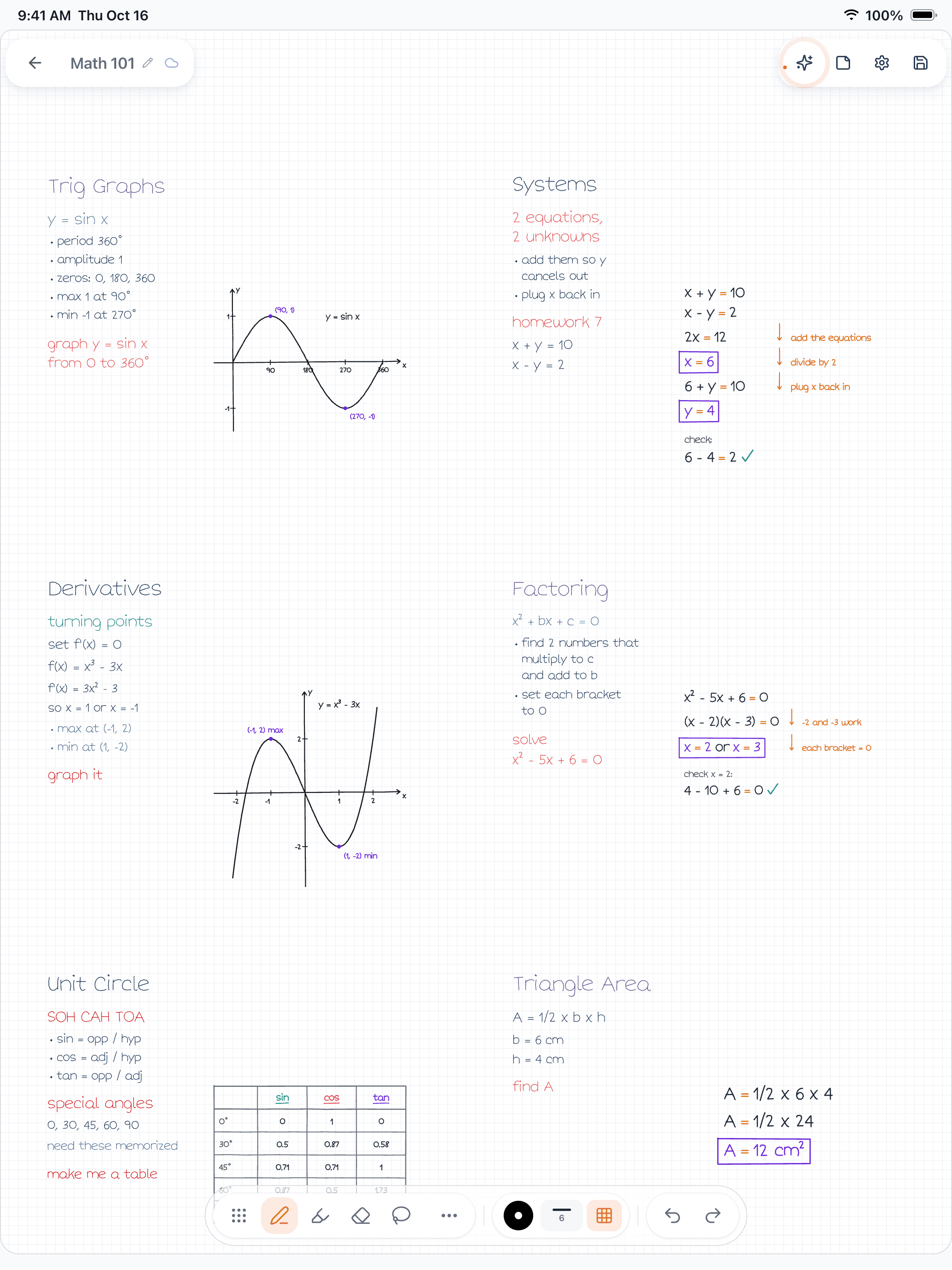
Figure 1. A real Wren 1.5.4 iPad board for a math course: notes on trig graphs, systems of equations, derivatives, factoring, the unit circle and triangle area, with AI ink graphs, a table and worked steps beside them.
One Pro plan covers iPad and the web, so a two-device setup does not mean two subscriptions. Writing in your own handwriting style is part of the iPad app; on the web, AI ink uses Wren's standard style. More on laptops in Wren on Windows, Chromebook and Android.
Make it yours in Wren
Test the AI part with a real page before you pick an app: watch Wren's AI write a biology comparison in ink and save it to your notes, see a pen pause on iPad, then have ChatGPT or Claude start a note for your own course.
TRY IT ON A REAL PAGE
Watch Wren's AI write the page. Then make it yours.
Wren’s AI writes this page in real ink, stroke by stroke. Save it to your Wren notes and keep writing on it, on the web or on iPad.
Wren’s AI writes the page here.
Make it yours.
This is real ink, not a picture. Save it to your Wren notes and it becomes your page.
- Write your own notes next to it
- Erase or move any line, box or diagram
- Ask Wren's AI to explain or extend it
Free to start. One account for Wren on the web and on iPad. More pages to try
PAUSE YOUR PEN
Write. Pause. Wren's AI answers on your page.
No chat window to copy from. Wren reads what is already on the page and adds the next part in ink, right where you are working.
- WriteOn iPad, write with Apple Pencil. On the web, type or sketch on a whiteboard page.
- PauseStop for a moment. Wren reads what is on the page.
- AI answers in inkWren's AI adds the graph, formula, diagram or next step on the same page, in ink you can edit.
Rather ask a question? On iPad, open Study Buddy: it reads the page and can add its answer in ink. On the web, Ask Wren answers questions about the open page.
ASK CHATGPT OR CLAUDE
Ask your AI. It writes in Wren.
Connect Wren to ChatGPT or Claude once. Then ask in the chat, and Wren writes the page into your notebook in ink, ready to edit on the web or on iPad.
Paste this into ChatGPT or Claude
Make a new Wren note called Biology with a one-page study sheet on cell respiration
- Connect WrenAdd the Wren plugin in ChatGPT, or add Wren as a custom connector in Claude. Sign in to Wren with your email or Google.
- Paste the promptYour AI finds the note by its title or subject, or starts a new one, and Wren writes the page.
- Keep writingOpen the note in Wren. The page is real ink: write next to it, erase or move any part.
Your AI sees note titles, subjects and page lists, not the writing on your pages. It adds pages and can redo pages Wren wrote; it never changes what you wrote. The ChatGPT plugin is available in the US and Canada.
Keep reading
- Best note-taking apps of 2027: twelve picks for every device, including typed-note apps such as Notion, Obsidian and Evernote.
- Best note-taking app for iPad: nine iPad apps reviewed one by one, with a comparison table.
- How Wren adds AI ink to handwritten notes: the write, pause, keep routine, step by step.
- Wren on Windows, Chromebook and Android: set up Wren on the laptop you already have.
- OneNote alternatives: apps to try instead of OneNote, with Windows, Chromebook and iPad picks.
Frequently asked questions
What is the best note-taking app for students?
It depends on the device you write on and the subject. On an iPad with Apple Pencil, Wren is the pick for AI that answers in ink, and Goodnotes or Notability for notebook-style notes and recorded lectures. On a Windows laptop or Chromebook, OneNote is free everywhere, Goodnotes has Windows and Android apps, and Wren and Notability run in the browser.
What is the best free note-taking app for students?
Microsoft OneNote is free on Windows, Mac, iPad, Android and the web, and many schools already provide Microsoft 365. Apple Notes is free on iPad, iPhone and Mac. Goodnotes, Notability and Wren are free to start, with paid plans for more.
What is the best AI note-taking app for students?
Pick by what you want the AI to produce. If you want a graph, a formula, a diagram or the next step of a solve added to your own page, Wren's AI answers in ink on the page and you keep or discard it. If you want summaries, quizzes or flashcards from notes or recordings, Goodnotes, Notability, OneNote and Apple Notes each document their own AI features.
Can I use Wren on a Chromebook or Windows laptop?
Yes, in the browser. Wren has no Windows or Android app; the Wren web app runs in any current browser with the same account and notes as the iPad app. You type or sketch on a whiteboard page, pause, and AI answers in ink.
Is it better to take notes by hand or by typing?
Both work; what matters is that you process the material rather than transcribe it. Many students write by hand on an iPad in class for math, diagrams and anything visual, and type on a laptop for essays and reading notes. Pick an app that follows you to both devices.