Best Study Apps for Students (2027), by Job
The best study app is not one app. Studying is several jobs: keeping notes, memorizing, staying focused, planning, checking math, getting unstuck and reading. Each has apps built for it, and most students need three or four of them, not twenty.
So this guide is organized by job. For each one we list two to four apps that do it well, with the devices they run on and how you pay. We make Wren, so we say that up front: it is listed under notes, for one specific job (AI that answers in ink on your notes page), and every other app is described from its maker's own site, help center or App Store listing, checked in November 2026. Prices change often, so we describe the price model and link the maker's page.
Our picks at a glance
- Notes: Wren for AI that answers in ink on your page; Goodnotes, Notability or Microsoft OneNote for a full digital notebook.
- Flashcards: Anki for free spaced repetition; Quizlet for ready-made sets and games; RemNote for notes and flashcards in one app.
- Focus: Forest for a phone-free timer; Freedom for blocking sites and apps on every device; or the Focus modes already on your phone.
- Planning: My Study Life for a class schedule with homework and exams; Notion for an all-in-one workspace; Google Calendar for deadlines.
- Math: Desmos and GeoGebra for graphing; Photomath and Wolfram|Alpha for checking steps.
- AI tutors: Gemini Notebook (formerly NotebookLM) for questions about your own files; ChatGPT's study mode and Khanmigo for guided help.
- Reading and PDFs: Zotero for sources and citations; LiquidText for pulling excerpts out of long readings; Adobe Acrobat Reader for free PDF markup.
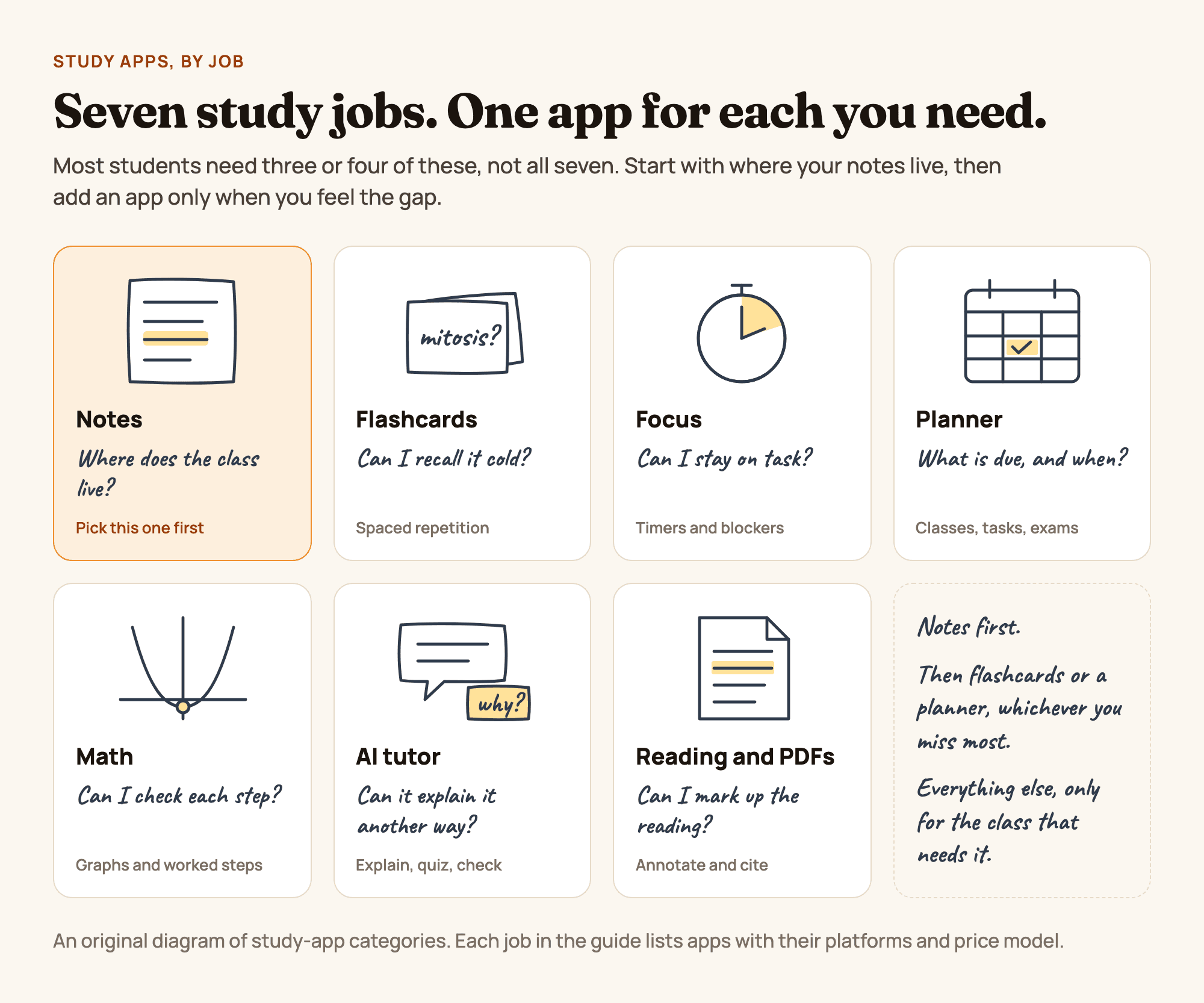
Figure 1. Seven study jobs, and the question each kind of app answers. An original diagram, not a product screenshot.
How we picked
- One job each. An app is listed under the job it does best, even if it does others too.
- Students actually use it. Every app here is a mainstream, maintained app with its own site or store listing.
- Devices. Many students study on an iPhone, an iPad and a Windows laptop or Chromebook in the same week, so we list where each app runs.
- Price model. Free, free tier with limits, subscription or one-time purchase. If an app has a useful free version, we say so.
- Facts from the maker. We used each app's official pages and store listings. If we could not confirm a feature, we left it out.
Study apps compared
| App | Job | Works on | Price model |
|---|---|---|---|
| Wren | Notes, AI that answers in ink | iPad, iPhone; web app in any browser | Free to start; one plan covers iPad and web |
| Goodnotes | Notes, digital notebook | iPad, iPhone, Mac, Windows, Android, web | Free (3 files); paid plans |
| Notability | Notes, lectures you record | iPad, iPhone, Mac, Android, web; desktop app for Windows and Mac | Free (5 notes); paid plans |
| Microsoft OneNote | Notes, free everywhere | iPad, iPhone, Mac, Windows, Android, web | Free; Copilot needs an eligible Microsoft 365 license |
| Anki | Flashcards, spaced repetition | Windows, Mac, Linux, Android, web; iPhone and iPad (paid app) | Free, except a one-time purchase on iPhone and iPad |
| Quizlet | Flashcards, ready-made sets | iPhone, iPad, Android, web | Free with limits; Quizlet Plus plans |
| RemNote | Notes plus flashcards | Web, desktop, iPhone, iPad, Android | Free; Pro and Pro with AI |
| Forest | Focus timer | iPhone, iPad, Android; Chrome and Firefox extension | Free; Forest Plus subscription |
| Freedom | Site and app blocker | Mac, Windows, iPhone, iPad, Android, Chromebook | Free tier; Premium yearly, monthly or lifetime |
| My Study Life | Study planner | Web, iPhone, Android | Free |
| Notion | Planner and workspace | Web, Mac, Windows, iPhone, iPad, Android | Free; Plus free for eligible college students |
| Desmos | Graphing calculator | Web, iPhone, iPad, Android | Free |
| GeoGebra | Graphing, geometry, 3D | Web, desktop, phones and tablets | Free for non-commercial use |
| Photomath | Step-by-step math help | iPhone, iPad, Android | Free; Photomath Plus |
| Wolfram|Alpha | Computation and math answers | Web, iPhone, iPad, Android | Free; step-by-step needs Pro |
| Gemini Notebook | AI that answers from your files | Web, iPhone, iPad, Android | Free; more with Google AI plans |
| Khanmigo | AI tutor | Web browser | Free for teachers; paid for learners and parents |
| Zotero | Sources, citations, PDFs | Mac, Windows, Linux, iPhone, iPad, Android | Free; optional paid storage |
| LiquidText | Active reading of PDFs | iPad, Mac, Windows | Free; paid upgrades |
| Adobe Acrobat Reader | Free PDF markup | Windows, Mac, iPhone, iPad, Android, web | Free; editing needs Acrobat Pro |
Platforms and price models from each maker's site and store listings, checked November 2026. Follow the links in each section for current prices.
Best note-taking apps for studying
Your notes are where every other study app draws from, so pick this one first. For a deeper comparison of note apps by device, see the best note-taking app for students and the best note-taking app for iPad.
Wren: best for AI that answers in ink on your notes
Wren is the note-taking app we make. You write or sketch on the page, pause, and Wren's AI answers in ink on that same page: write "graph y = x² - 4" and the parabola appears beside your notes, write the first line of an equation and the next step appears below it, or ask for a diagram, a formula, a mind map or a table and it is drawn where it belongs. Every addition arrives as a draft you keep or discard, so the page stays yours.
- Works on: iPad and iPhone, plus the Wren web app in any current browser (Windows, Chromebook, Mac, Android), with the same account and notes.
- Price model: free to start; one paid plan covers iPad and the web.
- Best for: math, science and any class where you get stuck on the next step, a graph or a diagram.
- Good to know: there is no Windows or Android app; on those devices you use the web app, where you type or sketch on a whiteboard page and AI answers in ink. Wren is not a spaced-repetition flashcard app; see the flashcard apps below.
See the routine step by step in how Wren adds AI ink to handwritten notes.
Goodnotes: best all-round digital notebook
Goodnotes is a full notebook app: notebooks and folders that feel like paper, strong PDF markup for slides and readings, and Goodnotes AI for questions and quizzes about your notes.
- Works on: iPad, iPhone and Mac, plus its own Windows and Android apps and Goodnotes for Web.
- Price model: free plan with up to 3 files, then paid plans (pricing). Syncing one library across devices needs the Pro plan.
- Best for: one tidy notebook library for every class, on almost any device.
Notability: best for lectures you record
Notability links an audio recording to what you write, so you can tap a line and hear what was said at that moment. Paid plans add AI study tools such as quizzes and flashcards made from your notes.
- Works on: iPad, iPhone and Mac, an Android app and a web app, plus a separate desktop app for Windows and Mac for typed notes and recordings.
- Price model: free Starter plan with 5 notes, then paid plans (pricing).
- Best for: lecture-heavy courses where you want to replay the explanation behind a line.
Torn between the two? See Goodnotes vs Notability.
Microsoft OneNote: best free note app on every device
OneNote is free on every major platform, and many schools already give students a Microsoft 365 account. Notebooks, sections and pages mix typing, handwriting, images and audio.
- Works on: iPad, iPhone, Mac, Windows, Android and the web (App Store).
- Price model: free; Copilot in OneNote needs an eligible Microsoft 365 license (Microsoft).
- Best for: students who switch between devices, or whose school runs on Microsoft 365.
Best flashcard and spaced repetition apps
Flashcard apps are for anything you must recall cold: vocabulary, formulas, dates, anatomy, definitions. The best ones use spaced repetition: they show you a card again just before you are likely to forget it, so you spend your time on the cards you do not know yet. How the method works, with a schedule you can follow on paper too: spaced repetition.
Anki: best free spaced repetition
Anki is a flashcard app built around spaced repetition. You write your own cards (or import shared decks), and its scheduler decides when you see each card again. Cards can hold images, audio and LaTeX math.
- Works on: Windows, Mac and Linux (free), Android as AnkiDroid (free), any browser through AnkiWeb (free), and iPhone and iPad as AnkiMobile, a one-time purchase with no subscription (Anki, App Store).
- Price model: free everywhere except iPhone and iPad.
- Best for: large amounts of material you need for months, such as a language or a medical course.
- Good to know: it looks plain and takes some setup; the payoff is in daily use.
Quizlet: best for ready-made sets and quick review
Quizlet lets you make flashcard sets or search sets made by other students and teachers, then study them as cards, in the Learn and Test modes, or as games.
- Works on: iPhone, iPad, Android and the web.
- Price model: free with limits and ads; paid Quizlet Plus plans remove ads and unlock more Learn rounds and practice tests (Quizlet).
- Best for: a class where someone has probably made the set already, and quick review on your phone.
- Good to know: a shared set can contain mistakes; check it against your notes before you trust it.
RemNote: best for notes and flashcards in one app
RemNote is a note-taking app where any line can become a flashcard, so your notes and your review deck stay in one place, with spaced repetition built in.
- Works on: web, desktop, iPhone, iPad and Android.
- Price model: free plan with unlimited notes and flashcards; Pro and Pro with AI add more PDF annotation, AI-made flashcards and quizzes, and more (pricing).
- Best for: students who type their notes and want to review them without copying cards into a second app.
Where Wren fits: in the Wren iPad app, the Flashcards agent turns a note or file you attach into a question-and-answer note: numbered questions with the answers in a key at the end, so you can cover them and quiz yourself. It is not spaced repetition and there are no flip cards, so for cards that schedule their own reviews, use one of the three apps above. For a no-app way to test yourself from your notes, try the blurting method.
Best focus apps and study timers
Forest: best for keeping your phone out of the way
Forest turns a focus session into a game: you plant a virtual tree that grows while you stay off your phone and withers if you leave the app. With Forest Plus, your focus time can also plant real trees through its partner Trees for the Future.
- Works on: iPhone, iPad and Android, plus a browser extension for Chrome and Firefox (Forest).
- Price model: free to download; Forest Plus subscription (App Store).
- Best for: study sessions where the phone is the main distraction.
Freedom: best for blocking sites and apps on every device
Freedom blocks the websites and apps you choose, on all your devices at once, for a session or on a schedule. Locked Mode makes it hard to stop a session early.
- Works on: Mac, Windows, iPhone, iPad, Android and Chromebook (on Chromebook it blocks websites, not apps).
- Price model: free tier; Premium adds schedules, Locked Mode and unlimited sessions, yearly, monthly or as a one-time lifetime purchase (pricing).
- Best for: students who lose study time to the same few sites on a laptop.
Built-in Focus modes: best free option
Your phone already has one. On iPhone and iPad, Focus silences chosen apps and people and can turn on automatically on a schedule. On Android, Focus mode in Digital Wellbeing pauses the apps you pick (availability depends on your phone).
- Price model: free, nothing to install.
- Best for: trying a distraction-free session before paying for anything.
Best study planner apps
My Study Life: best student planner
My Study Life is a planner built around school: your class timetable (including rotating and A/B schedules), homework and tasks, and countdowns to exams.
- Works on: web, iPhone and Android (My Study Life).
- Price model: free.
- Best for: keeping classes, homework and exams in one place on your phone.
Notion: best all-in-one workspace
Notion is a workspace for notes, to-do lists and databases you can shape into a semester planner, a reading tracker or a course hub. Templates do most of the setup.
- Works on: web, Mac, Windows, iPhone, iPad and Android.
- Price model: free plan; the Plus plan is free for students and teachers at eligible colleges and universities who sign up with their school email, re-verified each year. K-12 schools are not eligible (Notion).
- Best for: college students who like to build their own system.
- Good to know: a blank workspace can take a while to set up; start from a template.
Google Calendar: best for deadlines
Put every exam, due date and study session in the calendar your phone already uses, with reminders. Google Calendar is free on the web, iPhone and Android, and your school account may already include it.
- Best for: students who just need deadlines to stop sneaking up on them.
Best math apps for students
Use math apps to check your work and see the shape of a problem, not to skip the steps you will need on the test.
Desmos: best free graphing calculator
Type a function and Desmos graphs it instantly, with sliders to see what each number changes, tables and points.
- Works on: web, iPhone, iPad and Android (App Store).
- Price model: free.
GeoGebra: best for geometry, 3D and calculus
GeoGebra's Calculator Suite combines graphing, geometry, 3D, probability and a computer algebra system in one app.
- Works on: the web, desktop, and phones and tablets (GeoGebra).
- Price model: free for non-commercial use.
Photomath: best for seeing the steps of a problem
Point your phone at a printed or handwritten problem and Photomath, now owned by Google, shows the answer with steps. Photomath Plus adds animated tutorials and textbook solutions.
- Works on: iPhone, iPad and Android (App Store).
- Price model: free; Photomath Plus subscription.
- Good to know: check your work with it after you try the problem, not before.
Wolfram|Alpha: best for computation beyond homework
Wolfram|Alpha computes answers to math, science and data questions, from integrals to unit conversions. Step-by-step solutions need a Pro subscription, with a discounted plan for students (Wolfram|Alpha Pro).
- Works on: web, iPhone, iPad and Android.
- Price model: free; Pro for step-by-step solutions.
Writing the math yourself? On iPad, Apple's built-in Math Notes solves and graphs expressions you write. In Wren, you write the problem and pause, and the AI adds the graph or the next step in ink beside your work; how to take math notes covers the page layout that makes this work.
Best AI study apps and tutors
AI is useful for studying when it makes you do the thinking: asking you questions, explaining a step another way, or answering only from your own course material. Check your course's rules on AI first, and see the best AI for studying, and how to use it without cheating.
Gemini Notebook (formerly NotebookLM): best for questions about your own files
Google's NotebookLM is now called Gemini Notebook. Upload your PDFs, slides, websites, YouTube videos or text, and it answers questions about them with citations to the exact source, makes flashcards and quizzes, and turns the material into Audio Overviews, podcast-style discussions you can listen to.
- Works on: web, iPhone, iPad and Android (App Store).
- Price model: free; higher limits with Google AI Plus and Pro plans (Google).
- Best for: a reading-heavy course where the answer must come from the assigned material.
ChatGPT study mode: best for guided practice in a chatbot
OpenAI's study mode makes ChatGPT ask guiding questions and check your understanding instead of giving the answer straight away. OpenAI introduced it in July 2025 for logged-in users on its Free, Plus and Pro plans (OpenAI).
- Works on: web, desktop and mobile apps.
- Best for: working through a concept step by step when you already use ChatGPT.
Khanmigo: best AI tutor for school subjects
Khanmigo is Khan Academy's AI tutor. It guides students toward an answer with questions rather than doing the work for them, alongside Khan Academy's lessons and practice.
- Works on: in a web browser.
- Price model: free for teachers; a monthly or yearly subscription for learners and parents (Khanmigo).
- Best for: middle and high school students working through Khan Academy courses.
Where Wren fits: Wren's AI is not a chatbot beside your notes. It answers on your notes page, in ink, with the graph, formula, diagram or next step you asked for, and you keep or discard it.
Best apps for reading and PDFs
Zotero: best for sources and citations
Zotero saves articles, books and web pages from your browser with a click, keeps their PDFs, and formats citations and bibliographies in Word or Google Docs. Its built-in PDF reader lets you highlight and add notes.
- Works on: Mac, Windows, Linux, iPhone, iPad and Android, with browser connectors for Chrome, Firefox, Edge and Safari (Zotero).
- Price model: free; optional paid storage.
- Best for: research papers and essays with a reference list.
LiquidText: best for active reading of long PDFs
LiquidText lets you pull excerpts out of a PDF onto a workspace beside it, link them back to the page they came from, and compare passages from different parts of a document.
- Works on: iPad, Mac and Windows (LiquidText).
- Price model: free version; paid upgrades as a subscription or a one-time purchase.
- Best for: law, humanities and research reading where you connect passages.
Adobe Acrobat Reader: best free PDF markup
The free Acrobat Reader opens any PDF and lets you highlight, comment, add sticky notes and draw on it. Editing the text itself needs the paid Acrobat Pro.
- Works on: Windows, Mac, iPhone, iPad, Android and the web (Adobe).
- Price model: free.
Best free study apps
A complete study setup can cost nothing:
- Notes: Microsoft OneNote, or Apple Notes on an iPhone, iPad or Mac.
- Flashcards: Anki on Windows, Mac, Linux, Android or the web.
- Focus: the Focus modes on your phone.
- Planning: My Study Life or Google Calendar.
- Math: Desmos and GeoGebra.
- Reading: Zotero and Adobe Acrobat Reader.
Wren, Goodnotes, Notability, Quizlet, RemNote, Forest, Freedom and Gemini Notebook are free to start, with paid plans for more.
How to build your study app stack
Start from your hardest class and your biggest problem, not from the longest list:
| If you are... | Start with |
|---|---|
| Taking math, physics or engineering | A note app where you can write equations (Wren, Goodnotes or OneNote), plus Desmos |
| Memorizing a lot: languages, anatomy, law | Your note app, plus Anki or Quizlet |
| Reading-heavy: history, English, research | Zotero or LiquidText, plus Gemini Notebook for questions about the readings |
| Losing track of deadlines | My Study Life or Google Calendar, filled in at the start of term |
| Losing time to your phone | Focus mode first, then Forest or Freedom |
| On a Windows laptop or Chromebook | OneNote, Goodnotes or Wren in the browser, plus Anki on the web |
Whatever you pick, the app only helps if it changes how you study: notes you test yourself on, cards you actually review, a calendar you actually check. For iPad-specific picks, see the best apps for Apple Pencil; for the notes themselves, see how to take notes and note-taking methods; and for the techniques that make study time count, how to study effectively.
Make it yours in Wren
Try the note-taking part of your stack on a real page: watch Wren's AI write a study page in ink and save it to your own notes, see a pen pause on iPad, then ask ChatGPT or Claude to add a page to a note.
TRY IT ON A REAL PAGE
Watch Wren's AI write the page. Then make it yours.
Wren’s AI writes this page in real ink, stroke by stroke. Save it to your Wren notes and keep writing on it, on the web or on iPad.
Wren’s AI writes the page here.
Make it yours.
This is real ink, not a picture. Save it to your Wren notes and it becomes your page.
- Write your own notes next to it
- Erase or move any line, box or diagram
- Ask Wren's AI to explain or extend it
Free to start. One account for Wren on the web and on iPad. More pages to try
PAUSE YOUR PEN
Write. Pause. Wren's AI answers on your page.
No chat window to copy from. Wren reads what is already on the page and adds the next part in ink, right where you are working.
- WriteOn iPad, write with Apple Pencil. On the web, type or sketch on a whiteboard page.
- PauseStop for a moment. Wren reads what is on the page.
- AI answers in inkWren's AI adds the graph, formula, diagram or next step on the same page, in ink you can edit.
Rather ask a question? On iPad, open Study Buddy: it reads the page and can add its answer in ink. On the web, Ask Wren answers questions about the open page.
ASK CHATGPT OR CLAUDE
Ask your AI. It writes in Wren.
Connect Wren to ChatGPT or Claude once. Then ask in the chat, and Wren writes the page into your notebook in ink, ready to edit on the web or on iPad.
Paste this into ChatGPT or Claude
Add a table comparing mitosis and meiosis to my Biology note in Wren.
- Connect WrenAdd the Wren plugin in ChatGPT, or add Wren as a custom connector in Claude. Sign in to Wren with your email or Google.
- Paste the promptYour AI finds the note by its title or subject, or starts a new one, and Wren writes the page.
- Keep writingOpen the note in Wren. The page is real ink: write next to it, erase or move any part.
Your AI sees note titles, subjects and page lists, not the writing on your pages. It adds pages and can redo pages Wren wrote; it never changes what you wrote. The ChatGPT plugin is available in the US and Canada.
Your AI writes the page into that note as handwritten-style ink. It can list your notes by title, create notes, add pages, plan notebooks, draw figures and redo pages Wren wrote. It cannot read or change your own writing. Setup is in the Wren connector docs.
Keep reading
- Best note-taking app for students, by device: picks for iPad, Windows, Chromebook and Mac.
- Best note-taking app for iPad: nine iPad apps compared.
- Wren on Windows and Chromebook: use Wren on the laptop you already have.
- Compare note-taking apps: every app guide on one page.
Frequently asked questions
What is the best study app?
There is no single best study app, because studying is several jobs. Pick one app per job you actually need: a note-taking app such as Wren, Goodnotes, Notability or OneNote first, then a flashcard app such as Anki or Quizlet, and add a planner, a focus timer, a math tool or an AI tutor only for the gap you feel.
What are the best free study apps?
Anki is free on Windows, Mac, Linux, Android and the web (only the iPhone and iPad app is paid). Microsoft OneNote, Desmos, GeoGebra, Zotero, My Study Life, Google Calendar and Adobe Acrobat Reader are free, as are the Focus modes built into iPhone, iPad and Android. Wren, Goodnotes, Notability, Quizlet, RemNote, Forest, Freedom and Gemini Notebook have free tiers or are free to start.
Is Anki free on iPhone?
No. Anki is free on Windows, Mac and Linux, AnkiDroid is free on Android, and AnkiWeb is free in a browser, but AnkiMobile for iPhone and iPad is a one-time purchase with no subscription. All of them sync the same decks through a free AnkiWeb account.
What is the best AI app for studying?
It depends on what you want the AI to do. Gemini Notebook (formerly NotebookLM) answers from the files you upload, with citations. ChatGPT's study mode and Khanmigo ask guiding questions instead of handing over answers. Wren's AI answers in ink on your own notes page, as a graph, a formula, a diagram or the next step, which you keep or discard.
Does Wren make flashcards?
Not spaced-repetition flashcards. In the Wren iPad app, the Flashcards agent turns a note or file you attach into a question-and-answer note: numbered questions with the answers in a key at the end, so you can cover them and quiz yourself. For flip cards that schedule reviews for you, use Anki, Quizlet or RemNote.
How many study apps do I need?
Usually three or four: a note-taking app, a flashcard app, and a calendar or planner, plus a math or reading tool if your classes need one. More apps means more places to check, so add one only when you notice a gap.