How to Take Math Notes: Methods, Examples and Tools
Math notes are not like notes for other classes. A week later you won't need the lecture's sentences; you'll need the moves: how a problem was set up, what happened at each step and why. So the goal of a math page is a set of worked examples you can cover up and redo.
Here is a method that works on paper, an iPad or a laptop, with an example you can copy. We make Wren, a note app where AI answers in ink on your page; it comes in near the end, as one way to do the digital part.
The short version
- One notebook per course. Start every page with the date and the topic.
- Copy every worked example in full, including the steps the teacher only says out loud.
- Write the reason beside each step in a narrow column.
- Give each color one job: one for the working, one for notes on the moves, one for the answer.
- Sketch the graph or the diagram, even roughly.
- Keep a formula sheet and an error log in fixed places.
- Within a day, cover the steps and redo one example yourself.
Set up the page before class
- Header first. Date, course and topic at the top, so you can find "the day we did factoring" in seconds.
- Leave a margin column. A column about a third of the page wide, on the right, is where the reasons go.
- Use grid or dot paper. It keeps the equals signs lined up down the page and makes quick graphs easier.
- Leave room after each example. A few blank lines under every example are where you redo it later.
Copy the worked examples, not just the rules
Definitions and theorems matter, but most of what you do on a test is the steps of a worked example. For every example, write:
- The problem, exactly as given.
- Every step, one per line, with the equals signs lined up.
- The answer, boxed.
- A check: substitute the answer back in, or test whether it is a sensible size.
Teachers often skip a step on the board and say it out loud ("now move the 3 across"). Write that step down. It is usually the step you'll forget.
Use two columns: the step and the why
Split the example into what you did and why you did it. Here is a factoring example set up that way:
| Step | Why |
|---|---|
| x² − 5x + 6 = 0 | Given. A quadratic in the form x² + bx + c = 0. |
| (x − 2)(x − 3) = 0 | Find two numbers that multiply to 6 and add to −5: −2 and −3. |
| x − 2 = 0 or x − 3 = 0 | A product is 0 only if one of its factors is 0. |
| x = 2 or x = 3 | Solve each bracket. Box this. |
| Check x = 2: 4 − 10 + 6 = 0 ✓ | Substitute back in. |
Some students add a third column on the left for the type of problem ("factor a quadratic", "solve a system"). That turns your notes into an index of problem types, which is exactly what you scan before a test. It is the Cornell notes layout adapted for math: cover the steps, and the problem type becomes the question.
Give each color one job
Color helps when every color means the same thing on every page:
- Dark ink for the problem and the working.
- One accent color for notes on the moves: "add the equations", "divide by 2".
- One more color, or a box, for the final answer.
- Red only for warnings and mistakes, such as "don't divide both sides by x, you lose x = 0".
Stop at three or four. A page in eight colors is harder to read than one in black.
Sketch the graph, even a rough one
A rough sketch of axes, intercepts, turning points and asymptotes tells you whether an answer makes sense. If you found two roots, the parabola should cross the x-axis twice. If your sketch shows it never crosses, one of you is wrong. In geometry, physics and trig, draw the diagram before you write a single equation and label everything you know on it.
Keep a formula sheet as you go
Use the last pages of the notebook, or one page in your notes app. For every formula, write:
- the formula itself,
- what each letter stands for, with units,
- when it applies, and when it doesn't,
- one tiny worked example.
Add to it every week. A formula sheet written the night before a test is a list of symbols; one built over the term is a summary of the course.
Keep an error log
Every time you lose marks on homework or a quiz, add a row:
| Problem | What I did | Why it was wrong | Rule for next time |
|---|---|---|---|
| Solve 2(x − 3) = 10 | 2x − 3 = 10 | Didn't multiply the 2 through the bracket | Expand the bracket before moving terms |
| Differentiate x² sin x | 2x cos x | Used the chain rule, needed the product rule | Two functions multiplied: product rule |
After a few weeks, most students see the same two or three mistakes again and again: sign errors, a bracket not expanded, a question misread. Read the log before every test.
Abbreviations and symbols that save time
| Write | Means |
|---|---|
| ∴ | therefore |
| ∵ | because |
| ⇒ | implies |
| iff, ⇔ | if and only if |
| s.t. | such that |
| w.r.t. | with respect to |
| ∀ / ∃ | for all / there exists |
| WLOG | without loss of generality |
| ∎ or QED | end of proof |
Use the ones your teacher uses, and write a key on the inside cover until they're automatic.
Review within a day: cover it and redo it
The fastest review for math is active: cover the steps of one example, redo it on a blank space, then compare. Where you got stuck is what to ask about in the next class. Change the numbers in an example and you have a practice problem with a known method. If a step still feels like magic, explain it in plain words as if to a friend, the core of the Feynman technique. For how math notes fit with Cornell, outline and seven other methods, see note-taking methods compared.
Rewriting a whole page neatly only helps if you redo the math as you rewrite it. Copying it out again is mostly handwriting practice.
Before a test, build these redos into a plan: how to study effectively has a 7-day exam plan around the same cover-and-redo idea. Taking AP Calculus or AP Statistics? After a timed practice exam, the AP score calculator estimates your 1 to 5.
Taking math notes on an iPad or a laptop
On an iPad with Apple Pencil, you keep the speed of handwriting and gain undo, copy and paste and a lasso to move work around. Use a grid page, duplicate an example before you redo it, and keep one notebook per course as you would on paper. For the general setup, see how to take notes on iPad. Apple's built-in Math Notes can also solve an expression you write when you add an equal sign; our guide to Math Notes on iPad shows what it does and where it stops.
On a laptop, typing equations in class is slow. A touchscreen laptop with a pen lets you write instead. Some students write by hand in class and type the key results up afterwards, sometimes in LaTeX.
With Wren, on an iPad or in a browser, you write or sketch the problem on the page and pause. Wren's AI reads the page and adds what you asked for in ink: the worked steps of a solve, the graph of a function with its key points labeled, a diagram or the formula you half remember. Every answer arrives as a draft you keep or discard, so your notes only hold what you checked.
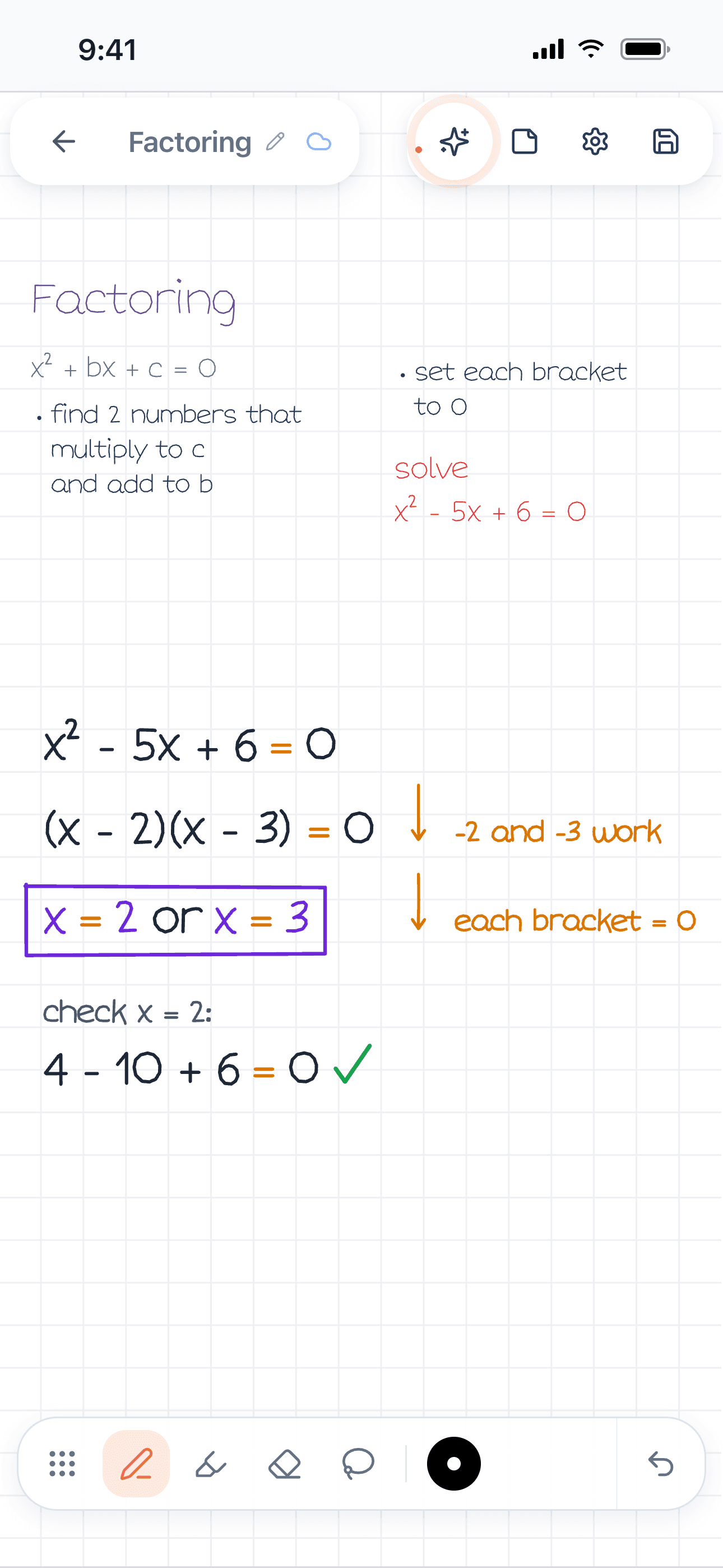
Figure 1. A Wren 1.5.4 page on iPhone. The student's factoring notes end with "solve x² − 5x + 6 = 0"; Wren's AI wrote the worked example in ink: the factored form, x = 2 or x = 3 boxed, a note beside each step and a check.
Use it the way you'd use a good study partner: try the problem first, then pause and compare. If the AI's steps differ from yours, find the line where they split; that line is what you didn't understand. AI can make mistakes too, so check its work the same way.
In the iPad app, Wren can draw the ink in a style based on a sample of your handwriting. In the Wren web app, on a Windows laptop or a Chromebook, you type or sketch on a whiteboard page with a mouse, touchscreen or stylus, and the AI ink isn't drawn in your handwriting style. It is the same account and the same notes on both. See Wren on Windows and Chromebook for the browser setup, and the Wren AI whiteboard for what the board can do. It works the same way for science homework: see the physics problem solver and the chemistry problem solver.
Make it yours in Wren
Pick one worked example from this week, write it in Wren on your iPad or in your browser, and pause. AI adds the steps or the graph in ink; keep what helps and file it in your course notebook. Or watch a ready-made study page write itself, then save it to your notes and keep writing on it:
TRY IT ON A REAL PAGE
Watch Wren's AI write the page. Then make it yours.
Wren’s AI writes this page in real ink, stroke by stroke. Save it to your Wren notes and keep writing on it, on the web or on iPad.
Wren’s AI writes the page here.
Make it yours.
This is real ink, not a picture. Save it to your Wren notes and it becomes your page.
- Write your own notes next to it
- Erase or move any line, box or diagram
- Ask Wren's AI to explain or extend it
Free to start. One account for Wren on the web and on iPad. More pages to try
Studying in ChatGPT or Claude? With Wren connected, paste this and the page lands in your notes:
ASK CHATGPT OR CLAUDE
Ask your AI. It writes in Wren.
Connect Wren to ChatGPT or Claude once. Then ask in the chat, and Wren writes the page into your notebook in ink, ready to edit on the web or on iPad.
Paste this into ChatGPT or Claude
Add a worked-example page on factoring quadratics, with a check line and a graph, to my Algebra note in Wren.
- Connect WrenAdd the Wren plugin in ChatGPT, or add Wren as a custom connector in Claude. Sign in to Wren with your email or Google.
- Paste the promptYour AI finds the note by its title or subject, or starts a new one, and Wren writes the page.
- Keep writingOpen the note in Wren. The page is real ink: write next to it, erase or move any part.
Your AI sees note titles, subjects and page lists, not the writing on your pages. It adds pages and can redo pages Wren wrote; it never changes what you wrote. The ChatGPT plugin is available in the US and Canada.
Frequently asked questions
What is the best way to take math notes?
Copy every worked example in full, including the steps the teacher only says out loud, and write the reason for each step beside it. Box the answer, add a check, and leave space to redo the example later. Keep a running formula sheet and an error log, and redo one example within a day.
Should I take math notes by hand or on a laptop?
By hand is usually faster for math, because equations, fractions and graphs are slow to type. A tablet with a stylus, or a laptop with a touchscreen and pen, gives you handwriting plus digital copies. Some students write by hand in class and type up the important results later.
How do you organize math notes?
Keep one notebook or digital notebook per course. Start every page with the date and the topic, keep worked examples in the order they were taught, and put the formula sheet and the error log in fixed places, such as the last pages of the notebook, so you always know where to look.
What should a math formula sheet include?
Each formula, what every letter stands for, its units, when it applies (and when it doesn't), and one tiny worked example. Add to it every week instead of writing it the night before the test.
What is a math error log?
A short table of the mistakes you made on homework and quizzes: the problem, what you did, why it was wrong and the rule that fixes it. Most students find the same few mistakes repeating, such as sign errors or a misread question, and the log makes that visible before a test.
Can AI help with math notes?
Yes, if it shows its work and you check it. In Wren, you write or sketch a problem, pause, and the AI adds the worked steps, a graph or a formula in ink on the same page, which you keep or discard. Try the problem yourself first, then compare.