Note-Taking Methods: 9 Systems and When to Use Each
A note-taking method is just a layout plus a habit: where things go on the page, and what you do with the page afterwards. Different material needs different layouts. A lecture that moves through points in order fits an outline; a topic where everything connects fits a mind map; three theories compared on the same five features fit a chart.
New to taking notes, or want the whole routine around a class? Start with how to take notes: what to do before, during and after a lecture, and with readings. This guide covers nine methods students use: the five classics (Cornell, outline, mapping, charting and sentence), two popular layouts (boxing and flow notes) and two ways to test yourself that produce notes of their own (the Feynman technique and blurting). For each one: how it works, when to use it, and what to watch out for.
Note-taking methods compared
| Method | What the page looks like | Best for | Watch out for |
|---|---|---|---|
| Cornell | Notes column, cue column of questions, summary box | Lectures and readings you will be tested on | Skipping the cues and summary after class |
| Outline | Indented bullets: topic, subtopic, detail | Structured lectures, textbook chapters | Lectures that jump around |
| Mapping (mind map) | Central idea with branches and links | Connected ideas, brainstorming, essay planning | Slow to make during a fast lecture |
| Charting | A table: items in rows, features in columns | Comparing theories, periods, organisms, cases | Topics that are not comparisons |
| Sentence | One numbered sentence per new fact | Fast lectures with many facts | Hard to see what matters most |
| Boxing | Each subtopic in its own drawn box | Review by chunk, digital notes you rearrange | Needs you to see the subtopics coming |
| Flow | Short phrases joined by arrows and small sketches | Understanding processes and why things happen | Messy to review if you do not tidy it |
| Feynman | A plain-language explanation, with the gaps marked | Checking you understand a concept | It tests understanding; it does not capture a lecture |
| Blurting | Everything you remember, then corrections in another color | Revision before a test | Only works after you have studied the material |
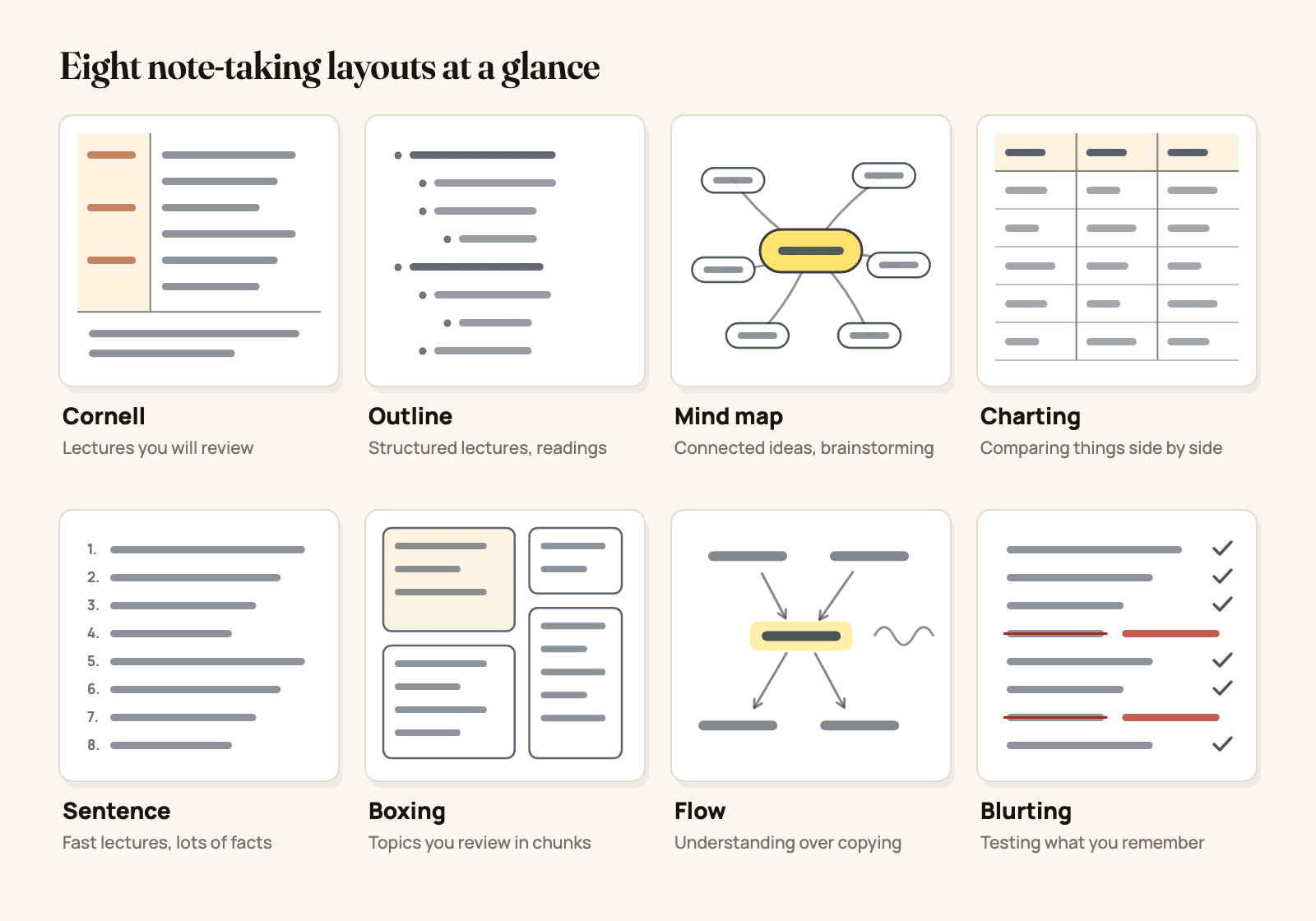
Figure 1. Eight note-taking layouts at a glance: Cornell, outline, mind map, charting, sentence, boxing, flow and blurting. Original diagram.
1. The Cornell method
Split the page into a wide notes column on the right, a narrow cue column on the left (about 2.5 inches or 6 cm) and a summary box at the bottom. Take notes during class in the right column. Right after class, write a question in the cue column for each chunk of notes, then sum up the page in 2 to 4 sentences. To study, cover the notes and answer the questions.
- Use it for: lectures and readings you will be tested on, in almost any subject.
- Why it works: it builds self-testing into the page, and the summary forces you to decide what mattered.
- Watch out for: treating it as a layout only. The cues and the summary are the method.
Our full guide has the step-by-step, a filled-in biology example, a math version and a free printable template: Cornell notes: how to take them, with an example and free template.
2. The outline method
Write the main topics at the left margin, then indent subtopics under them, and indent details under those. Use bullets, numbers or letters (I, A, 1, a) for the levels.
Causes of World War I
  - Long-term
      - Alliances: Triple Entente vs Triple Alliance
      - Militarism and the naval race
      - Nationalism in the Balkans
  - Trigger
      - Assassination of Franz Ferdinand, June 1914
- Use it for: lectures that follow slides, textbook chapters with clear headings, anything with a hierarchy.
- Why it works: the indentation shows what belongs under what, and it is quick to type.
- Watch out for: lectures that jump between topics; you will spend the class reorganizing. Switch to the sentence method and outline afterwards.
3. The mapping method (mind maps)
Write the main idea in the middle of the page and draw branches out to subtopics, then smaller branches to details. Add lines between branches when ideas connect. A concept map is the same idea with the links labeled ("causes", "is part of").
- Use it for: topics where everything connects (ecosystems, causes of a war, a novel's themes), brainstorming, planning an essay.
- Why it works: you see the whole topic on one page, and drawing a link forces you to say how two ideas relate.
- Watch out for: fast lectures. Mind maps are easier to make after class from your notes than live.
4. The charting method
Draw a table. Put the things you are comparing in the rows and the features in the columns, then fill in the cells.
| Mitosis | Meiosis | |
|---|---|---|
| Purpose | Growth and repair | Sex cells (gametes) |
| Divisions | 1 | 2 |
| Daughter cells | 2, identical | 4, genetically different |
| Chromosome number | Same as parent (diploid) | Half (haploid) |
- Use it for: comparisons: mitosis vs meiosis, three economic systems, characters in a play, historical periods.
- Why it works: gaps and differences jump out, and the empty chart is a ready-made self-test.
- Watch out for: forcing a non-comparison into a table. If there is nothing to compare, use another method.
5. The sentence method
Write each new fact or idea as a single sentence on its own numbered line. No structure while you write: just one line per point, in order.
- Use it for: fast lectures full of facts, discussion classes, any time you cannot tell yet how the ideas are organized.
- Why it works: it is the quickest way to get everything down without losing anything.
- Watch out for: a page where nothing stands out. Rewrite it within a day into an outline, a chart or Cornell notes.
6. The boxing method
Group the notes on each subtopic inside its own box. A page becomes a handful of separate chunks you can review one at a time. It became popular with digital note-takers because boxes are easy to move, resize and color on a tablet.
- Use it for: readings and recorded lectures where you can see the subtopics coming, revision notes, notes you will rearrange.
- Why it works: each box is one idea, which makes the page easy to scan and to review chunk by chunk.
- Watch out for: live lectures where you do not know where a subtopic ends; draw the boxes afterwards.
7. Flow notes
Instead of copying what you hear, write short phrases for the ideas and connect them with arrows, small sketches and your own examples, in whatever layout makes sense on the page. You are drawing your understanding, not recording the lecture.
- Use it for: processes, cause and effect, science and math concepts you need to understand rather than memorize.
- Why it works: you have to make sense of each idea to connect it, so the learning happens in class.
- Watch out for: pages that are hard to read later, and missed details. Pair flow notes with the slides or a textbook for the facts.
8. The Feynman technique
Named after the physicist Richard Feynman, this is a way to check that you understand something. Pick a concept, explain it in plain words on a blank page as if teaching someone new to the subject, and mark every place you get stuck or fall back on jargon. Go back to your notes for those gaps, then explain it again more simply.
- Use it for: concepts you think you understand but cannot yet explain: entropy, opportunity cost, natural selection.
- Why it works: gaps you cannot see while rereading become obvious when you try to explain.
- Watch out for: using it to capture a lecture. It is a review method that produces notes, not a way to take them in class.
The four steps with a worked example: the Feynman technique.
9. Blurting
Close your notes. On a blank page, write down everything you remember about a topic: facts, diagrams, formulas, in any order. Then open your notes, check what you wrote, and fill in what you missed or got wrong in another color.
- Use it for: revision before a test, at the end of each topic.
- Why it works: it is retrieval practice, also called active recall. Pulling information out of memory strengthens it more than reading it again, a finding well supported by research. The corrections in the second color are your study list.
- Watch out for: blurting a topic you have not studied yet. You need something to recall.
Step by step, by subject, with a spaced schedule: the blurting method. To time the rounds for any exam date: spaced repetition.
Best note-taking method by subject
| Subject | Try first | Why |
|---|---|---|
| Math | Cornell (worked example right, problem type left) | You can cover the steps and redo the problem from the cue |
| Physics and chemistry | Flow notes or Cornell, plus diagrams | Concepts connect, and diagrams carry much of the meaning |
| Biology | Cornell, with charts for comparisons | Lots of terms and processes, and many pairs to compare |
| History | Outline, then a timeline or chart | Events have causes, sequences and periods to compare |
| Literature and humanities | Mind map | Themes, characters and arguments connect in many directions |
| Languages | Charting (conjugations, cases), then blurting | Patterns fit tables; vocabulary needs recall practice |
| Economics and psychology | Cornell, with charts for theories | Definitions, models and studies to recall and compare |
| Computer science | Outline, with flow notes for algorithms | Concepts are hierarchical; algorithms are processes |
Math needs its own page layout as much as its own method: how to take math notes covers worked examples, two-column steps, a formula sheet and an error log. If you study on iPad, Math Notes on iPad explains the built-in tool that solves and graphs what you write, and where it stops.
Lectures, textbooks and online classes
- Live lectures: Cornell if the lecture is structured, the sentence method if it is fast. Do the cues, the summary or the rewrite the same day.
- Textbooks and readings: outline or boxing as you read, with a chart whenever the chapter compares things. Close the book and blurt at the end of each section.
- Recorded or online classes: you can pause, so use methods that take more thought live: mind maps, flow notes, boxing.
- Before a test: stop taking new notes. Blurt each topic, explain the hardest concepts with the Feynman technique, and quiz yourself from your Cornell cues. A day-by-day plan for the week before: how to study effectively. Taking AP exams? The 2027 AP exam schedule has every exam date and a study plan that counts back from them.
Handwritten or typed notes?
A well-known 2014 study by Mueller and Oppenheimer found that students who took notes by hand did better on conceptual questions than students who typed on laptops, partly because the typists copied lectures word for word. A 2019 replication by Morehead, Dunlosky and Rawson found the difference much less clear-cut.
The practical takeaway does not depend on the device: write ideas in your own words instead of transcribing, and review what you wrote. Handwriting on a tablet with a stylus gives you hand-drawn diagrams, arrows and mind maps plus search and an easy way to rearrange, which suits most of the methods above. Setting one up: how to take notes on iPad.
How to choose your method
Ask three questions about the class:
- Is the material a hierarchy, a web or a comparison? Hierarchy: outline. Web: mind map or flow notes. Comparison: chart.
- How fast is it? Too fast to organize live: the sentence method now, a better layout later the same day.
- How will you be tested? Recall of facts and terms: Cornell, then blurting. Understanding and application: flow notes, then the Feynman technique.
Most students end up with two: one for taking notes in class, and one for reviewing them. If you add AI to the review, use it to check your recall, not to replace it: see the best AI for studying, and how to use it without cheating.
Make it yours in Wren
Wren is the notes app we make, for iPad, iPhone and the web. Every method above works on a Wren page, and the parts that take longest to draw by hand, Wren's AI can draw for you in ink.
Watch a page write itself, then keep it. A comparison chart like the one in the charting section, written in real ink. Save it to your Wren notes and keep adding to it.
TRY IT ON A REAL PAGE
Watch Wren's AI write the page. Then make it yours.
Wren's AI writes a study page in real ink, stroke by stroke. Save it to your Wren notes, then keep writing on it, on the web or on iPad.
Wren’s AI writes the page here.
Make it yours.
This is real ink, not a picture. Save it to your Wren notes and it becomes your page.
- Write your own notes next to it
- Erase or move any line, box or diagram
- Ask Wren's AI to explain or extend it
Free to start. One account for Wren on the web and on iPad. More pages to try
Write what you want, then pause. Take notes your way: in the Wren iPad app with Apple Pencil, on any page background including Cornell, or in the Wren web app in any browser, typing or sketching on a whiteboard page. Under your notes, write "mind map of this?", "compare these in a table?" or "flowchart of the steps?" and pause. Wren's AI reads the page and draws it in ink on the same page: a mind map, a flowchart, a timeline, a table, a graph or a formula. Keep it or discard it. On iPad the ink is drawn in a handwriting style matched to yours; on the web it is not.
PAUSE YOUR PEN
Write. Pause. Wren's AI answers on your page.
No chat window to copy from. Wren reads what is already on the page and adds the next part in ink, right where you are working.
- WriteOn iPad, write with Apple Pencil. On the web, type or sketch on a whiteboard page.
- PauseStop for a moment. Wren reads what is on the page.
- AI answers in inkWren's AI adds the graph, formula, diagram or next step on the same page, in ink you can edit.
Rather ask a question? On iPad, open Study Buddy: it reads the page and can add its answer in ink. On the web, Ask Wren answers questions about the open page.
Or ask your AI to add the page. Connect ChatGPT or Claude to Wren once, then paste this:
ASK CHATGPT OR CLAUDE
Ask your AI. It writes in Wren.
Connect Wren to ChatGPT or Claude once. Then ask in the chat, and Wren writes the page into your notebook in ink, ready to edit on the web or on iPad.
Paste this into ChatGPT or Claude
Add a mind map of the causes of World War I to my History note in Wren.
- Connect WrenAdd the Wren plugin in ChatGPT, or add Wren as a custom connector in Claude. Sign in to Wren with your email or Google.
- Paste the promptYour AI finds the note by its title or subject, or starts a new one, and Wren writes the page.
- Keep writingOpen the note in Wren. The page is real ink: write next to it, erase or move any part.
Your AI sees note titles, subjects and page lists, not the writing on your pages. It adds pages and can redo pages Wren wrote; it never changes what you wrote. The ChatGPT plugin is available in the US and Canada.
Your AI adds it to that note as a new page of handwritten-style ink: a mind map, a table, a timeline or a flowchart. It can list your notes by title, create notes, add pages, plan notebooks, draw figures and redo pages Wren wrote. It cannot read or change your own writing. Setup for Claude and other MCP apps is in the Wren connector docs; for ChatGPT, see how to install the Wren plugin.
To see the canvas for connected thinking, read how to use Wren's canvas for connected thinking, or open Wren on the web, write a topic and pause.
Sources
Checked November 15, 2026.
- Cornell University Learning Strategies Center: The Cornell Note Taking System
- Roediger, H. L., and Karpicke, J. D. (2006). Test-enhanced learning: taking memory tests improves long-term retention. Psychological Science, 17(3), 249 to 255.
- Mueller, P. A., and Oppenheimer, D. M. (2014). The pen is mightier than the keyboard: advantages of longhand over laptop note taking. Psychological Science, 25(6), 1159 to 1168.
- Morehead, K., Dunlosky, J., and Rawson, K. A. (2019). How much mightier is the pen than the keyboard for note-taking? A replication and extension of Mueller and Oppenheimer (2014). Educational Psychology Review, 31, 753 to 780.
Frequently asked questions
What are the 5 main note-taking methods?
The five classic methods are the Cornell method, the outline method, the mapping (mind map) method, the charting method and the sentence method. Students also use boxing and flow notes for layout, and the Feynman technique and blurting to test what they know.
What is the best note-taking method?
There is no single best method; the best one fits the material. Cornell and outline notes suit structured lectures, mind maps suit connected ideas, charts suit comparisons and the sentence method suits fast lectures. Whatever you pick, the review matters more than the layout: test yourself from your notes instead of rereading them.
Which note-taking method is best for math?
Cornell notes adapted for math work well: the worked example goes in the notes column and the type of problem in the cue column, so you can cover the steps and redo the problem. For proofs and multi-step processes, flow notes with arrows between steps also help.
What is the boxing method of note-taking?
The boxing method groups the notes on each subtopic inside its own drawn box, so a page becomes a set of separate chunks. It makes a page easy to scan and review one box at a time, and works best when you can see the subtopics coming, for example in a reading or a recorded lecture.
Is blurting a note-taking method?
Blurting is a review method that produces a page of notes. You write down everything you remember about a topic from memory, without looking, then check it against your notes and fill in the gaps in another color. The gaps show you what to study next.
Should I take notes by hand or on a laptop?
Either can work. A well-known 2014 study found students who wrote by hand did better on conceptual questions than students who typed, partly because typists copied lectures word for word. A 2019 replication found the difference much less clear. The safer rule: whatever you use, write ideas in your own words instead of transcribing.