Spaced Repetition: How It Works, With a Study Schedule
Spaced repetition is a study method where you review the same material several times, with the gaps between reviews growing as you learn it: a day later, a few days later, a week later, a month later. Each review catches a memory just as it starts to fade, and each one makes it fade more slowly. The idea rests on one of the oldest findings in psychology, the spacing effect: study spread out over time is remembered far longer than the same amount of study crammed into one sitting.
This guide covers the forgetting curve, why spacing works, how far apart to space your reviews, ready-to-use schedules for different exam dates, the apps that schedule reviews for you, and how to do it all with handwritten notes and paper.
What is spaced repetition?
Two ideas, often mixed up:
- The spacing effect is the finding. The same study time, split into sessions spread over days, leads to better long-term memory than one long session. A review of more than 300 experiments found it again and again (Cepeda and colleagues, 2006).
- Spaced repetition is the method built on it. You plan reviews at growing intervals, and each review is a recall attempt: you answer from memory, check, and decide when to see it next.
That second part matters. Spaced rereading is better than crammed rereading, but spaced recall is better still. If you haven't yet, read active recall first: spaced repetition is active recall on a schedule.
The forgetting curve
In the 1880s the German psychologist Hermann Ebbinghaus memorised lists of nonsense syllables, then measured how much effort it took to learn each list again after a delay. The effort he saved showed how much of the list was still in memory. In his own words, after an hour "one half the amount of the original work had to be expended" again. After 24 hours, about a third was still saved; after 6 days, about a quarter; after a month, about a fifth. Memory fell fast at first, then levelled off. In 2015, Jaap Murre and Joeri Dros repeated the experiment and found much the same curve.
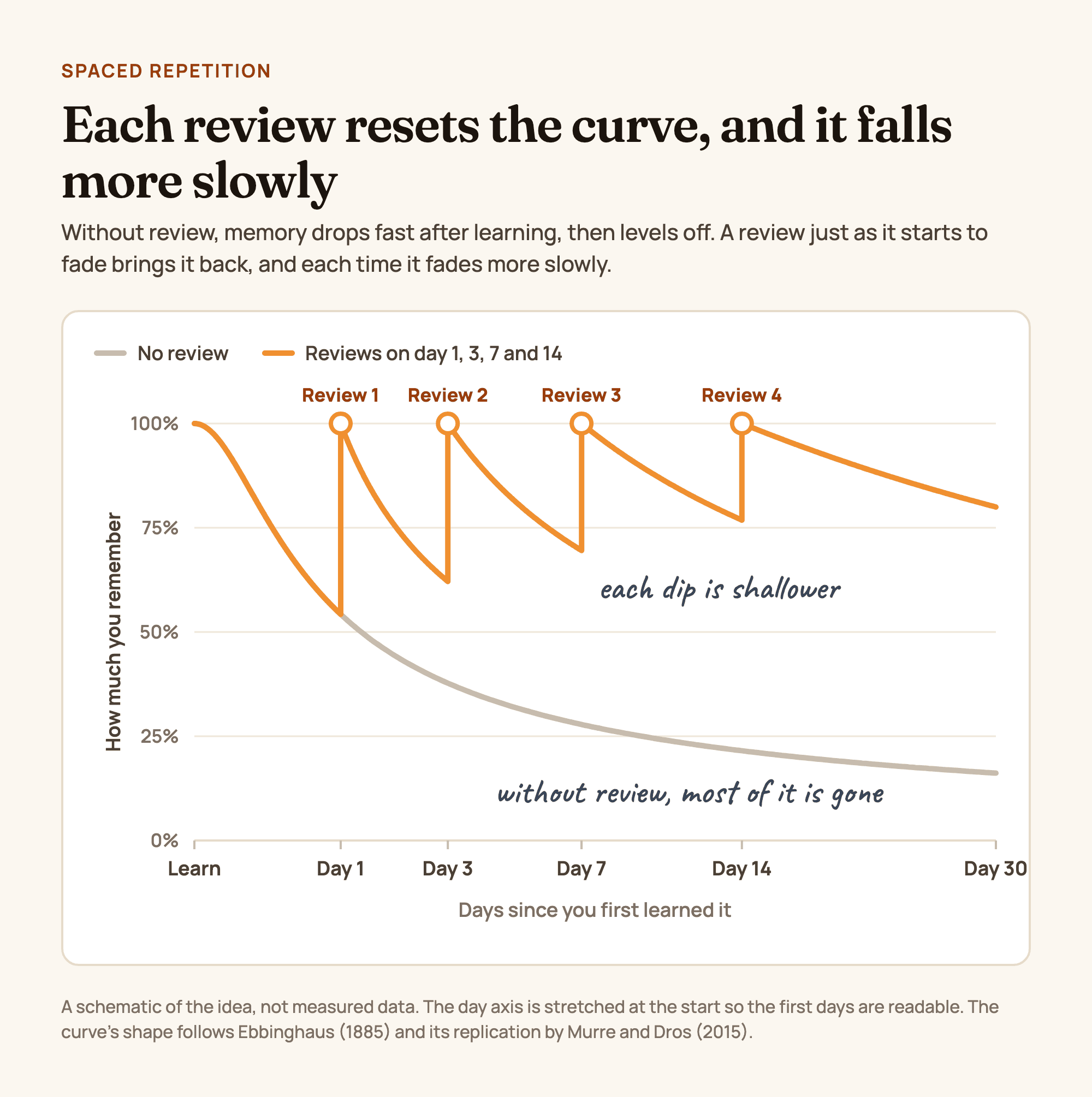
Figure 1. The forgetting curve without review, and with reviews spaced 1, 3, 7 and 14 days after learning. A schematic of the idea, not measured data. Original diagram, not a product screenshot.
Two caveats keep the curve honest. Nonsense syllables are about the hardest thing to remember; your biology notes have meaning and connections, so you will forget them more slowly. And the exact numbers vary by person and material. What holds up is the shape: steep at first, flatter later, and flatter still after each successful review. That shape is why the first review should come soon and the later ones can wait longer.
Why spacing works
When you review something you've half forgotten, pulling it back takes effort, and that effort strengthens the memory more than reviewing it while it's still fresh in your mind. Cramming feels efficient because everything is fresh: each repetition is easy, and easy feels like learning.
Students are fooled by this even after trying both. In a flashcard study, spacing beat cramming for 90% of the participants, yet after the first session 72% believed cramming had worked better (Kornell, 2009). If spaced review feels harder, that's a sign it's working.
How far apart should reviews be?
It depends on when you need to remember it. In a study of more than 1,300 people, Nicholas Cepeda and colleagues (2008) varied both the gap between two study sessions and the delay before the final test, up to a year. The best gap grew as the test got further away. As a share of the time until the test, it was about 20 to 40% for a test a week away, falling to about 5 to 10% for a test a year away.
In practice:
- Test next week: review every day or two.
- Test in a month: gaps of a few days to a week work well.
- Cumulative final or long-term learning: gaps can stretch to weeks.
Whether the gaps grow or stay equal matters less than people think. What matters most is that there are gaps at all, and that they are long enough to make recall effortful (Karpicke and Bauernschmidt, 2011).
A spaced repetition schedule you can use
Count from the day you first learn a topic (day 0). These are starting points: let each round set the next gap.
| When is the test? | Review rounds (days after first learning) | What each round looks like |
|---|---|---|
| In 1 week | Day 1, day 3, day 5, day 6 | Blurt or self-quiz each topic, check, re-study the gaps. Last round: practice questions |
| In 2 weeks | Day 1, day 3, day 7, day 11, day 13 | As above; add a full practice test around day 11 |
| In 1 month | Day 1, day 3, day 7, day 14, day 21, day 28 | Mix older topics into newer sessions from week 2 |
| Cumulative final, or for good | Day 1, day 3, week 1, week 2, month 1, then every month or two | Keep a running list of topics and their next review date |
Adjust as you go:
- Everything came back easily? Stretch the next gap.
- Missed a lot? Re-study the gaps now and bring the next round closer.
- Too many reviews on one day? Spread them over two. Consistency beats a perfect schedule.
Spaced repetition apps
If your material splits into small question-and-answer pairs (vocabulary, definitions, drug names, dates), an app can schedule each card for you. Each tool below has a different strength. Details checked November 2026.
| Tool | How it schedules reviews | Good fit for | Keep in mind |
|---|---|---|---|
| Anki | Each card gets its own next date from your rating (Again, Hard, Good or Easy). The default scheduler is based on SuperMemo's SM-2; since version 23.10 you can switch on FSRS instead | Large decks: languages, medicine, law, definitions | Free on Windows, Mac, Linux and Android (AnkiDroid). The iPhone and iPad app, AnkiMobile, is paid. Takes some setup |
| RemNote | Turns bullets in your notes into flashcards and schedules them with FSRS or SM-2 | Students who want typed notes and cards in one place | Built around typed notes |
| Quizlet | Learn mode adjusts question types and how often terms come back, based on your answers | Quick vocabulary sets and ready-made sets | Full Learn mode is part of Quizlet Plus; free accounts get a limited number of rounds per set. Check shared sets for errors |
| Goodnotes | Study Sets have a Smart Learn mode that adapts to your answers and spaces reviews over time | Students who already take notes in Goodnotes | Smart Learn shows some cards each session, not all; Practice mode runs through every card |
| Paper (Leitner system) | Boxes: a card you get right moves to the next box, reviewed less often; a card you miss goes back to box 1 | Handwritten cards, no screen | You track the review days yourself |
Apps are best for facts. Concepts, processes and problem types don't fit on a card as well, and are better reviewed on a page: blurt the topic, explain it with the Feynman technique or redo a worked example, on a schedule from the table above.
How to space handwritten notes
You don't need an app to space your reviews. Five habits make it work on paper or a tablet:
- Keep a review list. On the first page of each notebook, write each topic with the date you learned it and its next review dates. Tick each one off when it's done.
- Recall on a fresh page. On a review day, start a new page with the date and the topic, and blurt everything you remember before opening your notes. Rereading the old page is the passive version; the blurting method is the active one.
- Use your cue column as a deck. With Cornell notes, the questions in the left column are ready-made flashcards. Cover the notes, answer the cues, and mark each one right or wrong in the margin.
- Make a Leitner box. Write cards by hand and keep them in boxes. One example schedule: box 1 every day, box 2 every three days, box 3 once a week, box 4 every two weeks, box 5 before the test.
- Mix old topics in. Start every study session with a few minutes of recall on something from last week or last month, before the new material.
Common spaced repetition mistakes
- Rereading on review day. A spaced reread is better than a crammed one, but far weaker than a spaced recall attempt. Test, then check.
- Starting too late. Spacing needs days. Two weeks out, you can still space; the night before, you can't.
- Making too many cards. A deck you can't keep up with gets abandoned. Card the facts you keep missing, not every line of the textbook.
- Only carding facts. Concepts and problem types need page-based review: blurting, explaining and worked problems.
- Skipping the hard cards. The cards you dread are the ones that need the review most.
- Treating the schedule as fixed. If a round goes badly, shorten the next gap. If it goes well, stretch it.
Make it yours in Wren
Wren is the notes app we make, for iPad, iPhone and the web. Wren does not schedule reviews: keep the schedule in a calendar, a paper box or an app such as Anki. Wren helps with the review itself.
Start from a page built for review. A Cornell page in real ink, with a cue column that becomes your review questions. Save it to your Wren notes and add your own cues.
TRY IT ON A REAL PAGE
Watch Wren's AI write the page. Then make it yours.
Wren's AI writes a study page in real ink, stroke by stroke. Save it to your Wren notes, then keep writing on it, on the web or on iPad.
Wren’s AI writes the page here.
Make it yours.
This is real ink, not a picture. Save it to your Wren notes and it becomes your page.
- Write your own notes next to it
- Erase or move any line, box or diagram
- Ask Wren's AI to explain or extend it
Free to start. One account for Wren on the web and on iPad. More pages to try
On each review day, recall first, then pause. In the Wren iPad app, start a new page with the date and topic and write everything you remember with Apple Pencil, notes closed. Then write "What did I forget about Newton's laws?" and pause. Wren's AI reads the page and answers in ink on the same page: the missing law, the formula or a labelled diagram. Keep it or discard it, and check it against your notes. On a laptop, open the Wren web app in any browser and type or sketch on a whiteboard page; there the ink is not drawn in a handwriting style matched to yours.
PAUSE YOUR PEN
Write. Pause. Wren's AI answers on your page.
No chat window to copy from. Wren reads what is already on the page and adds the next part in ink, right where you are working.
- WriteOn iPad, write with Apple Pencil. On the web, type or sketch on a whiteboard page.
- PauseStop for a moment. Wren reads what is on the page.
- AI answers in inkWren's AI adds the graph, formula, diagram or next step on the same page, in ink you can edit.
Rather ask a question? On iPad, open Study Buddy: it reads the page and can add its answer in ink. On the web, Ask Wren answers questions about the open page.
Or ask your AI to set up the review page. Connect ChatGPT or Claude to Wren once, then paste this:
ASK CHATGPT OR CLAUDE
Ask your AI. It writes in Wren.
Connect Wren to ChatGPT or Claude once. Then ask in the chat, and Wren writes the page into your notebook in ink, ready to edit on the web or on iPad.
Paste this into ChatGPT or Claude
Add a review page with ten questions on Newton's laws to my Physics note in Wren.
- Connect WrenAdd the Wren plugin in ChatGPT, or add Wren as a custom connector in Claude. Sign in to Wren with your email or Google.
- Paste the promptYour AI finds the note by its title or subject, or starts a new one, and Wren writes the page.
- Keep writingOpen the note in Wren. The page is real ink: write next to it, erase or move any part.
Your AI sees note titles, subjects and page lists, not the writing on your pages. It adds pages and can redo pages Wren wrote; it never changes what you wrote. The ChatGPT plugin is available in the US and Canada.
Your AI writes the page into that note as handwritten-style ink. It can list your notes by title, create notes, add pages, plan notebooks, draw figures and redo pages Wren wrote. It cannot read or change your own writing. Setup for Claude and other MCP apps is in the Wren connector docs; for ChatGPT, see how to install the Wren plugin.
Keep reading
- Active recall: what it is and how to study with it: what to do in each review.
- How to study effectively: spacing alongside the other techniques with strong evidence, plus exam and finals study plans.
- The blurting method, step by step: a page-based review that suits spaced rounds.
- Cornell notes, with a free template: notes with a built-in question column.
- Note-taking methods compared: nine ways to take notes you can review later.
Sources
Checked November 15, 2026.
- Ebbinghaus, H. (1885/1913). Memory: A Contribution to Experimental Psychology, chapter 7, "Retention and obliviscence as a function of the time". Translated by H. A. Ruger and C. E. Bussenius.
- Murre, J. M. J., and Dros, J. (2015). Replication and analysis of Ebbinghaus' forgetting curve. PLOS ONE, 10(7), e0120644.
- Cepeda, N. J., Pashler, H., Vul, E., Wixted, J. T., and Rohrer, D. (2006). Distributed practice in verbal recall tasks: a review and quantitative synthesis. Psychological Bulletin, 132(3), 354 to 380.
- Cepeda, N. J., Vul, E., Rohrer, D., Wixted, J. T., and Pashler, H. (2008). Spacing effects in learning: a temporal ridgeline of optimal retention. Psychological Science, 19(11), 1095 to 1102.
- Kornell, N. (2009). Optimising learning using flashcards: spacing is more effective than cramming. Applied Cognitive Psychology, 23(9), 1297 to 1317.
- Karpicke, J. D., and Bauernschmidt, A. (2011). Spaced retrieval: absolute spacing enhances learning regardless of relative spacing. Journal of Experimental Psychology: Learning, Memory, and Cognition, 37(5), 1250 to 1257.
- Anki: What spaced repetition algorithm does Anki use? and download page.
- RemNote: Flashcard basics and FSRS algorithm.
- Quizlet Help Center: Studying on Quizlet.
- Goodnotes Support: Study with Smart Learn.
Frequently asked questions
What is spaced repetition?
Spaced repetition is a study method where you review the same material several times, with gaps between reviews that grow as you learn it: for example a day later, a few days later, a week later, then a month later. It uses the spacing effect, the finding that study spread out over time is remembered longer than the same study crammed into one session.
What is the best spaced repetition schedule?
There is no single best schedule, because the right gap depends on how far away the test is. A good default is to review 1 day, 3 days, 1 week, 2 weeks and 1 month after you first learn something. For a test next week, review every day or two. In research, the best gap was about 20 to 40% of the time left before a test a week away, and closer to 5 to 10% for a test a year away (Cepeda and colleagues, 2008).
Does spaced repetition work if my exam is next week?
Yes, on a shorter scale. Split the week into three or four review rounds instead of one long session the night before, and make each round a recall attempt. Spacing still beats cramming over a few days; it just has less room to work than over a semester.
What is the difference between spaced repetition and active recall?
Active recall is how you review: by pulling the answer from memory before you check. Spaced repetition is when you review: in rounds spread out over time. Together they make the strongest combination, so each spaced review should be a self-test, not a reread.
Can I do spaced repetition without an app?
Yes. The Leitner system uses paper flashcards and a few boxes: a card you answer correctly moves to the next box, which you review less often, and a card you miss goes back to the first box. You can also keep a review calendar on the first page of your notebook and blurt each topic onto a fresh page on its review day.
What is the forgetting curve?
The forgetting curve shows how memory fades after learning: fast at first, then more slowly. Hermann Ebbinghaus measured it on himself in the 1880s by learning lists of nonsense syllables and timing how long it took to relearn them. About a third of his original effort was still saved after a day, and about a fifth after a month. A 2015 study replicated his results.
Does Wren have spaced repetition?
No. Wren does not schedule reviews or show you cards when they are due; use a calendar, a paper box or a flashcard app such as Anki for the schedule. Wren helps with the review itself: write what you remember on a page, ask what you missed and pause, and its AI answers in ink on the same page.