How to Take Notes: A Practical Guide for Class, Reading and Review
To take good notes, get ready before class, write the main ideas in your own words during it, and turn the page into questions you can test yourself on afterwards. In class, write short phrases rather than sentences, keep the lecturer's examples, sketch anything visual and mark a ? wherever you get lost. The same day, answer every ?, add a question beside each chunk and a short summary at the bottom. Then study by covering your notes and answering your own questions, not by rereading them.
This guide covers each of those steps, what a useful page looks like, how to take notes from a textbook and in online classes, what changes by subject, and whether to write by hand or type. If you already know the basics and want a specific layout, start with note-taking methods: 9 systems and when to use each.
How to take notes: 8 steps
- Preview the topic before class. Skim the slides, the reading or the syllabus line for the lecture, so the new words are not new.
- Set up the page. Class, date and topic at the top, and a margin or column for questions later.
- Listen for the structure. How many main points, in what order, and how they connect.
- Write phrases, not sentences, in your own words, with symbols for the connections.
- Keep examples, definitions and anything written on the board. They are often what the test asks about.
- Sketch what is visual: a process, a graph, a diagram. A few boxes and arrows beat a paragraph.
- Mark a ? wherever you get lost, leave a gap, and keep going.
- After class, use the page: answer every ?, add a question beside each chunk and a short summary, then test yourself from it.
Before class: set up the page
Most of the work of good notes happens before the lecture starts. If you have seen the topic once, you can spend the lecture understanding it instead of copying down unfamiliar words.
- Preview. Skim the posted slides, the assigned reading or the textbook section the lecture covers. Write the lecture's main question at the top of the page, for example "How do we learn by association?". It gives you something to listen for.
- Set up the page the same way every time. Class, date and topic on the first line. Leave a wide left margin, or use a Cornell notes layout with a cue column and a summary box, so the page has room for the questions you add later.
- Keep one place per class. One notebook, folder or digital notebook for each course, with dated pages, so you can find a lecture again before the test.
- Write on the slides if they are posted. Print them or import the PDF into a note app and add your notes beside each slide instead of copying the slide text. On an iPad, how to take notes on iPad walks through importing slides and writing on them with Apple Pencil.
During class: how to take lecture notes
Lecture notes are not a transcript. Their job is to capture the main ideas, how they connect, and enough detail to rebuild the explanation later.
What to write down
- The main points and their order. Lecturers signal structure: "there are three reasons", "the key point is", "in contrast", "this leads to". Number the points as they come.
- Definitions, in your own words, with the exact technical term.
- Examples and worked problems, step by step. An example is the fastest way back into an idea later.
- Anything written on the board or repeated, and anything the lecturer says will be on the test.
- Your own connections. "Like the bell in Pavlov's experiment" or "opposite of last week" is worth a line.
What to skip
- Text that is already on the posted slides. Write what the lecturer adds to the slide, not the slide.
- Full sentences. Keep only the words that carry the idea.
- Stories and asides, unless they are the example that makes the idea click.
Write less, faster: symbols and abbreviations
A small set of symbols saves a lot of writing. Pick a few, use them the same way every time, and add your subject's own (for example "ATP" or "GDP") as you go.
| Write | Meaning | Write | Meaning |
|---|---|---|---|
| → | leads to, causes | w/ and w/o | with, without |
| = | is, means | b/c | because |
| ≠ | is not, differs from | ∴ | therefore |
| ↑ and ↓ | increases, decreases | vs | compared with |
| ≈ | about, roughly | ex: | example |
| def: | definition | ? | I lost this: answer it after class |
Leave space, and mark what you missed
Skip a line whenever the topic changes, so each chunk of notes has room for a question and a correction later. When you miss something, write the key word, a ? and keep going. Trying to catch up on one point usually costs you the next two.
When the lecturer talks too fast
- Switch to the sentence method: one numbered line per new point, no structure, and organize it the same day.
- Write the claim, not the explanation, and fill in the explanation from the slides or the textbook afterwards.
- Compare notes with a classmate after class. Different people catch different details.
- Record only if it is allowed. Ask the lecturer and check your school's policy first. Use the recording to fill the gaps you marked, not to replace taking notes.
After class: turn your notes into study material
Notes you never look at again do very little. The same day, while the lecture is fresh, do four things:
- Fill the gaps and answer every ? from the slides, the textbook or a classmate. If you still cannot answer one, take it to office hours.
- Write a question beside each chunk in the margin, such as "What is extinction?" next to the lines that explain it. This is the cue column of Cornell notes, and it turns the page into a quiz.
- Write a summary of two or three sentences at the bottom, without looking. If you cannot write it, you have found what you do not understand yet.
- Test yourself. Cover the notes, answer the questions in the margin out loud or on scrap paper, then check. For a whole topic, try the blurting method: write everything you remember on a blank page, then check it against your notes.
Testing yourself is what makes notes pay off. In a well-known study, students who practiced recalling a text remembered much more of it a week later than students who reread it, and a major review of study techniques rated practice testing and spreading study sessions out as highly useful, with rereading and highlighting near the bottom. So come back to the page a few more times before the test, and quiz yourself each time instead of rereading. For how to space those sessions and a 7-day plan for exam week, see how to study effectively.
What a useful page of notes looks like
Here is one page from an introductory psychology lecture on classical conditioning, with each habit from this guide marked.
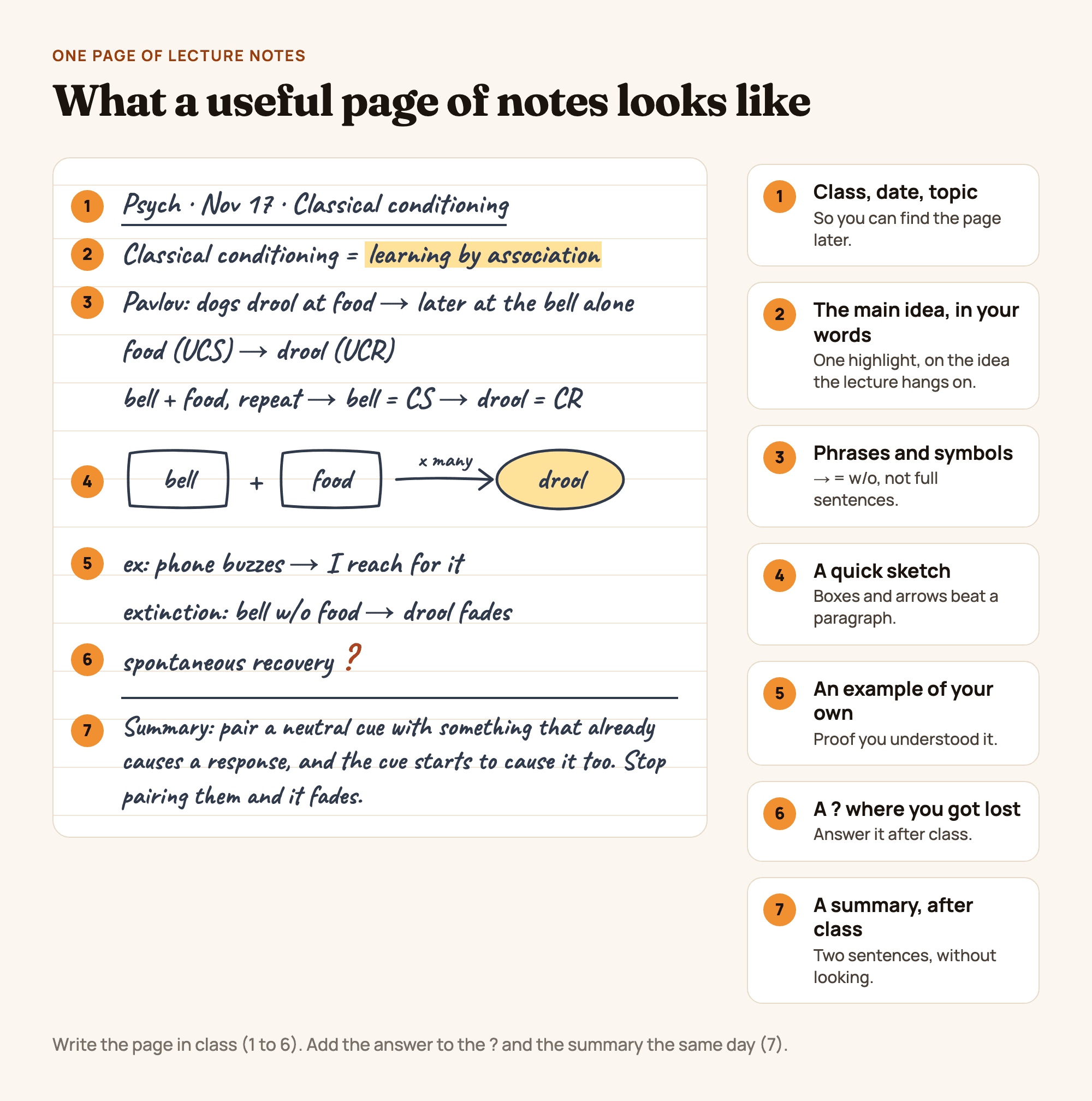
Figure 1. One page of psychology lecture notes, annotated: header, main idea, phrases and symbols, a sketch, an example, a ? and a summary. An original diagram, not a product screenshot.
What makes it work:
- It is short. The whole lecture fits on one page because it keeps the ideas and drops the sentences.
- There is one highlight, on the idea the lecture hangs on, not a highlighted paragraph.
- The sketch replaces a paragraph. Bell plus food, many times, leads to drooling: three boxes and an arrow.
- The student's own example (a phone buzzing) shows they understood it, and it is easier to remember than the textbook's.
- The ? is honest. "Spontaneous recovery" was too fast to follow, so it is marked to answer after class rather than half-copied.
- The summary was written after class, from memory, in two sentences.
Pick a note-taking method that fits the class
The steps above work with any layout. The layout itself should fit the material:
| If the class is... | Try | Why |
|---|---|---|
| A structured lecture you will be tested on | Cornell notes or an outline | Main points in order, with room for questions |
| Ideas that all connect to each other | A mind map or flow notes | Shows the links, not just the list |
| Several things compared on the same features | A chart | One row per thing, one column per feature |
| Too fast to organize live | The sentence method | One line per point now, a better layout later the same day |
| Math or physics problems | Worked examples, two columns: step and why | Lets you cover the steps and redo the problem |
For how each method works, with examples and when to avoid it, see note-taking methods compared.
How to take notes from a textbook or reading
Reading notes go wrong in the opposite way from lecture notes: you have all the time you need, so it is tempting to copy the book.
- Read a section first, then take notes. Notes taken during a first read tend to copy sentences; notes taken after it are in your own words.
- Turn each heading into a question and answer it in a few lines. "Causes of the Great Depression" becomes "What caused the Great Depression?".
- Quote rarely, and note the page. Put exact wording in quotation marks with the page number, so you can cite it in an essay without searching for it again.
- Highlight sparingly, then write the note. A highlight only says something mattered; a note says what it means.
- Close the book at the end of the chapter and write down everything you remember. The gaps show you which sections to reread.
How to take notes in online or recorded classes
You can pause a recording, so use that to take better notes, not more notes.
- Pause to write instead of rewinding. Stop the video at the end of each point, write it in your own words, then continue.
- Add the timestamp next to anything you might want to hear again, such as "12:40, the second example". It is faster than scrolling through the video later.
- Do not transcribe. If a transcript or captions are available, the words are already saved. Your notes are for what you understood and what you did not.
- Use the pauses for the harder layouts: a mind map, flow notes, or a diagram that would be too slow to draw in a live lecture.
How to take notes by subject
| Subject | What to capture | Tip |
|---|---|---|
| Math | Worked examples, every step; the name of the method; common mistakes | Two columns: the step and why it is allowed |
| Physics and chemistry | Formulas with units, labeled diagrams, worked problems | Write what each symbol means the first time it appears |
| Biology | Processes, structures, terms | Draw processes as flow diagrams with arrows |
| History | Dates, people, causes and effects | A timeline across the top of the page, causes and effects below |
| English and literature | Quotes with page numbers, themes, your own reactions | Keep your reactions in a different color from the text |
| Languages | New words in an example sentence, verb tables, grammar rules | Vocabulary in two columns, so you can cover one side |
| Economics | Definitions, graphs and what shifts them | Label both axes and the direction of every shift |
Math needs its own layout more than any other subject: how to take math notes covers worked examples, a formula sheet and an error log in detail.
Handwritten, typed or on a tablet?
A well-known 2014 study by Mueller and Oppenheimer found that students who took notes by hand did better on conceptual questions than students who typed on laptops, partly because the typists copied lectures word for word. A 2019 replication by Morehead, Dunlosky and Rawson found the difference much less clear-cut. The rule that holds either way: write ideas in your own words, not a transcript.
| Good for | Watch out for | |
|---|---|---|
| Paper | Diagrams, math, no distractions, no cost | Hard to reorganize, search or carry every class at once |
| Laptop, typing | Fast lectures, text-heavy classes, reading notes | Slipping into transcribing; awkward for math and diagrams |
| Tablet and stylus | Handwriting plus writing on slides, undo, rearranging and every class in one place | Notifications; the device costs more than a notebook |
If you take notes on a tablet, how to take notes on iPad covers the setup step by step. For the apps themselves, from notes to flashcards and planners, see the best study apps for students, by job.
Common note-taking mistakes
- Transcribing. Writing everything means thinking about nothing. Keep the ideas, drop the sentences.
- Copying the slides. If they are posted, write what the lecturer adds to them.
- Highlighting instead of writing. A highlighted page looks studied; a page of your own questions is.
- Making notes pretty instead of useful. Color is fine when each color has a job; rewriting a page to make it neat is time not spent testing yourself.
- Never using the page again. The questions, the summary and the self-test are where notes turn into memory.
- One unsorted pile. Date every page and keep one notebook or folder per class.
Make it yours in Wren
Wren is the notes app we make, for iPad, iPhone and the web. Three ways to try the habits above on a real page.
Watch a page of history notes write itself, then keep it. Save it to your Wren notes, then add your own questions in the margin and a summary at the bottom.
TRY IT ON A REAL PAGE
Watch Wren's AI write the page. Then make it yours.
Wren's AI writes a study page in real ink, stroke by stroke. Save it to your Wren notes, then keep writing on it, on the web or on iPad.
Wren’s AI writes the page here.
Make it yours.
This is real ink, not a picture. Save it to your Wren notes and it becomes your page.
- Write your own notes next to it
- Erase or move any line, box or diagram
- Ask Wren's AI to explain or extend it
Free to start. One account for Wren on the web and on iPad. More pages to try
Turn a ? into an answer on the page. In the Wren iPad app, take notes with Apple Pencil as usual. Where you would mark a ?, write the question instead, for example "why did one assassination start a world war?", and pause. Wren's AI reads the page and answers in ink on the same page: a diagram, a timeline, a formula or the next step. Keep it or discard it. For Cornell notes, choose the Cornell background in the Background options. On a laptop, open the Wren web app in any browser and type or sketch on a whiteboard page; AI answers in ink there too, in Wren's standard ink style.
PAUSE YOUR PEN
Write. Pause. Wren's AI answers on your page.
No chat window to copy from. Wren reads what is already on the page and adds the next part in ink, right where you are working.
- WriteOn iPad, write with Apple Pencil. On the web, type or sketch on a whiteboard page.
- PauseStop for a moment. Wren reads what is on the page.
- AI answers in inkWren's AI adds the graph, formula, diagram or next step on the same page, in ink you can edit.
Rather ask a question? On iPad, open Study Buddy: it reads the page and can add its answer in ink. On the web, Ask Wren answers questions about the open page.
Or ask your AI to start the page. Connect ChatGPT or Claude to Wren once, then paste this:
ASK CHATGPT OR CLAUDE
Ask your AI. It writes in Wren.
Connect Wren to ChatGPT or Claude once. Then ask in the chat, and Wren writes the page into your notebook in ink, ready to edit on the web or on iPad.
Paste this into ChatGPT or Claude
Add a timeline page on the causes of World War I to my History note in Wren.
- Connect WrenAdd the Wren plugin in ChatGPT, or add Wren as a custom connector in Claude. Sign in to Wren with your email or Google.
- Paste the promptYour AI finds the note by its title or subject, or starts a new one, and Wren writes the page.
- Keep writingOpen the note in Wren. The page is real ink: write next to it, erase or move any part.
Your AI sees note titles, subjects and page lists, not the writing on your pages. It adds pages and can redo pages Wren wrote; it never changes what you wrote. The ChatGPT plugin is available in the US and Canada.
Your AI writes the page into that note as handwritten-style ink. It can list your notes by title, create notes, add pages, plan notebooks, draw figures and redo pages Wren wrote. It cannot read or change your own writing. Setup for Claude and other MCP apps is in the Wren connector docs; for ChatGPT, see how to install the Wren plugin.
Want to see AI ink on a real page first? Read how Wren adds AI ink to handwritten notes, or open Wren on the web, write a question and pause.
Sources
Checked November 15, 2026.
- Roediger, H. L., and Karpicke, J. D. (2006). Test-enhanced learning: taking memory tests improves long-term retention. Psychological Science, 17(3), 249 to 255.
- Dunlosky, J., Rawson, K. A., Marsh, E. J., Nathan, M. J., and Willingham, D. T. (2013). Improving students' learning with effective learning techniques. Psychological Science in the Public Interest, 14(1), 4 to 58.
- Mueller, P. A., and Oppenheimer, D. M. (2014). The pen is mightier than the keyboard: advantages of longhand over laptop note taking. Psychological Science, 25(6), 1159 to 1168.
- Morehead, K., Dunlosky, J., and Rawson, K. A. (2019). How much mightier is the pen than the keyboard for note-taking? A replication and extension of Mueller and Oppenheimer (2014). Educational Psychology Review, 31, 753 to 780.
- Cornell University Learning Strategies Center: The Cornell Note Taking System.
Frequently asked questions
What is the best way to take notes?
Write the main ideas in your own words as short phrases, keep the examples, and mark anything you did not follow with a ?. Then use the notes: the same day, answer every ?, write a question beside each chunk and a short summary, and study by covering the notes and answering your questions. The layout matters less than the habit of testing yourself from the page.
How do you take notes faster?
Write phrases instead of sentences, use symbols and abbreviations such as an arrow for leads to, w/ for with and b/c for because, and skip anything already on the posted slides. If the lecture is still too fast, write one numbered line per new point and organize the notes after class.
How do you take lecture notes when the professor talks too fast?
Do not try to keep everything. Write the key term or the claim, leave a gap and keep going, then fill the gaps after class from the slides, the textbook or a classmate's notes. Preview the topic before class so the new words are not new. Record the lecture only if your school and the lecturer allow it, and use the recording to fill gaps, not to replace notes.
Is it better to take notes by hand or on a laptop?
Either works if you write ideas in your own words instead of transcribing. A well-known 2014 study found students who wrote by hand did better on conceptual questions, partly because laptop users copied lectures word for word; a 2019 replication found the difference much less clear. Handwriting, on paper or a tablet, makes diagrams and math easier; typing is faster for text-heavy classes.
How do you take notes from a textbook?
Read a section first, then close the book and write the main points in your own words. Turn each heading into a question and answer it, note page numbers next to anything you quote, and highlight sparingly. At the end of the chapter, write down everything you remember without looking, then check it against the book.
What should you do with your notes after class?
The same day, fill the gaps and answer every ? you marked, write a question beside each chunk of notes, and add a two or three sentence summary at the bottom. Later, study by covering the notes and answering those questions, and come back to the page again before the test instead of rereading it once the night before.